
Introduction
Small and medium-sized businesses (SMBs) today face increasingly sophisticated cyber threats and complex data regulations[1][2]. Microsoft 365 Business Premium already provides a secure productivity foundation for SMBs – including Office apps, Teams, device management, and baseline security like Defender for Business[2]. However, until recently, achieving enterprise-grade compliance and data protection meant costly upgrades to enterprise licenses. To bridge this gap, Microsoft introduced the Microsoft Purview Suite as an add-on to Business Premium, bringing advanced compliance, risk, and data governance capabilities “without the enterprise price tag.”[2] This report details the features included in the Purview Suite for Business Premium, how an SMB can effectively use them, and why they provide real value to a typical SMB.

Business Premium Baseline vs. Purview Suite Add-on
Microsoft 365 Business Premium (base subscription) includes some core compliance capabilities, but with limitations. Out-of-the-box, Business Premium provides Microsoft Purview Information Protection (sensitivity labels and classification) and Office 365 Data Loss Prevention (DLP) policies for Exchange, SharePoint, and OneDrive[3]. It also offers basic eDiscovery for content search and simple legal hold, and basic audit logs (90-day retention) in the compliance portal[3]. These features are useful for controlling information in Microsoft 365 apps – for example, an SMB admin can apply a sensitivity label to mark a document as “Confidential” or set a DLP rule to prevent emails with credit card numbers from leaving the organisation[3]. However, advanced compliance features are not included in the base plan – endpoint DLP (monitoring files on devices), auto-labeling of content, advanced auditing, and insider risk tools all require higher-tier licensing[3].
By contrast, the Purview Suite for Business Premium is a comprehensive compliance add-on (approximately $10 per user/month) that unlocks Microsoft’s E5-level compliance and data governance features for Business Premium subscribers[4][5]. In essence, this add-on brings the full Microsoft Purview capabilities – comparable to what large enterprises get with Microsoft 365 E5 Compliance – into the SMB realm. Key additions include: advanced Information Protection & Governance, Insider Risk Management, Communication Compliance, eDiscovery (Premium), Audit (Premium), and more[4]. The table below highlights the difference between Business Premium’s built-in compliance features and those enabled by the Purview Suite:

Table 1. Key Compliance Features: Business Premium vs. Purview Suite
| Compliance Feature | Business Premium (Base) | + Purview Suite Add-on |
|---|---|---|
| Data Loss Prevention (DLP) | ✔️ DLP for Exchange email, SharePoint, OneDrive[3]. No Teams chat or device-based DLP. | ✔️ DLP across M365 (incl. Teams chats) and on endpoints (Windows devices)[1][4] – preventing sensitive data leaks via any channel. |
| Sensitivity Labels & Encryption | ✔️ Manual classification labels; apply encryption/protection manually. | ✔️ Auto-classification of sensitive content using AI and templates; enforce encryption with Microsoft Purview Message Encryption; bring your own key via Customer Key for email/data encryption[2][2]. |
| Insider Risk Management | ❌ Not included. | ✔️ Insider Risk Management dashboards and policies to detect suspicious activities (e.g. mass file downloads) by users and alert admins[2]. Privacy controls built-in to protect user identities during investigation. |
| Communication Compliance | ❌ Not included. | ✔️ Communication Compliance to monitor and flag internal communications (Teams, email) for harassment, sensitive info sharing, or policy violations[2] – useful for HR and compliance oversight. |
| Records & Data Lifecycle | ✔️ Basic retention policies for email and files (manual setup)[2]. | ✔️ Advanced Records Management capabilities: classify files as official records, apply retention or deletion with event-based triggers and disposition reviews[2]. Ensures data is kept or disposed according to policy. |
| eDiscovery | ✔️ Content Search & basic eDiscovery (Compliance Center) for collecting data. | ✔️ eDiscovery (Premium) – full case management, legal hold, Teams conversation threading, relevance analytics, and export tools for legal investigations[2]. Simplifies responding to lawsuits or internal investigations. |
| Audit Logging | ✔️ Standard audit logs (90 days of log retention) for user/activity tracking. | ✔️ Audit (Premium) – extended audit logs retained for 1 year with more detailed events (e.g. document read/access events)[2]. Critical for forensic investigations and compliance audits. |
| Compliance Manager | ✔️ Access to Compliance Manager (basic level) with some assessments. | ✔️ Full Microsoft Purview Compliance Manager suite with detailed regulation templates and improvement actions tracking[4]. Helps manage GDPR, HIPAA, ISO 27001 and other compliance requirements in one portal. |
Notes: Business Premium includes Azure Information Protection Plan 1 (for manual labels) but not Plan 2 features like auto-labeling[5]. The Purview Suite effectively activates the Microsoft 365 E5 Compliance suite (Information Protection & Governance, Insider Risk, eDiscovery & Audit) on top of Business Premium[5][5]. These add-ons are available only to customers with Business Premium and are limited to 300 users (matching the SMB seat cap)[5][5].
Key Purview Suite Features and Effective SMB Use Cases
With the Purview Suite enabled, an SMB gains a broad set of tools to protect data, manage risks, and demonstrate compliance. Below, we explain each major feature area in detail and illustrate how it can be used in an SMB environment:
1. Information Protection & Data Loss Prevention (DLP)
What it is: Information Protection in Microsoft Purview allows organisations to classify and label data based on sensitivity. Labels (such as “Public”, “Confidential”, or “Highly Sensitive”) can be applied manually by users or automatically by the system, and can enforce encryption or access restrictions. Data Loss Prevention policies monitor and prevent the sharing of sensitive information across email, cloud storage, Teams chats, and even on endpoints.
How it helps: This is fundamental for compliance with data protection regulations (like GDPR or HIPAA) and for safeguarding intellectual property. For example, using Purview’s auto-labeling, an SMB can configure rules to automatically detect personal identifiers (like NI numbers or credit card data) in documents and emails and tag them as sensitive[2]. Once labeled, the data carries protections wherever it goes – “a ‘security tag’ stays attached to a document whether it’s stored in OneDrive, shared in Teams, or emailed outside the company”[2]. Policies tied to these labels can block oversharing of sensitive files, ensuring that, say, a file tagged “Confidential – Finance” can only be accessed by the finance team and not emailed externally[2][2].
Purview DLP extends these protections. It runs in the background to stop sensitive information from being shared with unauthorised people[2]. In practice, an SMB can enable templates (Microsoft provides many built-in sensitive info types, e.g. UK National Insurance number, credit card, health record, etc.) so that if an employee tries to email out a client’s personal data or copy it to a USB drive, the DLP policy will warn or block the action. This greatly reduces the likelihood of accidental data breaches. Even Microsoft Teams chats are covered – if someone tries to post confidential customer info in a Teams channel, the message can be prevented from sending (with a notice to the user) under a DLP rule.
Additional benefits: The Purview Suite also adds Microsoft Purview Message Encryption and Customer Key features. Message Encryption allows an SMB to send encrypted emails to any recipient (even outside the organisation) such that only the intended recipient can read it[2]. This is useful when sharing sensitive info with external partners or clients. Customer Key gives the business control over the encryption keys used for Microsoft 365 data, an extra layer of control often needed for strict regulatory compliance[2] (e.g. some finance or legal firms might require holding their own keys for data stored in cloud services). For an SMB dealing with confidential client data, these capabilities provide peace of mind that their emails and files are secure both inside and outside Microsoft’s cloud.
SMB use case example: A small medical clinic (50 staff) must comply with HIPAA privacy rules. Using Purview Information Protection, they label all files containing patient health information as “PHI – Highly Sensitive”. The labels auto-apply encryption, so even if a file is stolen or forwarded, it remains encrypted. DLP policies detect any attempt to email or Teams-chat those files outside the clinic’s domain and block it, preventing accidental leaks. The clinic’s admin also uses Customer Key to manage their own encryption keys for added control over patient data security. This way, even a modest-sized business can enforce data handling rules on par with large hospitals, avoiding compliance violations and costly data breaches.
2. Insider Risk Management & Communication Compliance
What it is: Insider Risk Management (IRM) in Purview uses behavioural analytics to identify risky activities by users within the organisation. It aggregates signals from across Microsoft 365 (file downloads, email forwarding, DLP alerts, etc.) to detect patterns that might indicate a potential insider threat – for example, an unhappy employee exfiltrating data before resignation. Communication Compliance is a related feature that specifically scans internal communications (Teams, Outlook email, Yammer) for policy violations such as harassment, sensitive data sharing, or other misconduct.
How it helps: Together, these tools enable an SMB to spot internal problems early and take action before they escalate. For instance, Microsoft Purview IRM can automatically flag when “an employee [is] downloading large volumes of files before leaving the company”[2] or if someone suddenly starts accessing files they never normally use. The system can generate an alert or case for a designated reviewer (e.g. the IT admin or an HR manager) to investigate. This is extremely valuable for SMBs who often have small IT/security teams – rather than manually combing logs, the tool surfaces suspicious behavior for them. Privacy controls ensure that these investigations don’t unnecessarily expose employees’ personal data; for example, usernames can be pseudonymised until a certain risk threshold is met[2], maintaining trust while enabling oversight.
With Communication Compliance, even without a dedicated compliance officer, an SMB can automatically monitor workplace communications for issues. Suppose a company has a policy against sharing customer credit card numbers in chat – a compliance policy can detect if anyone types a 16-digit number in Teams and flag it. Or, for HR purposes, it can detect profanity or harassment signals in messages, helping the business ensure a respectful workplace. These capabilities help SMBs meet obligations to prevent hostile work environments and protect confidential information in communications. If an issue arises (say, an allegation of harassment or a leak of confidential info via chat), the company already has a system in place to capture and review relevant communications, which is crucial evidence for internal investigations or legal proceedings.
SMB use case example: The owner of a 100-person design agency is concerned about employees taking client designs with them if they leave to a competitor. With Insider Risk Management, the owner sets up a policy to watch for massive file downloads or multiple deletions. Shortly after an engineer gives two weeks’ notice, Purview generates an alert: the employee downloaded an unusually high number of files and saved them to a personal cloud drive. The alert prompts the owner to intervene early, preventing potential IP theft[2]. In another scenario, Communication Compliance flags a series of messages in which a manager used inappropriate language toward a staff member. The HR team is alerted and can address the issue before it worsens, demonstrating the company’s proactive stance against harassment. These examples show how even without a large security staff, SMBs can effectively mitigate insider risks and uphold policies using Purview’s analytics.
3. Records & Data Lifecycle Management (Data Governance)
What it is: Records Management and Data Lifecycle features in Purview help organisations intelligently retain or delete information in accordance with laws and internal policies. This includes retention labels/policies (to keep data for a set period or indefinitely) and disposition rules (to review and approve deletion of important records). In essence, it is about governing the life cycle of data – from creation to disposal – to meet regulatory and business requirements.
How it helps: Many SMBs struggle with data governance – deciding what data to keep, for how long, and ensuring old or irrelevant data is properly disposed of. Purview’s capabilities give SMBs a framework to automate these decisions. For example, an SMB in a legal or financial field might be required to retain certain documents for 7 years. With Purview, they can apply a retention label (say “Finance – 7yr Retention”) to relevant folders or SharePoint sites. All content with that label will be retained for the specified period, overriding user deletions. Conversely, they might have a policy to delete emails that are older than 3 years to reduce liability. A policy can be set to auto-delete or archive such items, ensuring the company isn’t inadvertently hoarding data longer than allowed.
Purview’s Records Management goes further by letting you declare specific documents as “records” – meaning they are locked from editing or deletion. This is useful for preserving final contract documents or official meeting minutes that must remain unaltered for compliance. Disposition review workflows can be enabled so that when the retention period expires, a manager is notified to approve the deletion or extension of the record. All these actions are logged, providing an audit trail that the SMB can show regulators or auditors to prove compliance with data retention laws[2].
This level of automation and oversight is of real value to SMBs. It reduces the manual burden on staff to clean up files or ensure everyone is following policy. It also lowers risk – data that should be deleted isn’t accidentally kept forever (which could be a liability in a breach), and data that must be retained won’t be prematurely lost. For regulated SMBs (e.g., an accounting firm adhering to IRS or HMRC rules, or a government contractor following data retention regulations), these tools help avoid hefty fines by systematically enforcing the rules. Even for less regulated businesses, having good data hygiene saves storage costs and streamlines operations.
SMB use case example: A small investment advisory firm needs to comply with financial regulations that client records be kept for at least 6 years. They use Purview’s data lifecycle management to auto-tag all client correspondence and reports with a 6-year retention label[2]. This ensures even if an employee tries to delete an old email or document, it stays preserved until the retention period lapses. The system then flags it for disposition, and a compliance officer reviews and approves its deletion. At the same time, they have a policy to purge emails that are not client-related after 2 years, which Purview executes automatically. In their annual compliance audit, the firm can show auditors reports from Compliance Manager and Records Management demonstrating that all required data is retained and old data properly disposed of – giving a level of assurance (and proof) that would be hard to achieve manually in a small organisation.
4. eDiscovery (Premium) and Audit (Premium)
What it is: Microsoft Purview eDiscovery (Premium) is an advanced tool for legal discovery and internal investigations. It allows you to create cases, search across mailboxes, Teams, SharePoint, etc., apply legal hold to preserve data, and then review, tag, and export content responsive to a case. Microsoft Purview Audit (Premium) extends the standard audit logging by capturing more detailed user activity events and retaining audit logs for up to a year.
How it helps: These features ensure an SMB is “investigation-ready”[2]. In the event of a legal dispute, regulatory inquiry, or a serious internal incident, the company can respond quickly and thoroughly. With eDiscovery Premium, an SMB’s IT admin or legal delegate can centrally search all relevant data (emails, documents, chat history) related to a matter, without needing to involve expensive external consultants. They can place a legal hold on a former employee’s mailbox and OneDrive as soon as litigation is anticipated, stopping any deletion of content[2]. They can then review the collected data using built-in filters and analytics (for example, find all emails in a certain date range that contain a specific client name) and export the results for their lawyers. This is the same eDiscovery capability that large enterprises use; with the Purview add-on, a 50-person company gets it right inside their Microsoft 365 portal.
For internal investigations, eDiscovery is just as useful. Suppose there’s an internal fraud suspicion or an HR investigation – the tool allows a small HR or IT team to gather all necessary communications and files quietly and preserve evidence, rather than relying on ad-hoc forwarding of emails. Audit (Premium), on the other hand, is like a detailed activity log that can be critical in forensic analysis. Standard Microsoft 365 auditing might tell you that “User A deleted file X” but only retains such an event for 90 days. With Audit Premium enabled, audit records are kept for 365 days and include many more events (like when someone reads a file or replies to a message)[2]. For an SMB, this means if they discover a problem or receive an legal notice months after an incident, they can still retrieve the log data to understand what happened. It also means having evidence to demonstrate compliance or to trace the chain of events in a security incident.
SMB use case example: A 25-person architecture firm receives a client allegation that a staff member deleted important project files. With Audit (Premium), the firm’s IT admin can pull up a log showing exactly which files were deleted, when, and by whom, even if the event happened 8 months ago[2]. The audit reveals the files were actually deleted by a different user by mistake, helping resolve the dispute. In another scenario, a small retail company faces a wrongful dismissal lawsuit and must present employee communications as evidence. With eDiscovery Premium, the company quickly initiates a case, puts the ex-employee’s emails and Teams chats on hold, and searches across their data for any mentions related to the case. They export the relevant messages and documents to provide to their legal counsel[2]. Without Purview, an SMB might have to hire external eDiscovery services or might risk not finding all the needed information in time. By using the Purview suite, they not only save cost and effort, but also ensure no critical data slips through the cracks during an investigation[2].
5. Compliance Manager and Additional Tools
What it is: Microsoft Purview Compliance Manager is a dashboard and toolset that maps Microsoft 365’s controls to various regulatory requirements. It provides assessments for standards like GDPR, ISO 27001, PCI-DSS, etc., letting organisations track their compliance status and receive guidance on improving. Each action in Compliance Manager is a recommended control (for example, “Enable DLP for GDPR Article 32”) that can be checked off once implemented, contributing to an overall compliance score.
How it helps: For SMBs without dedicated compliance specialists, Compliance Manager serves as a virtual checklist and consultant. It translates complex regulations into a set of actionable tasks. An SMB can select relevant regulatory templates (e.g. GDPR if they handle EU personal data, or perhaps UK Cyber Essentials, or CCPA for California customers) and the tool will list out what they should do in Microsoft 365 to meet those requirements[4]. Many actions are technical (like configuring labels, DLP, MFA, etc.), which align well with the Purview and security features at their disposal. The Compliance Manager will also show what controls Microsoft covers (for cloud infrastructure) and what the customer needs to cover. Over time, the SMB can improve their compliance score in the dashboard, which quantifies their progress. This is very useful evidence for audits or even to show clients that the company takes compliance seriously.
Consider an SMB consulting firm aiming for ISO 27001 certification. Compliance Manager can provide the framework of controls needed and track that the firm has, say, set up an incident response plan, enabled required security features, done staff training, etc. It essentially centralises compliance project management. Additionally, since Compliance Manager is part of Purview, it integrates with the other features – as the SMB implements a DLP policy or creates a retention label, those can automatically satisfy certain compliance controls in the assessments.
Other supporting tools included in Purview Suite (and worth noting) are Microsoft Purview Data Map and Content Explorer which give insights into where sensitive data lives in your organisation, and Sensitivity Label analytics (through Purview reports) that show how labels and DLP are being used. While more auxiliary, these help an SMB discover their data landscape – for example, finding files containing personal data that they weren’t aware of, so that appropriate labels/policies can be applied.
Overall, Compliance Manager and related insights tools ensure that an SMB not only has the capabilities to protect and govern data, but also the visibility and guidance to use those capabilities effectively in pursuit of compliance.
Practical Use Cases for SMBs and Purview Solutions
SMBs in various industries can benefit from Purview Suite features in concrete ways. The table below summarizes some practical scenarios and how the Purview tools address them, providing value beyond what the base Business Premium offers:
Table 2. Common SMB Challenges vs. Purview Suite Solutions
| SMB Challenge or Scenario | Purview Feature(s) Utilized | Benefit to the Business |
|---|---|---|
| Protecting personal data under regulations (e.g. GDPR, HIPAA) – The company handles customers’ personal information and must prevent leaks or improper access. | Sensitivity Labels and Encryption; DLP Policies (including auto-detection of PII)[2][2]; Customer Key for encryption control[2]. | Ensures data privacy and compliance: Automatically classifies and protects personal data so it’s only accessible by authorised people. Prevents accidental sharing of sensitive info (e.g. blocking emails with credit card numbers)[2]. Helps avoid regulatory fines by enforcing GDPR/HIPAA rules through technology rather than relying on employee diligence. |
| Insider data theft or unauthorised access – A staff member might intentionally or unintentionally take sensitive files (intellectual property, client lists) out of the company. | Insider Risk Management analytics and alerts[2]; Audit (Premium) logs of file activities[2]; Endpoint DLP blocking files copied to USB or personal cloud[1]. | Mitigates internal risks: Detects risky behavior early (e.g. bulk file downloads before an employee resigns) and notifies management[2]. Blocks common exfiltration routes (like copying files to flash drives). Detailed audit trails help investigate and prove if data was accessed or exported, acting as a deterrent and forensic tool. |
| Inappropriate or non-compliant communications – Need to ensure employees follow conduct policies and no confidential data is shared in chat. | Communication Compliance policies scanning Teams and Exchange chats[2]; DLP for Teams chat content. | Enforces compliant communication: Flags harassment, sensitive data sharing, or other violations in messages so management can intervene early[2]. Supports a respectful workplace culture and protects the company by addressing issues (like insider trading discussions or client data sent over chat) proactively. |
| Legal inquiry or investigation response – The business receives a legal hold notice or needs to gather records for a lawsuit/internal audit. | eDiscovery (Premium) case management, legal hold, content search[2]; Audit (Premium) for historical user actions[2]. | Streamlined investigations: Allows the SMB to quickly find all relevant emails, documents, and chats across M365 and preserve them in-place[2]. Saves time and cost compared to outsourcing eDiscovery. Comprehensive log data (1 year) means critical evidence from months ago is available[2], increasing the chance of a successful response to legal or compliance inquiries. |
| Data retention and lifecycle requirements – The business must keep certain records for X years and clean out data that’s no longer needed. | Retention & Records Management policies with automatic deletion or retention[2]; Disposition review workflow. | Automated data governance: Ensures the company consistently complies with retention laws (e.g. deleting customer data after 7 years) without manual effort. Reduces storage bloat and risk by purging old data on schedule. Provides proof of compliant data handling if audited, via reports and audit trails[2]. |
As shown above, the Purview Suite’s features align closely with real-world challenges SMBs face in protecting data and meeting compliance obligations. In each scenario, having these tools in place can mean the difference between a minor issue and a major incident (or penalty). They bring a level of control and insight that smaller organisations typically lack, thereby significantly reducing risk.
Licensing and Cost Considerations
For SMBs evaluating the Purview Suite, cost and licensing are important factors. The Purview Suite for Business Premium is an add-on license that requires each user to also have a Business Premium subscription. Microsoft prices this compliance suite at roughly $10 USD per user/month (in addition to the $22 for Business Premium)[4][6]. There is also a combined Defender + Purview Suite bundle for $15 user/month that includes both the security and compliance add-ons, which is a further discount if an organisation needs both sets of capabilities[4][4]. All these add-ons are capped at 300 users, the same limit as Business Premium itself[5]. (Notably, Microsoft requires a minimum of 25 seats for these add-ons[2], so very small clients might need to purchase for 25 users even if, say, only 10 users are on Business Premium.)
Compared to other Microsoft 365 licensing options, the Purview Suite add-on is cost-effective for what it delivers. To get equivalent compliance features without this add-on, an SMB would typically have to upgrade to Microsoft 365 E5 or buy a bundle like “E5 Compliance” for each user. Microsoft 365 E5 (which includes the full Purview feature set along with advanced security and other tools) is priced at about $57 per user/month – nearly double the cost of Business Premium + Purview Suite (~$32). In other words, Business Premium + Purview (~$32) gives you the compliance power of E5 Compliance, at ~40% lower cost than a full E5 license[2]. Moreover, it avoids the need to transition to an Enterprise agreement; you can stay on the Business Premium (SMB) platform. Table 3 provides a quick comparison:
Table 3. Pricing and Plan Comparison
| Plan / License | Key Compliance Features | Cost (USD) |
|---|---|---|
| Microsoft 365 Business Premium (Base) | Basic compliance included (manual labels, Exchange/SharePoint DLP, basic eDiscovery, 90-day audit)[3]. Suitable starting point for security & productivity. | ~$22 user/month[6] |
| + Purview Suite Add-on (Business Premium with advanced compliance) | All Microsoft Purview features (Information Protection & auto-labeling, DLP across all channels, Insider Risk, Communication Compliance, Records Mgmt, eDiscovery & Audit Premium)[4][4]. Requires Business Premium as a prerequisite. | + ~$10 user/month[4] (Total ~$32/user/month) |
| Microsoft 365 E5 (Enterprise) | Includes advanced compliance (equivalent to Purview Suite) and advanced security, analytics, etc. No 300-seat limit (enterprise scale). | ~$57 user/month |
Pricing note: The above costs are indicative list prices as of 2025. Volume discounts or regional pricing may vary. The Purview Suite and Defender Suite add-ons were introduced in September 2025[5], so they are relatively new offers – positioned to give Business Premium customers a cheaper route to E5 capabilities.[4] Microsoft cites savings of ~47% compared to buying equivalent compliance features standalone, and up to ~68% savings when opting for the combined Defender+Purview bundle[1][2].
In summary, from a licensing standpoint, the Purview Suite add-on is highly compelling for SMBs who need these capabilities. It avoids the jump to expensive enterprise plans, and one can choose the compliance add-on, the security add-on, or both, depending on the business’s priorities (data protection vs. threat protection, or both)[4]. It’s also flexible – if an organisation outgrows the 300-user limit, they can transition to enterprise plans over time (Microsoft allows some grace for exceeding 300 users mid-term, but recommends moving to E3/E5 as you scale beyond SMB limits)[5][5]. For most typical SMBs under 300 employees, however, Business Premium plus Purview Suite will cover their needs at a fraction of the enterprise cost.
Why Purview Suite is Valuable to a Typical SMB
Traditional thinking might be that advanced compliance and risk management tools are only for big enterprises with dedicated compliance departments. Microsoft Purview Suite for Business Premium challenges that notion by tailoring enterprise-grade capabilities to SMB needs and constraints[2]. Here are key reasons a typical SMB should consider this add-on and the tangible value it provides:
- Stronger Data Protection & Regulatory Compliance: Every business, large or small, is responsible for protecting sensitive data. Regulations like GDPR do not exempt small companies – in fact, SMBs can face devastating fines or reputational damage from a data breach. Purview Suite gives an SMB the ability to know exactly where their sensitive data is and control how it’s used. Features like auto-labeling and DLP act as an automated safety net against human error, which is a leading cause of data leaks. By ensuring that personal data isn’t mishandled, and by retaining the proper records, an SMB can confidently demonstrate compliance to regulators and customers[2][2]. This level of data governance can be a competitive advantage, as clients increasingly want assurance that their data is safe.
- Internal Risk Reduction and Proactive Oversight: Small businesses often operate on trust, but risky insider behavior or simple staff mistakes can and do happen. Without tools like insider risk detection or communication monitoring, a lot can go unnoticed until it’s too late. The Purview Suite essentially gives an SMB an early warning system for internal risks – something that was previously out of reach without a security operations team. Stopping an insider-caused breach or catching a compliance issue early can save a company from financial loss and legal troubles. Even the presence of these controls can act as a deterrent (employees knowing that unusual downloads are flagged, for example, may be dissuaded from taking data). Ultimately, it helps foster a culture of accountability and security within the organisation.
- Efficiency in Legal and Compliance Workflow: When an SMB without eDiscovery tools faces a lawsuit or audit, they often have to scramble – manually searching Outlook mailboxes, asking employees to forward emails, etc., which is inefficient and unreliable. With Purview eDiscovery, SMBs can respond to legal requests with the same rigor as a large enterprise, but without hiring extra personnel or consultants[2]. Everything needed (search, hold, export) is in one place, reducing turnaround time and ensuring nothing important is overlooked[2]. The Audit log improvements likewise mean an SMB can investigate incidents in-depth on their own. This self-service ability in compliance matters can translate to significant cost savings (avoiding external legal discovery costs) and better outcomes (since the company can find exonerating or relevant evidence quickly).
- Integrated Solution (Less Complexity): SMB IT teams wear many hats. Introducing multiple point solutions for DLP, for archiving, for monitoring, etc., could increase complexity and management overhead. The Purview Suite, however, is integrated into the Microsoft 365 platform that the business already uses. The compliance center is unified – one login to manage labels, DLP, risk, eDiscovery, etc. – and the tools work together (for example, a single label can both encrypt a file and apply a retention period). This integration is invaluable for lean teams. It means no separate servers or third-party services to maintain, and it leverages the cloud intelligence Microsoft provides (like continually updated sensitive info detection, AI for classification). In short, Purview allows a small organisation to achieve a robust compliance posture without adding a lot of operational burden[4].
- Enterprise-Level Assurance for Clients and Partners: Having Purview Suite features in place can be a selling point or requirement in some industries. For instance, a small law firm could win more corporate clients if it can demonstrate that it uses the same caliber of data protection tools as those clients do. In some cases, cyber insurance providers, customers, or partners may ask what data security measures an SMB has – being able to cite DLP, encryption, insider risk controls, etc., can positively impact those evaluations. Essentially, it lets an SMB say: “We operate with the same compliance standards as a Fortune 500, using Microsoft’s top-tier solutions”[2]. That builds trust and could open doors to opportunities that might otherwise be risky for a small company.
- Future-Proofing (AI and Beyond): Looking ahead, SMBs adopting new technology like AI-driven cloud services also need to guard against new risks (for example, employees feeding confidential data into AI chatbots). Microsoft Purview is evolving to address these scenarios too – for example, integration with Defender for Cloud Apps can reveal if users are uploading sensitive data to unapproved AI apps[2]. By establishing a strong data governance foundation with Purview now, SMBs set themselves up to safely leverage tools like Microsoft 365 Copilot (the AI assistant that uses your organisation’s data). Well-defined labels and DLP policies mean Copilot will only access information that is allowed and won’t expose confidential data in its responses[1][1]. In short, Purview helps ensure that as the business grows and adopts new tools, its data remains well-managed and protected.
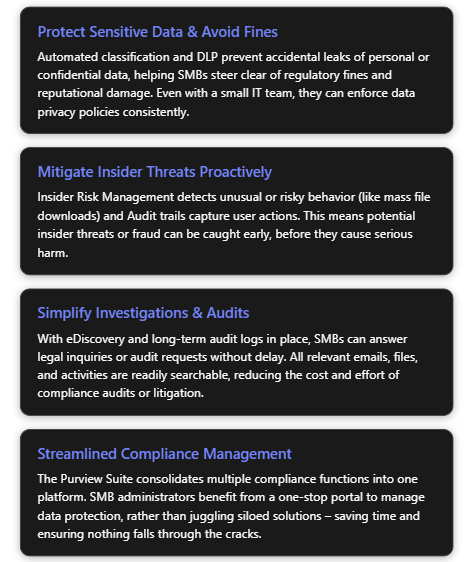
Bottom Line: For a typical SMB, the Microsoft Purview Suite add-on brings tangible, real-world benefits that go well beyond tick-box compliance. It helps protect the business’s crown jewels (its data), reduces the likelihood of costly incidents (breaches, lawsuits, fines), and does so in a way that is manageable for small IT teams and affordable for small-business budgets[2][2]. In an environment where SMBs are expected to meet many of the same data protection standards as large enterprises, Purview provides an equaliser – enabling “the same level of compliance and data protection as large enterprises but simplified for smaller teams and tighter budgets.”[2] By considering this add-on to their Microsoft 365 Business Premium subscription, SMBs can significantly elevate their compliance and risk management stance, turning what could be a vulnerability into a strength for the organisation.
References
[1] Elevate SMB Security, Compliance & Copilot Readiness: Microsoft …
[2] Introducing new security and compliance add-ons for Microsoft 365 …
[3] Purview Microsoft 365 Business Premium Licensing question
[4] Microsoft 365 Business Premium: Defender & Purview add-ons
[5] Microsoft 365 Business Premium: New security and compliance add-ons
 CIAOPS
2 thoughts on “Microsoft Purview Suite for Business Premium: Features & SMB Use Cases”