Need to Know podcast–Episode 317

It is only a matter of days now before we get our hands on Copilot for Security. Listen along for the latest information on this exciting new service from Microsoft. You’ll also hear about the new Security Exposure Management and lots more announcements from Microsoft.

You can listen directly to this episode at:

https://ciaops.podbean.com/e/episode-327-copilot-for-security-is-almost-amongst-us/

Subscribe via iTunes at:

https://itunes.apple.com/au/podcast/ciaops-need-to-know-podcasts/id406891445?mt=2

Don’t forget to give the show a rating as well as send me any feedback or suggestions you may have for the show.

Brought to you by www.ciaopspatron.com

Resources

@directorcia

Join my shared channel

CIAOPS merch store

Become a CIAOPS Patron

CIAOPS Blog

CIAOPS Brief

CIAOPSLabs

Support CIAOPS

Here’s what you missed from Microsoft Secure

Microsoft Copilot for Security generally available on April 1

Microsoft Copilot for Security is generally available on April 1, 2024, with new capabilities

Microsoft Copilot for Security: AI-Powered Security for All

Security Exposure Management

Introducing Microsoft Security Exposure Management

Microsoft introduces a preview of Copilot in Intune

Advancing the new era of work with Copilot, Windows, and Surface

Introducing Microsoft Surface Pro 10 and Surface Laptop 6 for Business

Collect information like a pro – New Microsoft Lists forms experience

The new Planner in Teams is now in Public Preview

Troubleshoot and Manage Microsoft Purview Data Loss Prevention for your Endpoint Devices

Introducing Restricted SharePoint Search to help you get started with Copilot for Microsoft 365

What is Global Secure Access (preview)?

Summary of podcast episode straight from Copilot for Microsoft 365:

Main ideas:

Microsoft Secure event highlights: Microsoft announced two major security products at the online event: Security Copilot and Security Exposure Management.

Security Copilot features and pricing: Security Copilot is an AI service that helps defenders analyze and respond to security incidents, as well as optimize their security posture. It will be available on April 1st as a pay-as-you-go service, with a billing unit of $4 per month.

Security Exposure Management features and availability: Security Exposure Management is a tool that helps users understand and reduce their attack surface, by providing insights into internal and external threats, critical assets, attack paths, and security initiatives. It is integrated with other Microsoft security products, such as Defender EAS and DLP. It is now available to all users at security.microsoft.com.

New Surface devices for business users: Microsoft also launched a new Surface Pro 10 and a Surface Laptop 6, aimed at business users. These devices feature a neural processing unit (NPU) for local AI workloads, and a Copilot key that launches Copilot on the desktop.6

New Microsoft List Forms experience: Microsoft introduced a new feature that allows users to create a Microsoft style form based on a SharePoint list, and save the data back to the list. This feature is currently only available for internal users.89

New Planner in Teams public preview: Microsoft announced a public preview of the new Planner in Teams, which is part of its vision to consolidate its task management capabilities. The new Planner has a cleaner and more consistent interface, and supports personal, team, and project planning.

CIAOPS Brief 20240330

image

Microsoft Entra resilience update: workload identity authentication –

https://techcommunity.microsoft.com/t5/microsoft-entra-blog/microsoft-entra-resilience-update-workload-identity/ba-p/4094704

Microsoft Entra Internet Access: Unify Security Service Edge with Identity and Access Management –

https://techcommunity.microsoft.com/t5/microsoft-entra-blog/microsoft-entra-internet-access-unify-security-service-edge-with/ba-p/4088980

The foundation for responsible analytics with Microsoft Purview –

https://www.microsoft.com/en-us/security/blog/2024/03/26/the-foundation-for-responsible-analytics-with-microsoft-purview/

Transform your business with AI skill building on Microsoft Learn –

https://www.microsoft.com/en-us/microsoft-cloud/blog/2024/03/18/transform-your-business-with-ai-skill-building-on-microsoft-learn/

Redefining forms creation with Copilot –

https://insider.microsoft365.com/en-us/blog/redefining-forms-creation-with-copilot

Custom Plugins in Microsoft Copilot for Security –

https://www.linkedin.com/pulse/custom-plugins-microsoft-copilot-security-chris-stelzer-enc0c/

4 tabletop exercises every security team should run –

https://www.csoonline.com/article/1311295/4-tabletop-exercises-every-security-team-should-run.html

Frost & Sullivan names Microsoft a Leader in the Frost Radar™: Managed Detection and Response, 2024 –

https://www.microsoft.com/en-us/security/blog/2024/03/25/frost-sullivan-names-microsoft-a-leader-in-the-frost-radar-managed-detection-and-response-2024/

Seamlessly secure your data estate with Microsoft Purview –

https://techcommunity.microsoft.com/t5/security-compliance-and-identity/seamlessly-secure-your-data-estate-with-microsoft-purview/ba-p/4095930

How Microsoft Incident Response and Microsoft Defender for Identity work together to detect and respond to cyberthreats –

https://www.microsoft.com/en-us/security/blog/2024/03/21/how-microsoft-incident-response-and-microsoft-defender-for-identity-work-together-to-detect-and-respond-to-cyberthreats/

After hours

You’ve Never Seen A Wheelchair Like This – https://www.youtube.com/watch?v=QpwJEYGCngI

Editorial

If you found this valuable, the I’d appreciate a ‘like’ or perhaps a donation at https://ko-fi.com/ciaops. This helps me know that people enjoy what I have created and provides resources to allow me to create more content. If you have any feedback or suggestions around this, I’m all ears. You can also find me via email director@ciaops.com and on X (Twitter) at https://www.twitter.com/directorcia.

If you want to be part of a dedicated Microsoft Cloud community with information and interactions daily, then consider becoming a CIAOPS Patron – www.ciaopspatron.com.

Watch out for the next CIA Brief next week.

Time to enable more logging

Having logs enabled is a good thing because it allows you to track down information after the fact. This is especially handy when you are performing a security investigation. Here is some additional logging that I recommend you enable.

image

Start by navigating to:

https://entra.microsoft.com

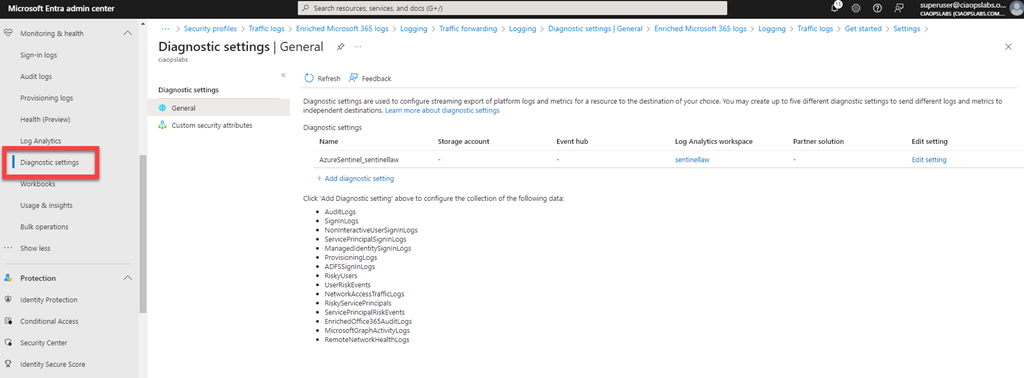
You’ll need to login with an administrative account that has rights. Expand the menu on the left of the screen until you see Monitoring & health and shown above.

image

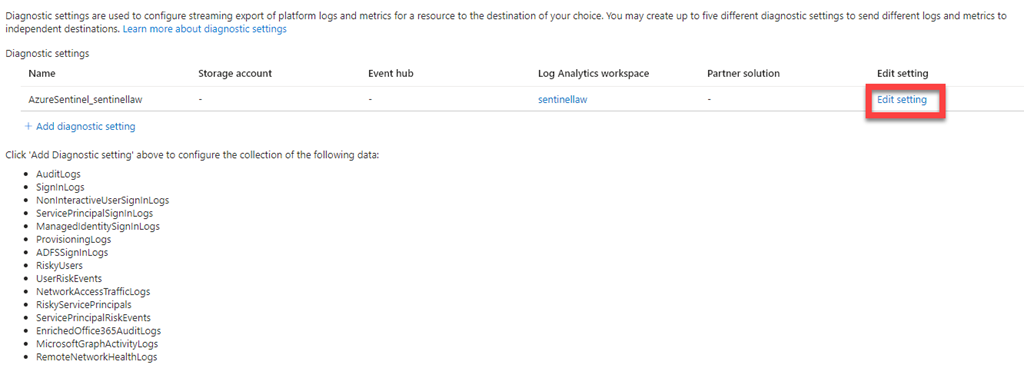
Under this option you will find the menu item Diagnostic settings as shown above, which you select. This will display your diagnostic settings on the right. Here you can see that I am currently sending logs to a Log Analytics workspace, which is linked to Microsoft Sentinel for analysis. If you aren’t already sending your logs to a Log Analytics workspace you can set one up via the Add diagnostic setting hyperlink. I will assume here you already have something set up.

image

Select the Edit settings hyperlink and under Edit settings column on the right, as shown above.

image

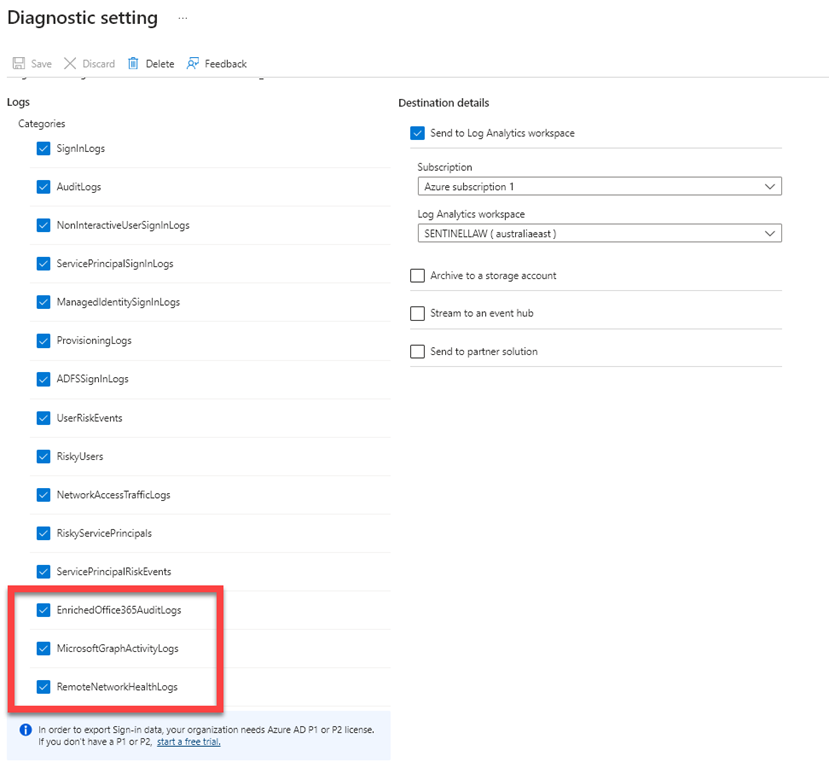
Scroll down the categories of logs listed and ensure they are all select so the logging data will be sent to Microsoft Sentinel via the Log Analytics workspace.

If you have already enabled this logging I suggest you go back in and check that all categories are selected as Microsoft has now added some additional items:

– EnrichedOffice365Auditlogs

– MicrosoftGraphActivityLogs

– RemoteNetworkHealthLogs

which I had to enable.

When you have completed your category selections press the Save button in the menu bar at the top of the window to update your preferences.

This now means that you’ll have even more data in your Sentinel environment to help keep you secure.

March Microsoft 365 Webinar resources

image

The slides from this month’s webinar are available at:

https://github.com/directorcia/general/blob/master/Presentations/Need%20to%20Know%20Webinars/202403.pdf

If you are not a CIAOPS patron you want to view or download a full copy of the video from the session you can do so here:

http://www.ciaopsacademy.com.au/p/need-to-know-webinars

Watch out for next month’s webinar.

Recap from Copilot for Microsoft 365:

Main ideas:

Webinar overview: The document is a transcript of a webinar hosted by Robert Crane on March 20, 2021, about Microsoft 365 updates and forms.

Microsoft Copilot for Security: One of the major updates in Microsoft 365 is the launch of Microsoft Copilot for Security, a cloud-based AI service that analyzes security logs and helps detect and respond to threats.

Surface devices with Copilot button: Microsoft also announced new Surface devices with a Copilot button that can launch the AI assistant directly. The devices have a neural processing unit for local AI calculations.

Microsoft Forms update: Microsoft Forms has a new user interface and features, such as multilingual support, email receipts, and quick polls. There is also a Forms Pro version with more capabilities.

Forms integration with Stream: Forms can be integrated with Stream, Microsoft’s video platform, to add interactivity and feedback to videos. Users can embed forms in Stream videos and see the results in real time.

Centralised Microsoft 365 Add in deployments with PowerShell

Almost 4 years ago I wrote this article:

Centralised Office 365 Add in deployments with PowerShell

Upon review, it seems that the Finedtime addin is no longer available. I have therefore updated the script:

https://github.com/directorcia/Office365/blob/master/o365-addin-deploy.ps1

to remove this and prevent errors.

If you have any Office addins that you believe should be deployed as a ‘standard’ to all users in a tenant, please let me know and I’ll look at adding them to the script.

CIAOPS Brief 20240323

image

Follow the Breadcrumbs with Microsoft Incident Response and MDI: Working Together to Fight Identity –
https://techcommunity.microsoft.com/t5/microsoft-security-experts-blog/follow-the-breadcrumbs-with-microsoft-incident-response-and-mdi/ba-p/4089623

Advancing the new era of work with Copilot, Windows, and Surface –
https://www.microsoft.com/en-us/microsoft-365/blog/2024/03/21/advancing-the-new-era-of-work-with-copilot-windows-and-surface/

Introducing Microsoft Surface Pro 10 and Surface Laptop 6 for Business –
https://www.youtube.com/watch?v=uxHn2DMigb4

AI Data Drop: The 11-by-11 Tipping Point –
https://www.microsoft.com/en-us/worklab/ai-data-drop-the-11-by-11-tipping-point/

Collect information like a pro – New Microsoft Lists forms experience –
https://techcommunity.microsoft.com/t5/microsoft-sharepoint-blog/collect-information-like-a-pro-new-microsoft-lists-forms/ba-p/4086659

How to chat with Microsoft Copilot in Word –
https://www.youtube.com/watch?v=9ewTQGTvtW0

Here’s what you missed from Microsoft Secure –
https://www.youtube.com/watch?v=n9lFglSnlzM

Microsoft Threat Intelligence unveils targets and innovative tactics amidst tax season –
https://www.microsoft.com/en-us/security/blog/2024/03/20/microsoft-threat-intelligence-unveils-targets-and-innovative-tactics-amidst-tax-season/

Microsoft Visio | The Ultimate Diagramming Tool –
https://www.youtube.com/watch?v=5XjwaDmire4

How to edit .vsd files in Visio for the web –
https://www.youtube.com/watch?v=fWBlv2amooo

Implementing Passwordless Authentication with Microsoft Entra ID for SMB – Part 2 –
https://www.youtube.com/watch?v=OIwsd572nnI

After hours

Why work doesn’t happen at work– https://www.youtube.com/watch?v=5XD2kNopsUs

Editorial

If you found this valuable, the I’d appreciate a ‘like’ or perhaps a donation at https://ko-fi.com/ciaops. This helps me know that people enjoy what I have created and provides resources to allow me to create more content. If you have any feedback or suggestions around this, I’m all ears. You can also find me via email director@ciaops.com and on X (Twitter) at https://www.twitter.com/directorcia.

If you want to be part of a dedicated Microsoft Cloud community with information and interactions daily, then consider becoming a CIAOPS Patron – www.ciaopspatron.com.

Watch out for the next CIA Brief next week.

CIAOPS Brief 20240316

image

Bringing Copilot to more customers worldwide—across life and work –

https://www.microsoft.com/en-us/microsoft-365/blog/2024/03/14/bringing-copilot-to-more-customers-worldwide-across-life-and-work/

What is the database behind ChatGPT? –

https://techcommunity.microsoft.com/t5/microsoft-mechanics-blog/what-is-the-database-behind-chatgpt/ba-p/4076750

Microsoft named as a Leader in three IDC MarketScapes for Modern Endpoint Security 2024 –

https://techcommunity.microsoft.com/t5/security-compliance-and-identity/microsoft-named-as-a-leader-in-three-idc-marketscapes-for-modern/ba-p/4083116

Exposure Management: The Evolution of Vulnerability Management –

https://techcommunity.microsoft.com/t5/microsoft-defender-for-cloud/exposure-management-the-evolution-of-vulnerability-management/ba-p/4084587

Insider Risk in Conditional Access | Microsoft Entra + Microsoft Purview Adaptive Protection –

https://www.youtube.com/watch?v=C9jXvvZqVyI

Protect data used in generative AI apps with Microsoft Purview –

https://www.youtube.com/watch?v=dYzTyEcjHc0

Microsoft Copilot for Security: AI-Powered Security for All –

https://www.youtube.com/watch?v=sNaxv2zflmc

Security Exposure Management –

https://www.youtube.com/watch?v=cK8wSA6apk0

Microsoft introduces a preview of Copilot in Intune –

https://techcommunity.microsoft.com/t5/microsoft-intune-blog/microsoft-introduces-a-preview-of-copilot-in-intune/ba-p/4083276

From vision to value realization: A closer look at how customers are embracing AI Transformation to unlock innovation and deliver business outcomes –

https://blogs.microsoft.com/blog/2024/03/13/from-vision-to-value-realization-a-closer-look-at-how-customers-are-embracing-ai-transformation-to-unlock-innovation-and-deliver-business-outcomes/

Introducing Microsoft Security Exposure Management –

https://techcommunity.microsoft.com/t5/security-compliance-and-identity/introducing-microsoft-security-exposure-management/ba-p/4080907

Security for AI: How to Secure and govern AI usage –

https://techcommunity.microsoft.com/t5/security-compliance-and-identity/security-for-ai-how-to-secure-and-govern-ai-usage/ba-p/4082269

Protect at the speed and scale of AI with Copilot for Security in Microsoft Purview –

https://techcommunity.microsoft.com/t5/security-compliance-and-identity/protect-at-the-speed-and-scale-of-ai-with-copilot-for-security/ba-p/4078785

New at Secure: Corpus of Intel Profiles Available in Defender XDR –

https://techcommunity.microsoft.com/t5/microsoft-defender-threat/new-at-secure-corpus-of-intel-profiles-available-in-defender-xdr/ba-p/4083161

Behind the Scenes: Talking AI and Copilot with Microsoft Customer Support Engineers –

https://techcommunity.microsoft.com/t5/microsoft-365-blog/behind-the-scenes-talking-ai-and-copilot-with-microsoft-customer/ba-p/4081962

Microsoft Copilot for Security generally available on April 1 –

https://blogs.partner.microsoft.com/partner/microsoft-copilot-for-security-generally-available-on-april-1/

The new Planner in Teams is now in Public Preview –

https://techcommunity.microsoft.com/t5/planner-blog/the-new-planner-in-teams-is-now-in-public-preview/ba-p/4072525

Microsoft Copilot for Security is generally available on April 1, 2024, with new capabilities –

https://www.microsoft.com/en-us/security/blog/2024/03/13/microsoft-copilot-for-security-is-generally-available-on-april-1-2024-with-new-capabilities/

New Home Experience in OneNote for iPhone –

https://prod.support.services.microsoft.com/en-us/office/new-home-experience-in-onenote-for-iphone-f72fd07e-cdb7-407f-8277-f579a3077cea?preview=true

Audi is reimagining endpoint management and security with Microsoft Intune –

https://www.youtube.com/watch?v=WWlmWYQgqis

Unlock the power of video with Microsoft Stream –

https://insider.microsoft365.com/en-us/blog/unlock-the-power-of-video-with-microsoft-stream

Business Email Compromise –

https://www.youtube.com/watch?v=GnEGWzfxU8c

New Outlook for Windows: A Guide to Product Availability –

https://techcommunity.microsoft.com/t5/outlook-blog/new-outlook-for-windows-a-guide-to-product-availability/ba-p/4078895

After hours

GoPro: The Streets of Japan in 4K– https://www.youtube.com/watch?v=s0MDY9fl-IA

Editorial

If you found this valuable, the I’d appreciate a ‘like’ or perhaps a donation at https://ko-fi.com/ciaops. This helps me know that people enjoy what I have created and provides resources to allow me to create more content. If you have any feedback or suggestions around this, I’m all ears. You can also find me via email director@ciaops.com and on X (Twitter) at https://www.twitter.com/directorcia.

If you want to be part of a dedicated Microsoft Cloud community with information and interactions daily, then consider becoming a CIAOPS Patron – www.ciaopspatron.com.

Watch out for the next CIA Brief next week.

blockMsolPowerShell blocks all users if set to true

One of the options in the EntraID Authorization policy in the Default user permissions section is a setting blockMsolPowerShell which means when you dig into it:

Specifies whether the user-based access to the legacy service endpoint used by MSOL PowerShell is blocked or not.

Screenshot 2024-03-12 210611

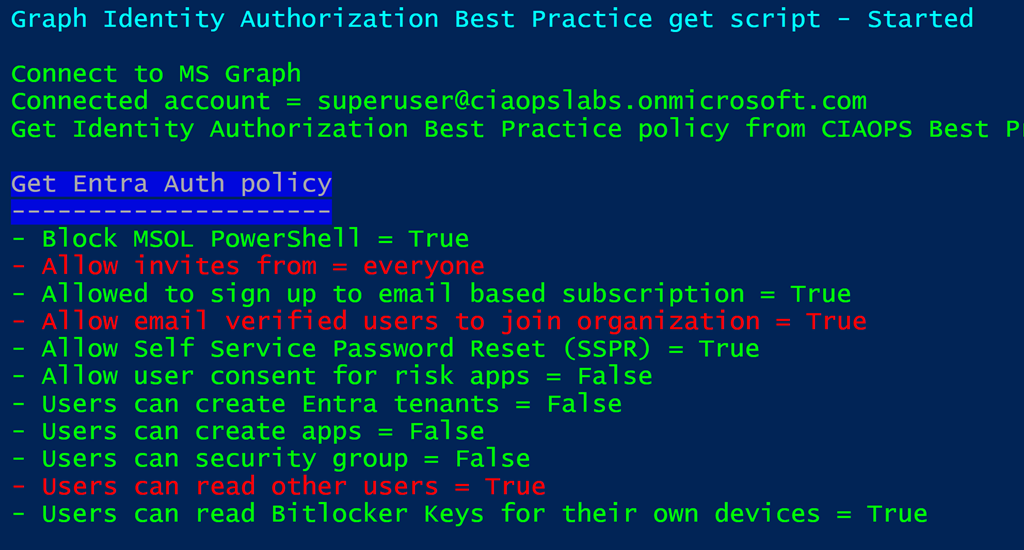
Using my script:

https://github.com/directorcia/Office365/blob/master/graph-idauthpolicy-get.ps1

you can see whether this is enabled, which it is as shown above.

Screenshot 2024-03-12 205633

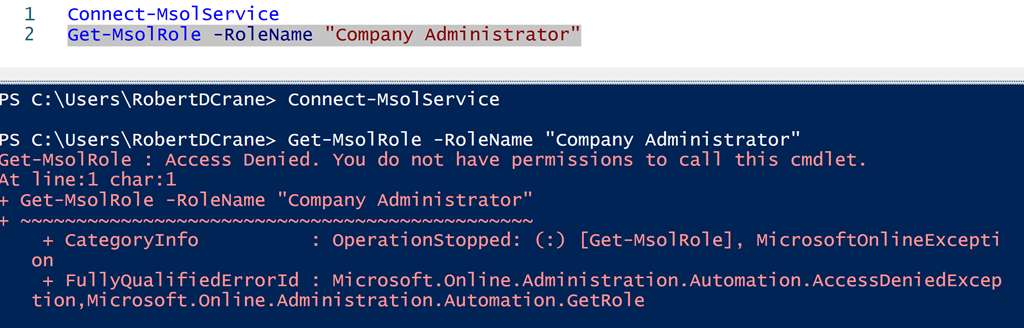
With this setting blockMsolPowerShell set to True, then all user access to the msolservice PowerShell commands are blocked as shown above. This applies to users, ordinary and administrators (even Global Administrators, which is the result I tested in the above screenshot). The user can connect to the service BUT they can’t run an msol commands as shown above.

Now given that the msolservice module will be deprecated on March 30, 2024 there shouldn’t be any issue disabling this for ALL users. However, you may want to make sure you test any Outlook add-ins or other third party apps you have in place that might have a dependency on the old msolservice module. The easiest way to achieve this is probably to simply disable the settings and see if problems arise. If they do, just make sure you know how to revert the setting back. I think is going to be the fastest way to determine if and what any dependencies you may have.

I would suggest that unless you have a dependency it should be disabled to improve the security of your environment.