CIA Brief 240203

image

Microsoft Create: How to use ChatGPT to plan a vacation –

https://www.youtube.com/watch?v=hT3IkaftZME

Monthly Microsoft Security news – February 2024 –

https://techcommunity.microsoft.com/t5/microsoft-defender-xdr-blog/monthly-news-february-2024/ba-p/4046948

Easily control audio and video settings in Teams meetings –

https://insider.microsoft365.com/en-us/blog/easily-control-audio-and-video-settings-in-teams-meetings

Microsoft Intune Tunnel for Mobile Application Management –

https://www.youtube.com/watch?v=-s_tBW_XQu0

Microsoft Endpoint Privilege Management –

https://www.youtube.com/watch?v=N3X2JGdXqDE

Microsoft Cloud PKI –

https://www.youtube.com/watch?v=wJfL55viYjg

Microsoft Intune Suite – beyond endpoint management in 2024 –

https://www.youtube.com/watch?v=FLcX9-uXlKY

How Microsoft 365 Delivers Trustworthy AI –

https://techcommunity.microsoft.com/t5/copilot-for-microsoft-365/how-microsoft-365-delivers-trustworthy-ai/ba-p/4045596

3 new ways the Microsoft Intune Suite offers security, simplification, and savings –

https://www.microsoft.com/en-us/security/blog/2024/02/01/3-new-ways-the-microsoft-intune-suite-offers-security-simplification-and-savings/

Midnight Blizzard: Guidance for responders on nation-state attack –

https://www.microsoft.com/en-us/security/blog/2024/01/25/midnight-blizzard-guidance-for-responders-on-nation-state-attack/

Unlock the Power of Video at Work and School: 6 Features to Use in Microsoft Stream –

https://techcommunity.microsoft.com/t5/microsoft-stream-blog/unlock-the-power-of-video-at-work-and-school-6-features-to-use/ba-p/4043899

Power Platform January 2024 Newsletter –

https://www.linkedin.com/pulse/january-2024-newsletter-microsoft-power-platform-community-uy5rc/

Easily Manage Privileged Role Assignments in Microsoft Entra ID Using Audit Logs –

https://techcommunity.microsoft.com/t5/microsoft-entra-blog/easily-manage-privileged-role-assignments-in-microsoft-entra-id/ba-p/4013854

Microsoft Teams available on Apple Vision Pro on February 2 –

https://techcommunity.microsoft.com/t5/microsoft-teams-blog/microsoft-teams-available-on-apple-vision-pro-on-february-2/ba-p/4042499

Microsoft earnings beat across the board as cloud, AI drive momentum –

https://www.msn.com/en-us/money/technology/microsoft-earnings-beat-across-the-board-as-cloud-ai-drive-momentum/ar-BB1hvri9?ocid=entnewsntp&pc=U531&cvid=e176344ba388468f9bc7ad3509af872d&ei=13

Make meetings more fun and personal with Decorate your background –

https://www.youtube.com/watch?v=PhbowtYOkyw

Introducing More Granular Certificate-Based Authentication Configuration in Conditional Access –

https://techcommunity.microsoft.com/t5/microsoft-entra-blog/introducing-more-granular-certificate-based-authentication/ba-p/2365668

Create an org wide team –

https://www.youtube.com/watch?v=MrbmYhQxvok

Microsoft Incident Response Retainer Overview –

https://www.youtube.com/watch?v=9q-j0gq33Fg

After hours

Vision Pro Review: 24 Hours With Apple’s Mixed-Reality Headset –

https://www.youtube.com/watch?v=8xI10SFgzQ8

Editorial

If you found this valuable, the I’d appreciate a ‘like’ or perhaps a donation at https://ko-fi.com/ciaops. This helps me know that people enjoy what I have created and provides resources to allow me to create more content. If you have any feedback or suggestions around this, I’m all ears. You can also find me via email director@ciaops.com and on X (Twitter) at https://www.twitter.com/directorcia.

If you want to be part of a dedicated Microsoft Cloud community with information and interactions daily, then consider becoming a CIAOPS Patron – www.ciaopspatron.com.

Watch out for the next CIA Brief next week.

CIAOPS Need to Know Microsoft 365 Webinar – February

laptop-eyes-technology-computer_thumb

Join me for the free monthly CIAOPS Need to Know webinar. Along with all the Microsoft Cloud news we’ll be taking a look at Copilot for Microsoft 365 now that it is available generally..

Shortly after registering you should receive an automated email from Microsoft Teams confirming your registration, including all the event details as well as a calendar invite.

You can register for the regular monthly webinar here:

February Webinar Registrations

(If you are having issues with the above link copy and paste – https://bit.ly/n2k2402

The details are:

CIAOPS Need to Know Webinar – Febraury 2024
Tuesday 20th of February 2024
11.00am – 12.00am Sydney Time

All sessions are recorded and posted to the CIAOPS Academy.

The CIAOPS Need to Know Webinars are free to attend but if you want to receive the recording of the session you need to sign up as a CIAOPS patron which you can do here:

http://www.ciaopspatron.com

or purchase them individually at:

http://www.ciaopsacademy.com/

Also feel free at any stage to email me directly via director@ciaops.com with your webinar topic suggestions.

I’d also appreciate you sharing information about this webinar with anyone you feel may benefit from the session and I look forward to seeing you there.

Microsoft 365 Backup restore process

image

In a previous article:

Setting Microsoft 365 Backup policies

I determined that I liked the simplicity of setting up backups with Microsoft 365 Backup but the negative was a lack of reporting or alerting on the execution of these jobs.

I’m sorry to say that I also find the restoration process for Microsoft 365 lacking for a number of reasons.

1. The main reason is, at the moment, there is not really a granular restore option.

2. The restore option is typically all over the top of what is there already, effectively replacing it or restoring everything to a different location and then you have to manually copy the data across.

3. Selecting which actual backup to restore from I also found cumbersome.

4. I found the restoration of Exchange online mailboxes the most tricky to restore a select amount of data. You have to filter what you looking for via a few options. You kind of have to know what you want prior, you can’t just browse.

5. When the restore process actually runs you get no real indication of what it is actually doing, you simply have to wait for it to finish. My 1.28TB test SharePoint site took around 45 minutes to copy to a new location.

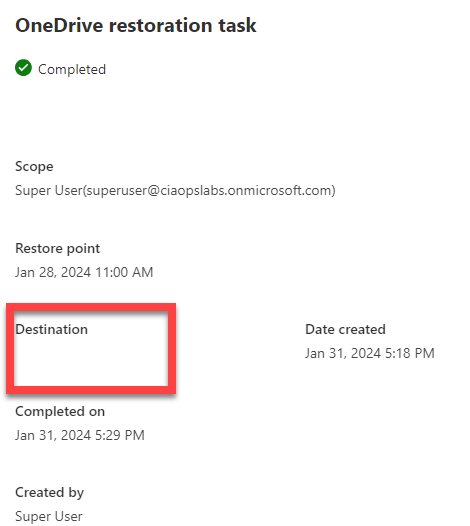
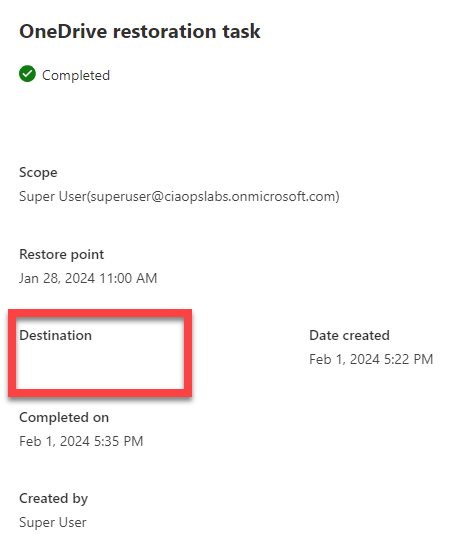
This may be me but when I did a restore of a OneDrive for Business to another location, the destination into which it copied the data is blank!

image

I did this more than once and got the same result. I couldn’t find any new SharePoint sites in my environment or sub folders. As such I am still trying to find out where the data actually restored to, as it does say it is completed!

image

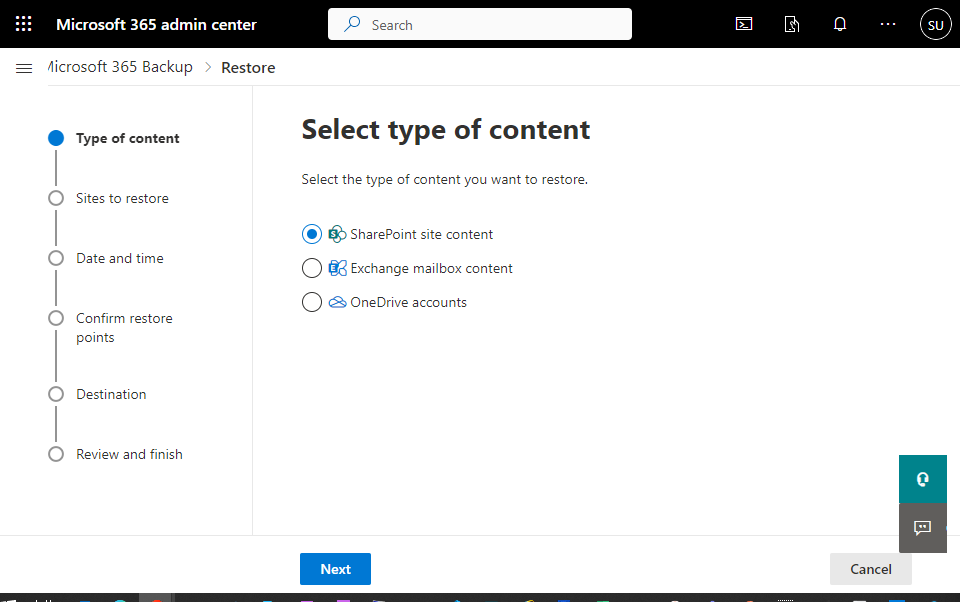
The good thing is the restore process is pretty straight forward. A wizard takes you through the process as shown above.

image

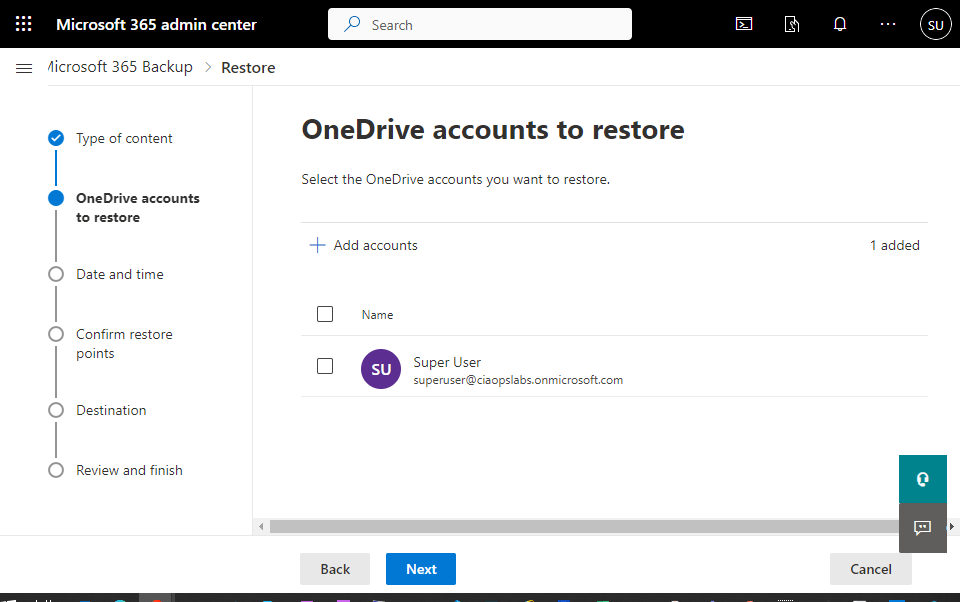
For example, if you want to restore a OneDrive for Business you select the item from a list.

image

You then need to select a time and date to restore from. This is somewhat cumbersome and would be much better if you could simply browse through the available backups. For now you need to select the date and time you want.

image

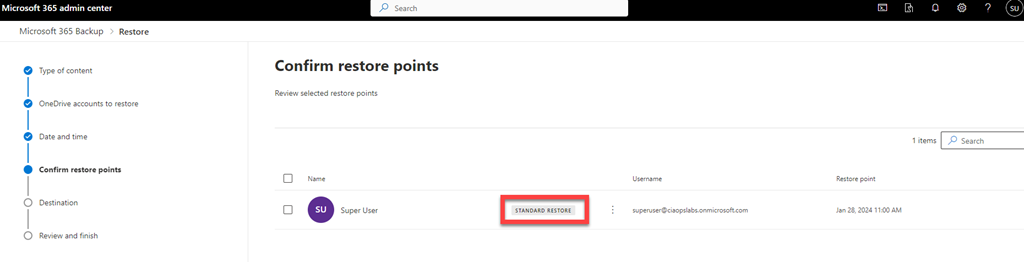
I’m not sure what “standard restore” means when you confirm the restore point as shown above.

image

When you select the destination you’ll see that it typically everything over the top or everything to another location and then you need to manually copy what you need and delete the rest.

image

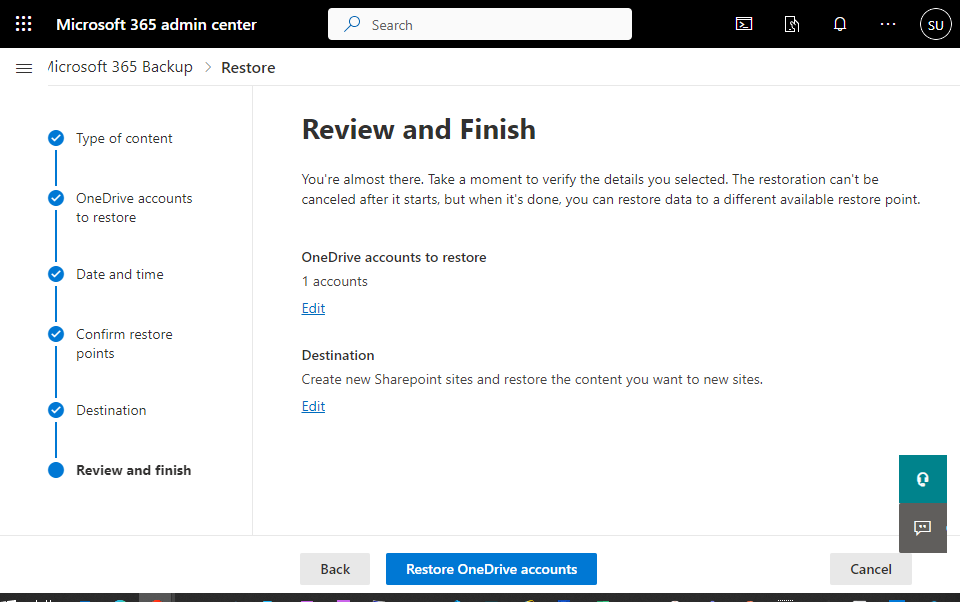
You confirm the restore.

image

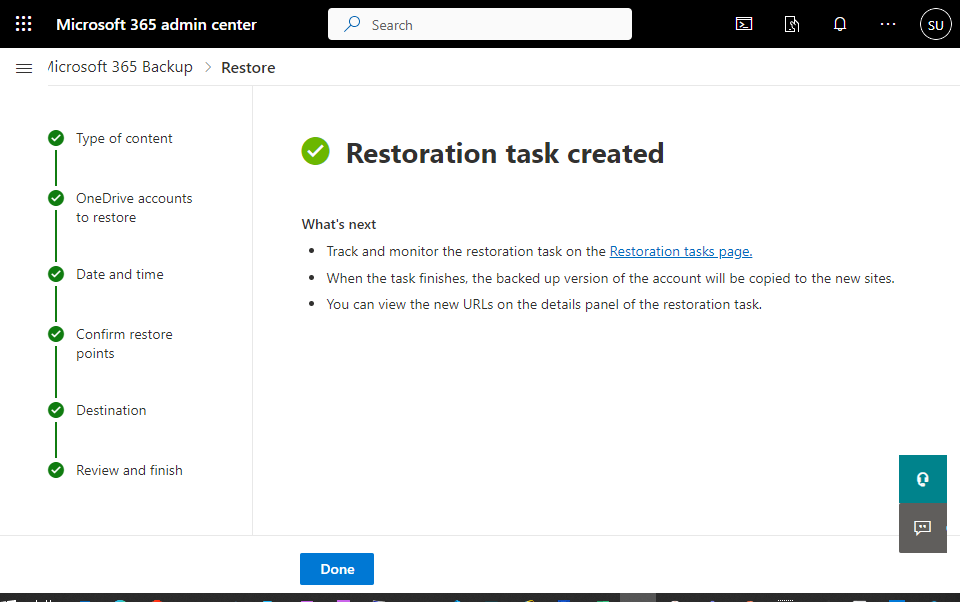
and you select Done.

image

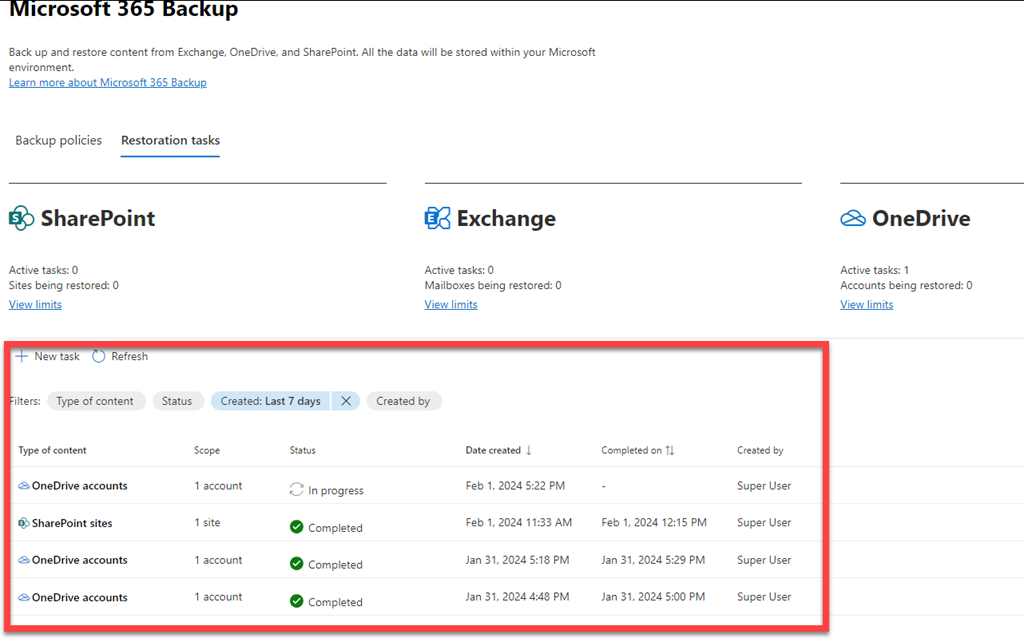
Then at the bottom of the page are the restore tasks as shown above.

image

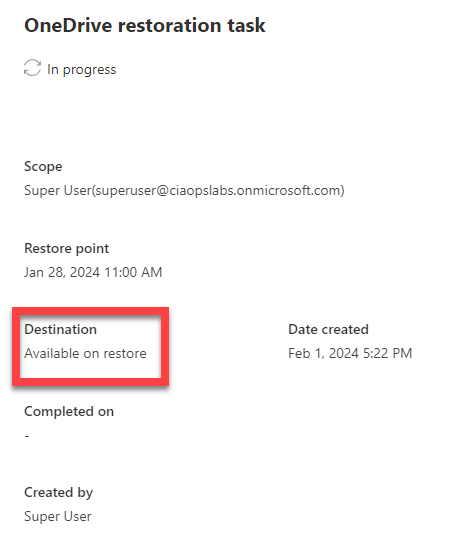
Even with the restore in progress, you’ll see you don’t any information of progress or completion time. You’ll also note that the Destination will be available on restore,

image

but it wasn’t again unfortunately.

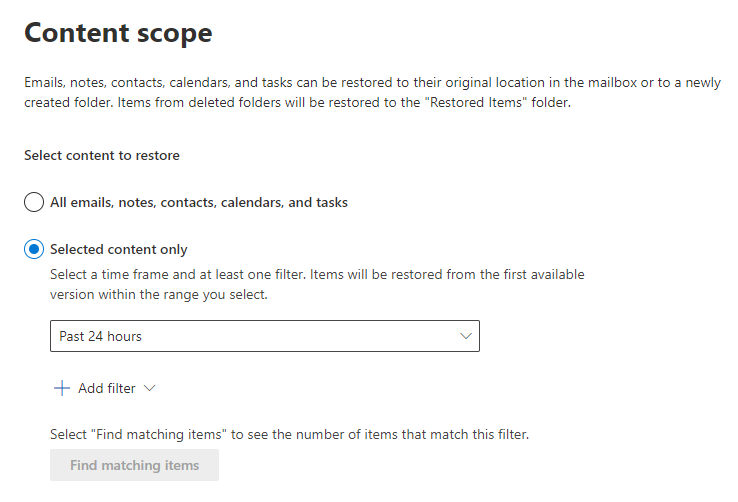
I found the mailbox restore process quite cumbersome.

image

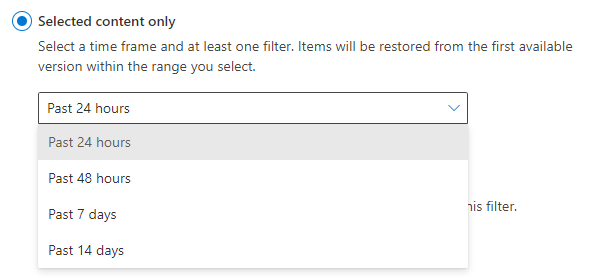
If you want to do selected content as shown above you need to select a time frame

image

and that time frame is 14 days maximum.

image

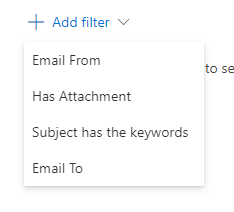
Then you need to add filters from the four options shown above.

image

Then you have to find any matches and more me, most of the time I didn’t find any in my test environment, which was frustrating.

Remember, Microsoft 365 Backup is still in preview and will continue to improve and develop. However, as it stands now I don’t feel this is a viable alternative for people who do wish to restore their Microsoft 365 environment in a granular manner. I think as a disaster recovery tool, that is, back up everything and restore everything, over the top if needed, it would be fine.

Thus, in summary, for now, I think Microsoft 365 Backup could work as a disaster recovery service but for granular, item level restore – no so much. However, it is still very early days for this product, so keep your eye on what develops. I know I will.