Using Yammer to keep up to date

I’ve written two previous articles about how you can use various Office 365 services to keep you and your business up to date. You’ll find these at:

Using Office 365 to stay up to date

Using Microsoft Teams to keep up to date

I’ll show you how to do exactly the same thing but this time using Yammer and Microsoft Flow.

image

I am going to assume that you already have your Yammer network in operation (it does come free with most Office 365 suites after all!). So the first step in the process, as with previous articles, is to go and find the RSS feed for the item you wish to track.

image 

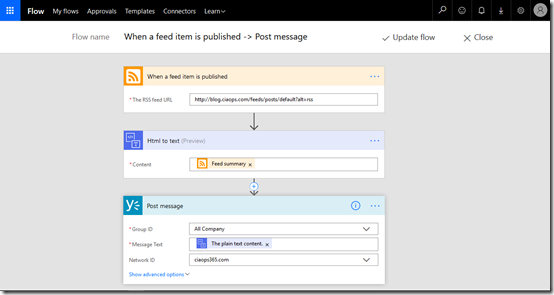
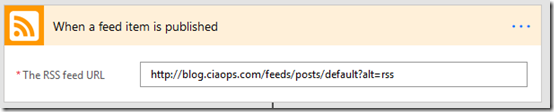
In this case I’ve created a new Flow and the trigger item I’ve selected is when a new items is created on the feed.

image

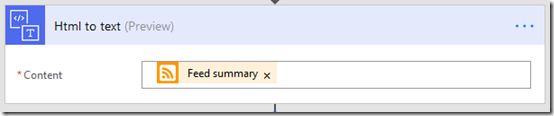
Once the process has started I’m then going to send that feed through a HTML to Text convert to make it easier for users to read.

image

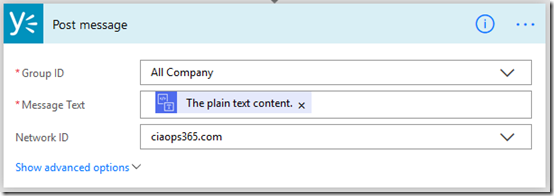
I’m then going to take the result of that conversion and post it automatically to a location in Yammer. In this case, I have elected to post it to All Company but you may wish to create a dedicated Yammer group for these items (kind of like the dedicated channel I suggested when using Teams).

image

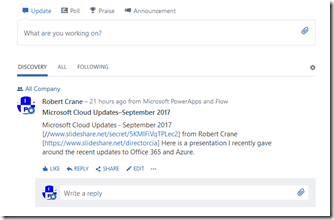
So when a new article is published like that above, it will appear on Yammer like so.

image

This should give the news much greater visibility and importantly allow other in the business to comment, add conversations and more value around the item. It also allows people to draw it to the attention of others using ‘@’ mentions.

You could extend this further by automatically adding appropriate ‘#’ hashtags to make search and categorisation easier. You are only limited in what you can do by your imagination.

I think this Yammer style automatic posting of new items works best for items that are relevant across the organisation or at least across a group wider than what you find in a Microsoft Team channel. However, all three that I have covered, Office 365 Groups, Microsoft Teams and this can be used where ever and when ever they make sense. They all have mobile apps. They all encourage participation and they all make the information searchable.

The idea with all these suggestion is to demonstrate how easy it is to bring the news you want directly to a common location in your business. Hopefully, it also demonstrates how powerful this can be when enhanced by comments from people inside your business. This concept applies for all business, large and small. It is the smart way to use the tools you have to fetch the information you need.

Remember, Office 365 is not just a single service like email, it is a toolbox that allows you to solve business challenges. Make sure you explore all it has to offer and implement it in ways to make your business more productive as I have hopefully shown here.

Office 365 Saturday–Melbourne

I’ll be speaking at Office 365 Saturday in Melbourne on Saturday the 16th of September 2017.

There are three tracks with a wide range of speakers on all things Office 365. The event is free to attend and runs from 8.30am – 5.30pm at Clifton’s in Melbourne. You can learn more about the event and register here:

https://www.meetup.com/O365-Saturday/events/239503295/

My session is on automation options available in Office 365.

I hope to see you there.

Sharing a link doesn’t allow download?

Here’s something that I only just came across. I want to share a PowerPoint presentation from my OneDrive for Business.

image

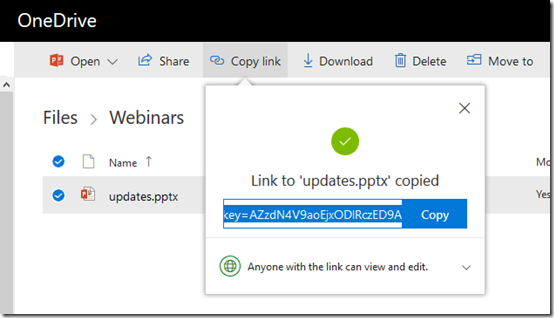
I select the file then I select Copy link from menu. In this case I am happy to share anonymously so anyone can edit.

This process gives me a link which I sent to the recipient.

image

When that link is opened at the destination you can view the file in a browser but, as you see above, there appears to be no option to download the file?

image

Even if I go in and edit the file at the destination there is no download option?

I must be missing something here? How can I actually send a link to a third part from my OneDrive for Business and allow them to just download the file?

clip_image002

The only way I can see to get it to work is to share the parent folder which contains the file. Send the link for the parent folder offers the option to download like you can see above but this isn’t really ideal when all I want to do is share a single file.

Surely, I must be missing something here?

Focus on the ‘Me’ services first

The way I approach Office 365 adoption for businesses is very different from the approach that many take. My experience shows that successful adoption is all about understanding the human experience rather than just implementing technology.

The vast majority of people and businesses are very change adverse. That’s normal. This means they are already wary of what technology brings their work life. Many have also had plenty of experiences where technology failed them and actually made their job more difficult. All of these factors are an accumulated mountain that implementing new systems inside a business need to surmount.

The solution is not to attack that mountain with more technology, it is to focus on enabling people with technology. It is about making technology more personal for the user and showing them how it can help them get their job done. It is about letting them become familiar with what the technology can do.

Thus, the starting point is always the individual, because we all know everyone wants to know ‘what’s in for me?’. If you don’t get individual buy in then you’ll never get business buy in. It’s the individuals that make the business succeed, not the other way around! So what’s the strategy here when it comes to Office 365 adoption?
image

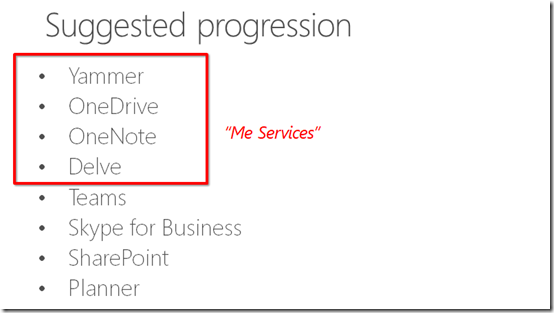
The approach I recommend is always to focus on the ‘me’ services in Office 365 first. These services to my mind are Yammer, OneDrive for Business, OneNote and Delve.

I have talked about why Yammer is the key starting point for adoption previously:

Why Yammer is still relevant

In summary, Yammer is a great way to make a big impact with little investment. It basically allows the business to work in public, which most businesses have never been able to do. Yammer also allows people to contribute and consume what is happening in the business and with those around them, on the desktop or on their phones. In short, it brings the social nature of being human into a business and in my experience produces huge initial wins for the business.

Once Yammer has been rolled out the next recommendation is to get users onto OneDrive for Business. In essence this gives them familiarity with the SharePoint experience of working with files but without being in the glare of everyone else in the business as they do with Team Sites. Because OneDrive for Business is personal, they can play, use and learn without fear of ‘breaking something’ or interfering with others. It has the added benefit of moving all their unbackedup data (desktop, My Documents, C: drive, etc) to somewhere they can easily access that just about anywhere. For the business, it provides greater compliance and security over their information.

Next up, I recommend OneNote. OneNote is an app that most people have never used but it is available on all platforms. That makes it easy to start saving information into. Once information is in OneNote it is backed up and sync’ed to all devices automatically. How many people do you know that carry a pen and pad wherever they go? Just about everyone right? Imagine the benefits those people would get if they recorded even some of their stuff into OneNote? The killer feature of OneNote is search. Since you have already got users hooked on OneDrive for Business, now you show them the benefits of creating and saving OneNote notebooks there. Whether they create one massive personal notebook or lots of smaller ones, it doesn’t matter. Now they have a digital notebook that never runs out, is always backed up and available on all their devices.

The final piece of the puzzle is Delve. How is Delve a ‘me’ service you may ask? Well, the way I see it, Delve is a user’s personal search engine. It allows them to search across all their documents, all the shared documents they have access to, their attachments as well information about others in the business. Remember how I said search is the killer feature of OneNote? It is actually the killer feature of Office 365.  Delve shows them THEIR document feed, the people THEY are interactive with most. It allows them to create THEIR OWN personal blog and so on.

Delve is also great from an administrator’s point of view because there isn’t much that needs configuring. However, for successful adoption an administrator MUST ensure that one feature of Delve is enabled. Can you guess what that is?
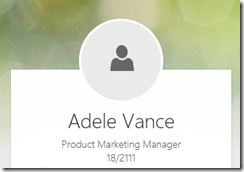
image

Nothing looks worse than having just a shadow staring back at you from your Delve. To drive adoption successfully you MUST have the user’s profile picture there automatically or show them how to upload it themselves.
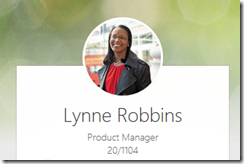
image

Users will feel greater ownership if they see firstly, their own picture and secondly, pictures of the co-workers. Remember, you are implementing something like Office 365 to benefit users, not just for something to do. Thus, doing everything you can to promote buy in makes sense. There are so many other benefits of ensuring you have images in user’s profile that I won’t go into here, but rest assured, they are critical when it comes to adoption.

Once you have all these ‘me’ services rolled out, then you can start looking at ‘us’ services like Teams, SharePoint and so on. How do you know when the time is right to shift from ‘me’ adoption to ‘us’ adoption? Well, the metrics that you established prior to rolling out Office 365 should be the yard stick, however when users come to you and say things like:

– “Hey this Yammer thing is great, could we use it for this?”

– “OneNote is amazing, will work for this project?”

and so on. Basically, you’ll know then that the time is right to shift to rolling out ‘us’ services. You just have to wait till users start asking for them. At that point you know they are comfortable with the technology and have embraced the benefits themselves and now want to extend that elsewhere in the business. They are no longer afraid of the new technology, they see how it can make their lives easier. At that point, it is time to unlock your adoption achievement award and move on.

Thus, successful Office 365 adoption is about focusing on the individual before the team. It is about giving them ‘me’ services to allow them to become familiar in their own time and space. Once they do that they’ll come to you asking how these can be extended beyond their own world.

That is the way to do Office 365 adoption successfully in my books.

Need to Know podcast–Episode 163

Marc joins us after his short break to cover off all the Azure news as only he can do while I do the Office 365 stuff as usual. Still plenty of news coming our way even though we are preparing for Microsoft Ignite very soon. Enjoy the return of Mr Azure in this episode. Thanks to Rode and Ingram Micro Cloud for the support of this podcast.

Take a listen and let us know what you think –feedback@needtoknow.cloud

You can listen directly to this episode at:

https://ciaops.podbean.com/e/episode-163-hes-back/

The podcast is also available on Stitcher at:

http://www.stitcher.com/podcast/ciaops/need-to-know-podcast?refid=stpr

Don’t forget to give the show a rating as well as send us any feedback or suggestions you may have for the show.

Resources

@marckean

@directorcia

Azure news from Marc

New and improved iPad app for Yammer

Easily access Secure Score

Microsoft Forms email notifications

Document Library properties in Microsoft Forms

Communications Sites comes to SharePoint mobile app

Slight change to SharePoint sharing

New group calendar web part rolling out

Microsoft Forms available in app launcher

This episode is brought to you by:

image

CIAOPS Need to Know Azure Webinar–September 2017

pexels-photo-325229

I’m please to announce that we’ll be kicking off a regular monthly webinar focused on Azure. This will be like our successful Office 365 webinars and follow the same format, updates and news, deep dive on a topic and then open Q and A.

Our first free Azure webinar to be held in September is now open for registrations. There will be the latest Azure news as well a deep dive into getting start with Azure. This means it will be a great session to attend if you are just starting your Azure journey.

These sessions will be recorded and made available afterwards in the CIAOPS Academy.

You can register for free at:

September Azure Webinar Registrations

The details are:

CIAOPS Need to Know Azure Webinar – September 2017
Thursday 14th of September 2017
2pm – 3pm Sydney Time

All sessions are recorded and posted to the CIAOPS Academy.

There of course will also be open Q and A so make sure you bring your questions for me and I’ll do my best to answer them.

The CIAOPS Need to Know Webinars are free to attend but if you want to receive the recording of the session you need to sign up as a CIAOPS patron which you can do here:

http://www.ciaopspatron.com

or purchase them individually at:

http://www.ciaopsacademy.com/

Also feel free at any stage to email me directly via director@ciaops.com with your webinar topic suggestions.

I’d also appreciate you sharing information about this webinar with anyone you feel may benefit from the session.

CIAOPS Patron–Gold Enterprise

gold

I’m please to announced the availability of the CIAOPS Patron – Gold Enterprise Plan. This plan is designed to cater for those businesses that want to provide access to the CIAOPS Patron program across their organisation. The benefits include:

This means that for a single monthly payment a business can give access to all these resources to all their staff.

Look out for more announcements around the CIAOPS Patron program coming soon.