Microsoft Video Indexer

https://www.videoindexer.ai/embed/player/9d31188b-b0e7-4e1b-b08b-5545caba2c7f/d4cf35fbb4

Don’t forget to adjust the caption and font on the above from the menu that appears when you mouse over the the panel.
https://www.videoindexer.ai/embed/insights/9d31188b-b0e7-4e1b-b08b-5545caba2c7f/d4cf35fbb4

Thought I’d show you the results of what happens when you use the Microsoft Video Indexer. I have written about this before but now you can upload just audio files. So I uploaded the latest Need to Know podcast to see what happened.

You can see the embedded results above and the direct page here:

https://www.videoindexer.ai/accounts/9d31188b-b0e7-4e1b-b08b-5545caba2c7f/videos/d4cf35fbb4/

I haven’t made any editing changes and there are few funny interpretations and translations there but overall it is very impressive what this technology can do.

There are plenty more options that I’m going to start playing with at the back end but I thought I’d share with you the raw results before I start tinkering going forward.
Saving Office 365 Login Credentials with PowerShell

I need to log into lots and lots of different Office 365 tenants all the time. Having an easier way to do this and prevent fat fingering the wrong information is a big time saver for me. This is even more the case when I use PowerShell.

I therefore decided that it would be easier to have the ability to save tenant credentials to a local file and then recall these as needed. To save the credentials to an XML file use the command:

Get-Credential | Export-CliXml -Path c:\downloads\tenant.xml

This will prompt you for a login and password as normal but then save the results into an XML in the location you specified.

image

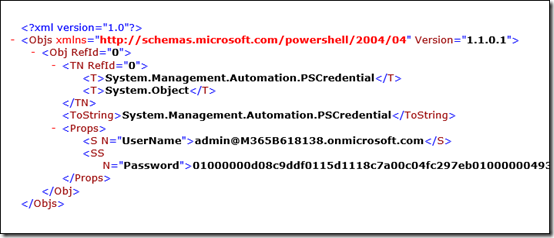
If you look at the XML file created, you can see the username as expected but you’ll notice that the password has been saved securely rather than in plain text.

It is important to note here that this file now contains the access details to the tenant. You need to ensure that the file remains secure because if someone else manages to get it they maybe able to login to the tenant! Beware!

To extract the details from the file and save them into a variable you can use in PowerShell use the following command:

$credential=import-clixml -path c:\downloads\tenant.xml

now you can connect to Office 365 services as normal using:

connect-msolservice –credential $credential

and you you won’t be prompted for the login details.

Hopefully, I’ve covered all the steps in the video above, so you can see it all in action from end to end.

Making changes to existing Site Collections

Here’s a quick summary video on how to make changes to a traditional SharePoint Site Collection. This will only work with pure SharePoint Teams Sites, not those created with Microsoft Teams and Office 365 Groups. That will become available in the new SharePoint Admin Center coming soon. Till then, this video will show you how to access the settings as well as how to interact with the most common configurations.

Introduction to Microsoft 365 Enterprise

The second family of Microsoft 365 subscriptions you can obtain are those from the Enterprise family. These give you a range of additional features and power when it comes to managing an securing your environment.

This material will give you an overview of what Microsoft 365 Enterprise is and the major differences to the Business offering.

Microsoft Cloud Update–December 2017

All the latest news on Azure and Office 365.

Microsoft

https://preview.partner.microsoft.com/en-au/community/partnersummit-highlights

https://www.yammer.com/mpn-aus/

https://techcommunity.microsoft.com/

Office 365

https://techcommunity.microsoft.com/t5/Microsoft-Teams-Blog/New-usage-reports-for-Microsoft-Teams/ba-p/132614
    
https://techcommunity.microsoft.com/t5/OneDrive-Blog/Introducing-a-new-secure-external-sharing-experience/bc-p/125925

https://blogs.technet.microsoft.com/skypehybridguy/2017/11/07/microsoft-teams-powershell-support/

https://support.office.com/en-us/article/Get-access-to-the-Office-365-Business-apps-for-Enterprise-subscriptions-5382dc07-aaa5-45c9-8767-502333b214ce

https://support.office.com/en-us/article/Customer-Key-for-Office-365-FAQ-41ae293a-bd5c-4083-acd8-e1a2b4329da6

https://techcommunity.microsoft.com/t5/SharePoint-Blog/SharePoint-mobile-notifications-keep-you-up-to-date/ba-p/128763

https://flow.microsoft.com/en-us/blog/microsoft-flow-integration-in-one-drive-for-business-and-new-connector-actions/

https://techcommunity.microsoft.com/t5/Microsoft-Teams-Blog/What-s-new-in-Microsoft-Teams-November-update/ba-p/132962

Azure

https://azure.microsoft.com/en-us/services/cost-management/

https://azure.microsoft.com/en-us/blog/announcing-general-availability-of-azure-reserved-vm-instances-ris/

https://blogs.msdn.microsoft.com/uk_faculty_connection/2017/11/07/microsoft-azure-low-priority-virtual-machines-take-advantage-of-surplus-capacity-in-azure/

https://cloudblogs.microsoft.com/enterprisemobility/2017/09/19/fewer-login-prompts-the-new-keep-me-signed-in-experience-for-azure-ad-is-in-preview/

https://azure.microsoft.com/en-us/community/events/

https://azure.microsoft.com/en-us/blog/windows-server-system-state-backup-azure-ga/

https://blogs.technet.microsoft.com/uktechnet/2017/11/07/how-to-choose-an-azure-virtual-machine/

https://azure.microsoft.com/en-au/blog/azure-advisor-got-better/