I have blogged here before about the issue around Search Server Express 2008 on SBS 2008. However it is a different story when it comes to search Server Express 2010 on SBS 2011 as I will briefly show here.
Before I launch too deep into this post I will tell you that I have created an e-Book with over 100 pages covering everything I talk out here plus a whole lot more. Here are the chapter headings;
1. Settings the SharePoint Farm Passphrase
2. Installing search Server express 2010 on SBS 2011
3. Configuring the Search Service
4. Adding a Search Site
5. Configuring PDF indexing
6. Removing Search Server Express from SBS 2011
7. Linking to Search Center
8. Using Search Center
This book will cover much more in depth that what the rest of this blog post will so if you are really serious about Search Server Express on SBS 2010 then I’d commend this US$9.99 book to you. You can purchase it at (along with other titles):
http://www.lulu.com/spotlight/ciaops
and I appreciate everyone who does purchase a copy to support what I do.
I’ll also tip my hat to Susan Bradley for providing me a test SBS 2011 Standard server to work all this out on.
Warnings
There are a few very, very important warnings that you MUST take note of before proceeding.
A. Installing Search Server Express 2010 on SBS 2011 makes SBS 2011 ‘non-standard’. This doesn’t mean it isn’t supported what it means is that the default SharePoint on SBS gets modified which has ramifications for patching, updating and troubleshooting.
B. You MUST know your SharePoint farm passphrase. On SBS 2011 this passphrase is randomly generated during installation. If you don’t know it you need to set it to something you know while SharePoint is working! See this previous blog post for more information.
C. Search Server express 2010 is going to stress you SBS 2011 box, especially when it indexes content. You can configure this but beware that large amounts of indexing really ‘pegs’ the box.
D. Make sure you can roll back any failed installation. This may mean uninstalling Search Server express 2010, which requires reconfiguring SharePoint as well as knowing the farm passphrase. I won’t be covering that here. That’s why I recommend you buy my e-book to get all the info.
These aside Search Server Express 2010 on SBS 2011 will allow you to provide a single search interface across just about all your network data. Search is really the ‘killer app’ in our information overload society. When people want to find information where do they go? To a search engine! Problem is most search engines only look outside a business but with Search Server Express 2010 you can now index and search your internal information. Who wouldn’t want that? best of all Search Server Express 2010 is free.
The ability to search SharePoint content on SBS 2011 Standard is provided by default, however it is limited to only the content contained within the Companyweb site. With the installation of Windows Search Server Express 2010 it is possible to not only search Companyweb content but also network file shares, web sites and Exchange Public folders.
One down side with installing Search Server Express 2010 over the existing installation of SharePoint on SBS 2011 standard is that it doesn’t directly integrate into the existing search functionality within Companyweb. This means that if you use standard Companyweb search (located in the top right of most pages) you will only be able to search Companyweb content even when Search Server Express 2010 is installed. To search across network file shares, web sites, Exchange Public Folder and Companyweb content you will need to use a special Search Center subsite once Search Server Express 2011 has been installed.
Microsoft Search Server 2010 Express is freely available from Microsoft and can be downloaded from:
http://www.microsoft.com/downloads/details.aspx?displaylang=en&FamilyID=cea31a4f-a8b4-4864-b520-be612becdcfa
The general recommendation is to install Search Server Express 2010 and SharePoint Foundation 2010 on a dedicated member server in a network. However, in this example we will be installing it here onto an existing SBS 2011 Standard machine.
It is very important to ensure that the existing SharePoint Foundation configuration on SBS 2011 Standard is fully patched and up to date. It is also important to remember that SharePoint Foundation updates require a manual configuration step as detailed here:
http://blogs.technet.com/b/sbs/archive/2011/05/24/you-must-manually-run-psconfig-after-installing-sharepoint-2010-patches.aspx
This means that you need to ensure that your SBS 2011 Standard SharePoint installation does not require any more updates. The easiest way is to logon to the SBS 2011 Standard console.

From the Start Menu select All Programs, then Microsoft SharePoint 2010 Products, then SharePoint 2010 Central Administration. Accept any User Account Control (UAC) that you see.
From the menu on the left of SharePoint Central Administration select Systems Settings and then Manage Servers in this farm from under the Servers heading at the top of the right side of the page.
You should now see a screen like that shown previously. If the Status column for your SBS 2011 Standard server DOES NOT show No Action Required, as it does above, then you will typically need to run the PSCONFIG command line option to complete any SharePoint Foundation upgrade. Information on completing this process is contained in the link provided above.
It also vital that you know what the passphrase for the SharePoint farm is. .
It is also vital that prior to commencing any of this work that you ensure you have a recovery process including a verified set of backups.
With all the preliminary work completed and the Search Server Express 2010 software downloaded we are ready to commence the installation.
Log onto the SBS 2011 Standard server as an administrator and right mouse click the downloaded Search Server Express 2010 file to commence the installation and select Run as administrator from the menu that appears.. The required files will firstly be extracted to the server.
Accept the User Account Control window by clicking the Continue button.
The files will then be extracted and the installation commenced.

You should now see a Start screen displayed. In this window select the option Install the prerequisites.
You should now see the welcome screen. Click Next to continue.
The server will be checked to ensure that it meets all the minimum requirements and is configured correctly.
During this process you may find that an additional number of required components are downloaded and installed on the SBS 2011 Standard server. These will be done automatically and generally a reboot will not be required but you should be aware of the possibility.
When the process is complete you may need to take further action as recommended by the tool. Click Finish to complete the process.
You will now be returned to the Start window. From here now select the option Install Search Server Express.
This will commence the installation wizard.
The first screen you will see is the software license agreement. Check the I accept the terms of this agreement box at the bottom and click the Continue button to proceed.
You’ll then be asked for a default installation location for the binary files. Accept the default location and click the Install Now button.
You should now see the Installation Progress screen as shown above and the status bar should move from left to right as the program is installed on the SBS 2011 Standard server.
Once the installation has completed you will then be prompted to run the Configuration Wizard as shown above. Simply leave the checkbox Run the SharePoint Products Configuration Wizard now checked and click the Close button.
The SharePoint Configuration Wizard should now launch as shown above. Click the Next button to continue.
You will then be prompted that the following services will be started or reset during the configuration:
– Internet Information Services
– SharePoint Administration Service
– SharePoint Timer Service
This may affect other users on the network and if so you should prepare them for interruption to their normal programs. Click the Yes button to accept this warning and continue. Then click the Next button to proceed.

Since SharePoint has already been installed on SBS 2011 Standard you will be prompted with the details of the existing configuration database like shown above.
Click Next to continue.
The configuration process will now continue. The only option available is to stop the process via the Cancel button.

You will notice during the installation process (Step 9) that the existing SharePoint farm on SBS 2011 Standard will be upgraded. As mentioned previously, this now makes the original installation of SharePoint on SBS 2011 Standard ‘non-standard’.
When the process completes you should receive a success message like shown above. Click the Close button to continue.
Internet Explorer will now be launched and you’ll be taken to the SharePoint Central Administration web site. You should then see the prompt asking whether you wish to sign up for the customer experience. Make your select and click OK.

You’ll now see the option to run the SharePoint configuration farm wizard. Here it is important to select Cancel to terminate the wizard. If you elect to run the wizard you will damage both the Search Server Express 2010 installation and the default SharePoint on SBS 2011 Standard installation requiring a reinstallation of both components. Although in most cases you use wizards on SBS 2011 Standard, with SharePoint on SBS you should NEVER run the configuration wizard.
After you cancel the SharePoint wizard you will be returned to SharePoint Central Administration as shown above.
Select Application Management from the left and then Manage service applications from under the Service Applications heading in the middle of the page.
You will now manually configure the Search Server Express Service into the existing SharePoint Farm.

Select the arrow at the bottom of the New button in the upper left side of the window and from the menu that appears (as shown above) select Search Service Application.
You will now be prompted to enter the configuration details for the new Search Service.
Leave the Service Application name as default (Search Service Application 1). Leave the Search Service Account as default (\spfarm).
Scroll down the screen for more options.
It is recommended that you create a new application pool.
It is recommended that you use a descriptive name (here SearchServicePool).
Leave the service account as default (here \spfarm).
Scroll down the page for more options.
It is recommended that you also create a new application pool for Search Query (here SearchQueryPool) and use the default service account (\spfarm).
Scroll down the page and select the Save button when complete.

You should now see the Search Service being configured as shown. This may take several minutes depending on the specifications of your hardware.
There are two phases that the configuration needs to complete. The second phase generally takes much longer than the first.
When the process is complete you should receive a success message like that shown above.
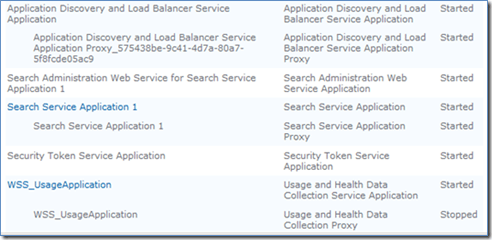
When you close that window you will be returned to the SharePoint Service Application page. Here you should see additional services listed as shown above. You will also see that the Search Service Application 1, or the name you called the Search Service name is a hyperlink. If you click this you will then be able to configure the Search Service.
If you now look at the services on the SBS 2011 Standard server you will notice an additional SharePoint Service called SharePoint Server Search 14.
To configure the Search Service simply click on the hyperlink in Central administration shown above and add the additional content sources you desire.
Finally, to actually use the Search Service create a subsite in Companyweb based on the Search template that is now available.
I will again point you to my e-book as the most comprehensive source of getting everything working.
Purchase – SharePoint Foundation Master Class: Search Server Express on SBS 2011 Standard


