Need to Know Podcast–Episode 172

Our last episode for 2017. Some reflections along with the usual news and updates from the Microsoft cloud. We take this opportunity to thank our all our sponsors and listeners for the year as well as wishing everyone a great Christmas and New Year. Marc and I will be back in 2018 to keep you up to date with all the latest in Azure and Office 365 in our own unique way. See you all in 2018!

Take a listen and let us know what you think –feedback@needtoknow.cloud

You can listen directly to this episode at

https://ciaops.podbean.com/e/episode-172-end-of-2017/

Subscribe via iTunes at:

https://itunes.apple.com/au/podcast/ciaops-need-to-know-podcasts/id406891445?mt=2

The podcast is also available on Stitcher at:

http://www.stitcher.com/podcast/ciaops/need-to-know-podcast?refid=stpr

Don’t forget to give the show a rating as well as send us any feedback or suggestions you may have for the show.

Resources

@marckean

@directorcia

Azure news from Marc

New to Office 365 in December

Whiteboard app

Flow panel in SharePoint

Microsoft 365

Introduction to Microsoft 365 Enterprise

The second family of Microsoft 365 subscriptions you can obtain are those from the Enterprise family. These give you a range of additional features and power when it comes to managing an securing your environment.

This material will give you an overview of what Microsoft 365 Enterprise is and the major differences to the Business offering.

CIAOPS Need to Know Office 365 Webinar–December 2017

laptop-eyes-technology-computer

The last Office 365 webinar for 2017, oh where has the year gone, is now scheduled. Not a lot of time this month when you take holidays into consideration but hopefully you can attend. The session will have news plus updates as well as deep dive into Microsoft Flow, which is the automation engine built right into Office 365. I’ll show you how to use Flow to start automating all those repetitive processes.

You can register for free at:

December Webinar Registrations

The details are:

CIAOPS Need to Know Webinar – December 2017
Thursday 21st of December 2017
11am – 12am Sydney Time

All sessions are recorded and posted to the CIAOPS Academy.

There of course will also be open Q and A so make sure you bring your questions for me and I’ll do my best to answer them.

The CIAOPS Need to Know Webinars are free to attend but if you want to receive the recording of the session you need to sign up as a CIAOPS patron which you can do here:

http://www.ciaopspatron.com

or purchase them individually at:

http://www.ciaopsacademy.com/

Also feel free at any stage to email me directly via director@ciaops.com with your webinar topic suggestions.

I’d also appreciate you sharing information about this webinar with anyone you feel may benefit from the session.

Microsoft Cloud Update–December 2017

All the latest news on Azure and Office 365.

Microsoft

https://preview.partner.microsoft.com/en-au/community/partnersummit-highlights

https://www.yammer.com/mpn-aus/

https://techcommunity.microsoft.com/

Office 365

https://techcommunity.microsoft.com/t5/Microsoft-Teams-Blog/New-usage-reports-for-Microsoft-Teams/ba-p/132614
    
https://techcommunity.microsoft.com/t5/OneDrive-Blog/Introducing-a-new-secure-external-sharing-experience/bc-p/125925

https://blogs.technet.microsoft.com/skypehybridguy/2017/11/07/microsoft-teams-powershell-support/

https://support.office.com/en-us/article/Get-access-to-the-Office-365-Business-apps-for-Enterprise-subscriptions-5382dc07-aaa5-45c9-8767-502333b214ce

https://support.office.com/en-us/article/Customer-Key-for-Office-365-FAQ-41ae293a-bd5c-4083-acd8-e1a2b4329da6

https://techcommunity.microsoft.com/t5/SharePoint-Blog/SharePoint-mobile-notifications-keep-you-up-to-date/ba-p/128763

https://flow.microsoft.com/en-us/blog/microsoft-flow-integration-in-one-drive-for-business-and-new-connector-actions/

https://techcommunity.microsoft.com/t5/Microsoft-Teams-Blog/What-s-new-in-Microsoft-Teams-November-update/ba-p/132962

Azure

https://azure.microsoft.com/en-us/services/cost-management/

https://azure.microsoft.com/en-us/blog/announcing-general-availability-of-azure-reserved-vm-instances-ris/

https://blogs.msdn.microsoft.com/uk_faculty_connection/2017/11/07/microsoft-azure-low-priority-virtual-machines-take-advantage-of-surplus-capacity-in-azure/

https://cloudblogs.microsoft.com/enterprisemobility/2017/09/19/fewer-login-prompts-the-new-keep-me-signed-in-experience-for-azure-ad-is-in-preview/

https://azure.microsoft.com/en-us/community/events/

https://azure.microsoft.com/en-us/blog/windows-server-system-state-backup-azure-ga/

https://blogs.technet.microsoft.com/uktechnet/2017/11/07/how-to-choose-an-azure-virtual-machine/

https://azure.microsoft.com/en-au/blog/azure-advisor-got-better/

Need to Know podcast–Episode 170

Marc and I are back to give you updates on all the latest that’s happening in the Microsoft cloud, especially around Azure and Office 365. We also do a deep dive into Azure Directory Services to give you a better idea of exactly what it is and how it can be used.

Take a listen and let us know what you think –feedback@needtoknow.cloud

You can listen directly to this episode at:

https://ciaops.podbean.com/e/episode-170-directory-services/

Subscribe via iTunes at:

https://itunes.apple.com/au/podcast/ciaops-need-to-know-podcasts/id406891445?mt=2

The podcast is also available on Stitcher at:

http://www.stitcher.com/podcast/ciaops/need-to-know-podcast?refid=stpr

Don’t forget to give the show a rating as well as send us any feedback or suggestions you may have for the show.

Resources

@marckean

@directorcia

Azure news from Marc

Business apps in Enterprise SKUs

New usage reports for Teams

Customer key for Office 365 FAQs

SharePoint mobile notifications

New in November for Office 365

Azure cost management

Microsoft 365 Android configuration mappings

The great thing about Microsoft 365 Business is that it gives you control over the devices that are connected to your Office 365 environment. Many of these will be running Windows 10, which I have covered in previous posts:

Microsoft 365 Windows 10 device configuration mappings

and

Microsoft 365 Application management for Windows 10 mappings

These days, of course, there are additional, non-Microsoft devices, that also need to be connected to Office 365. One of these is Android. What I’m going to cover here is the Application Management for Android in Microsoft 365 Business.
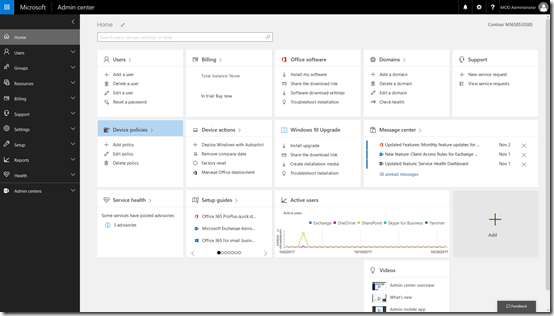
image

Start by navigating to the Admin center in your Microsoft 365 Business tenant.
image

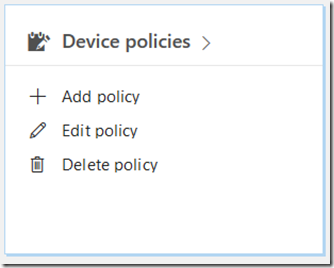
Locate the Device policies tile and select it.

image

You may see a number of policies but one should be named Application Management for Android. Select this.

image

image

image

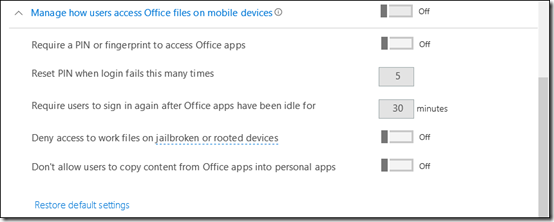
If the policy doesn’t exist you can create a new one. When you do you will see the above settings.

If you expand the display for each option you should see a list of all the options and their status as shown above.

The question now is, how do these map to settings in Intune under the covers?

To view the settings in Intune you’ll need to login to the Azure portal for that tenant and then navigate to the Intune option. Remember, you get access to an Azure management portal when you sign up for Office 365 free. I covered off how you can access it here:

Enabling your Office 365 Azure AD access
image

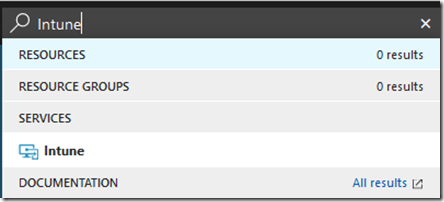
The easiest way to find the Intune settings is to do a search in the top right and then select Intune from the results.
image

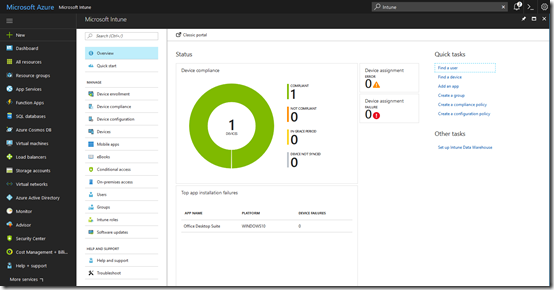
You should see the Intune console displayed as shown above.
image

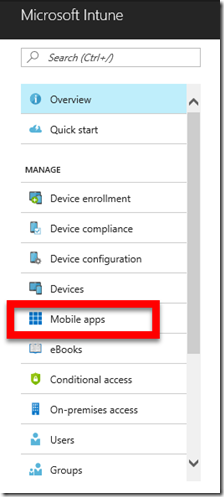
From the menu, under the Manage section, select Mobile apps

image

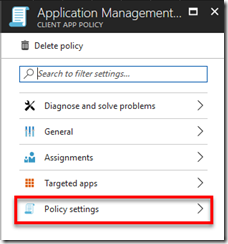
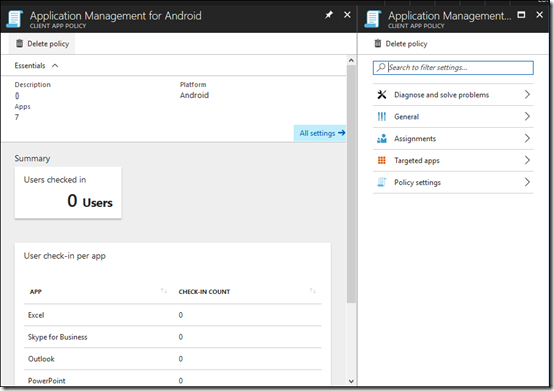
From here select the App protection policies option under the Manage section. This should display a policy on the right that matches the one you have in the Microsoft 365 Business console (here Application Management for Android). Select the policy name to continue.
image

The first setting in the policy in Microsoft 365 Business under the heading Protect work files when devices are lost or stolen is:

image

In Intune select Policy Settings

image

Here you will find:

image

The next option in the Microsoft 365 Business policy for Android is:

image

In the same policy area in Intune this maps to the setting:
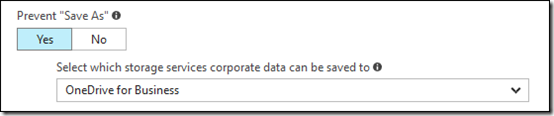
image

Next in Microsoft 365 Business is:

image

which maps to, also in Policy settings in Intune:

image

In Microsoft 365 Business, under the heading – Manage how users access Office files on mobile devices is:

image

This can be found once again in the Policy settings area of Intune and the options are:

image

Next is:

image

which maps to:

image

Next in the Microsoft 365 Business policy is:

image

which again can be found in the Policy Settings area:

image

Finally, in this section for Microsoft 365 Business is:

image

which corresponds to:

image

The managed apps are basically those at the bottom of the policy in Microsoft 365 Business, typically apps like Excel, Outlook, Word, etc.

image

If you go out of Policy settings in Intune you should see:
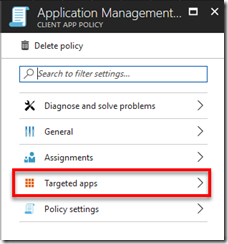
image

Select Targeted apps.

image

image

Here you will see the same list of apps that you find in Microsoft 365 Business.

Remember, this policy is for Android devices and there is one for Windows 10 and iOS as well. Also remember that you can’t go and make changes to the in Intune, I have just shown you the mappings here. if you want to change the policy for any of your devices it needs to be done in Microsoft 365 Business.

You can of course delete the existing policy in Microsoft 365 Business or create different device policies and apply them to different security groups in your environment. Thus, you can have separate policies for floor staff and management if desired.

Microsoft 365 Business makes it easy to manage your devices by putting the policies right in the Office 365 Admin console. These map to policies in Intune under the covers but are only designed to be set inside the Microsoft 365 Business Admin console.

Scratch your own itch

pexels-photo-145985

The length and breadth of cloud services like Azure and Office 365 continue to grow. This size can be very intimidating for those starting their journey with these tools. A very common question I get is, “where do I start?”.

Many people’s first attempt at learning these technologies is simply too general. Just wanting to “learn Office 365” for example has too many entry points. I would suggest that your best option is to bring a specific project or need to your learning process.

For me, this was the need to create a process for migrating SharePoint on premises to Office 365 which I detailed here:

I finally get Microsoft Azure

I’ve seen others do things like move their accounting system into Azure or a third party service running on Windows or Linux. What about using Microsoft Flow to automate a manual process in your business? Even if the project you want to tackle has nothing to actually do with something in your business, bringing a very specific challenge to cloud services that you need to solve will accelerate your learning.

Of course, this learning process is going to result in many failures and frustrations. I can’t tell you the number of times that I’ve had to redo something because I ‘stuffed up’ or the amount of time I have invested in solving something that in fact, turned out to have a very simple resolution. All of that is simply part of the learning process and something you’ll need to accept will happen.

As they say, in the process of learning there is never really any failures. It is all simply knowledge accumulation and if nothing else it shows you want not to do next time. Once you embrace this, wrong steps remain frustrating but actually give you a renewed energy to find the right solution.

However, it is too easy to become dishearten if you don’t have a specific goal you want to achieve. Having no or ill defined goals doesn’t provide the focus when you want to give up as it gets ‘tough’ in my experience. So, from the start, set out to solve something specific and I thing you’ll be pleasantly surprised by the result.

Deploying Microsoft 365

Here’s an overview of the administration options that are available for you in Microsoft 365 Business.

You’ll see how to add Microsoft 365 Business licenses as well as what each contains. You learn about the device and application policies that you can configure in Microsoft 365 Business as well as see the back end deployment inside Azure.

If you need to manage Microsoft 365 Business or are wonder how it all works in the back end then take a look at this tutorial.