Unlocking the Power of Microsoft Loop: Overcoming Limitations with External Users

Video URL = https://www.youtube.com/watch?v=YQym9vUc684

Hey everyone! In this video, I dive deep into the world of Microsoft Loop and explore its capabilities within Microsoft Teams. I’ll show you how to seamlessly integrate Loop components into your workflow and highlight some of the challenges faced when working with external Azure B2B users. You’ll learn practical tips on how to navigate these limitations and ensure your team can access and collaborate effectively. Whether you’re a creator or an external user, this video will provide valuable insights to enhance your Microsoft Loop experience. Don’t miss out on these essential strategies to optimize your team’s productivity!

February Microsoft 365 Webinar resources

image

The slides from this month’s webinar are available at:

https://github.com/directorcia/general/blob/master/Presentations/Need%20to%20Know%20Webinars/202502.pdf

If you are not a CIAOPS patron you want to view or download a full copy of the video from the session you can do so here:

http://www.ciaopsacademy.com.au/p/need-to-know-webinars

Watch out for next month’s webinar.

CIAOPS Need to Know Microsoft 365 Webinar – February

laptop-eyes-technology-computer_thumb

Join me for the free monthly CIAOPS Need to Know webinar. Along with all the Microsoft Cloud news we’ll be taking a look at Loop in Microsoft 365 once again.

Shortly after registering you should receive an automated email from Microsoft Teams confirming your registration, including all the event details as well as a calendar invite.

You can register for the regular monthly webinar here:

February Webinar Registrations

(If you are having issues with the above link copy and paste – https://bit.ly/n2k2502)

The details are:

CIAOPS Need to Know Webinar – February 2025
Friday 21st of February 2025
11.00am – 12.00am Sydney Time

All sessions are recorded and posted to the CIAOPS Academy.

The CIAOPS Need to Know Webinars are free to attend but if you want to receive the recording of the session you need to sign up as a CIAOPS patron which you can do here:

http://www.ciaopspatron.com

or purchase them individually at:

http://www.ciaopsacademy.com/

Also feel free at any stage to email me directly via director@ciaops.com with your webinar topic suggestions.

I’d also appreciate you sharing information about this webinar with anyone you feel may benefit from the session and I look forward to seeing you there.

Copilot pages missing

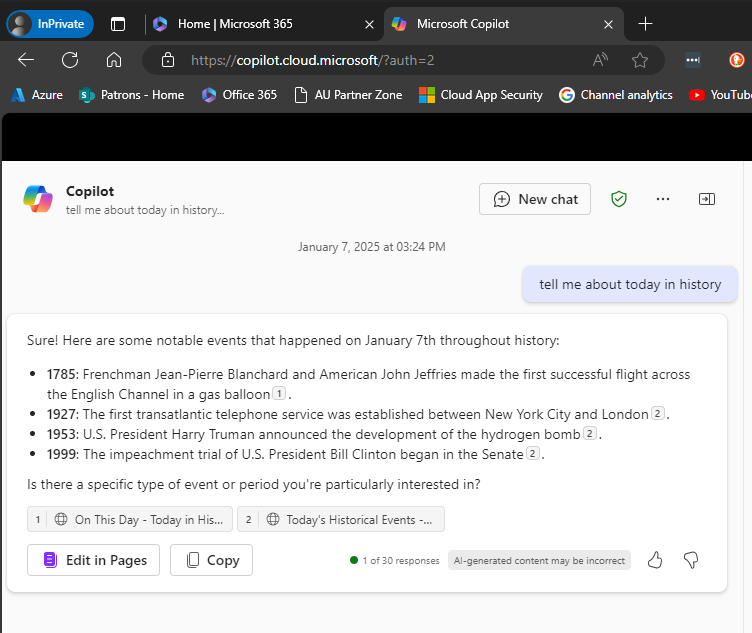
Recently, I discovered that Copilot pages were not appearing in Edge inprivate.

image

You can see the example above: Edge, inprivate and no Copilot pages.

image

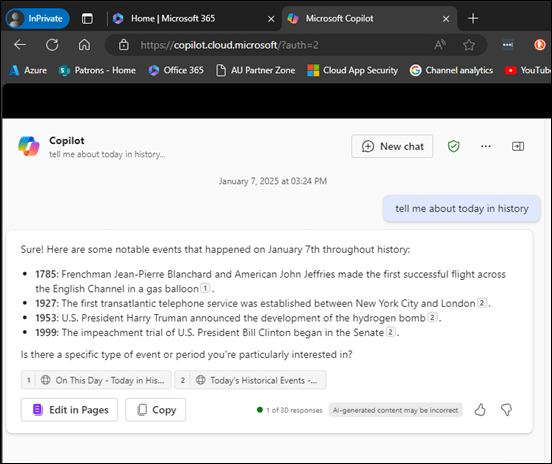
It seems that a control in the Microsoft 365 administration portal (Copilot | Settings | Pin Copilot) plays a role somehow. Initially mine was set to Do not pin Microsoft Copilot to the navigation bar.
image

However, when I changed the setting to Pin Copilot to the navigation bar (recommended) and after a browser refresh or two (or close down/reopen browser), the Edit in Pages now appears within Edge inprivate as shown above.

What I also didn’t appreciate is that if you don’t have a paid version of Copilot for Microsoft 365 and simply use the free version of Copilot with your Microsoft 365 environment you can also get access to the Edit in Pages capabilities, which I thought required a fully paid Copilot for Microsoft 365. However, that doesn’t appear to be the case as the above screen shot came from a tenant with no paid Copilot for Microsoft 365 and the Edit in Pages is available, PROVIDED it seems, you turn on the pin Copilot option!

Of course, I can’t find this documented anywhere and only stumbled across it playing around. I have found the Edit in Pages button appearance to be somewhat unreliable when it did appear, but I have been turning the setting on and off to test, which have contributed to that unreliability.

After all this testing, my advice would be, based on the tests I’ve run, that even if you don’t have a pad version of Copilot for Microsoft 365 in your environment you want the option to Pin Copilot to the navigation bar enabled as I detailed above. That should allow the Edit in Pages to always appear regardless of a paid version of Copilot being in the tenant or not and regardless of browser or browser session you use.

Another observation is that with the pinned option set, the free version of Copilot returns more information as you can see when you compare the screen shots. With the pinned option enabled you get citations and hyperlinsk to the citation. Interesting.

It would be nice to know for sure if this setting does what I have found but for now you’ll have to take my word for it based on what I have found in my testing.

CIAOPS Need to Know Microsoft 365 Webinar – November

laptop-eyes-technology-computer_thumb

Join me for the free monthly CIAOPS Need to Know webinar. Along with all the Microsoft Cloud news we’ll be taking a look at Microsoft Loop.

Shortly after registering you should receive an automated email from Microsoft Teams confirming your registration, including all the event details as well as a calendar invite.

You can register for the regular monthly webinar here:

November Webinar Registrations

(If you are having issues with the above link copy and paste – https://bit.ly/n2k2411

The details are:

CIAOPS Need to Know Webinar – November 2024
Friday 29th of November 2024
11.00am – 12.00am Sydney Time

All sessions are recorded and posted to the CIAOPS Academy.

The CIAOPS Need to Know Webinars are free to attend but if you want to receive the recording of the session you need to sign up as a CIAOPS patron which you can do here:

http://www.ciaopspatron.com

or purchase them individually at:

http://www.ciaopsacademy.com/

Also feel free at any stage to email me directly via director@ciaops.com with your webinar topic suggestions.

I’d also appreciate you sharing information about this webinar with anyone you feel may benefit from the session and I look forward to seeing you there.