Empower attendees to design, build, and deploy intelligent chat agents using Copilot Studio’s Agent Builder, with a focus on real-world automation, integration, and user experience
What you’ll learn
Understand the architecture and capabilities of Copilot Chat Agents
Build and customise agents using triggers, topics, and actions
Deploy agents across Teams, websites, and other channels
Monitor performance and continuously improve user experience
Apply governance and security best practices for enterprise-grade bots
Who should attend?
This session is perfect for:
IT administrators and support staff
Business owners
People looking to get more done with Microsoft 365
Anyone looking to automate their daily grind
Save the Date
Date: Friday the 29th of August
Time: 9:30 AM Sydney AU time
Location: Online (link will be provided upon registration)
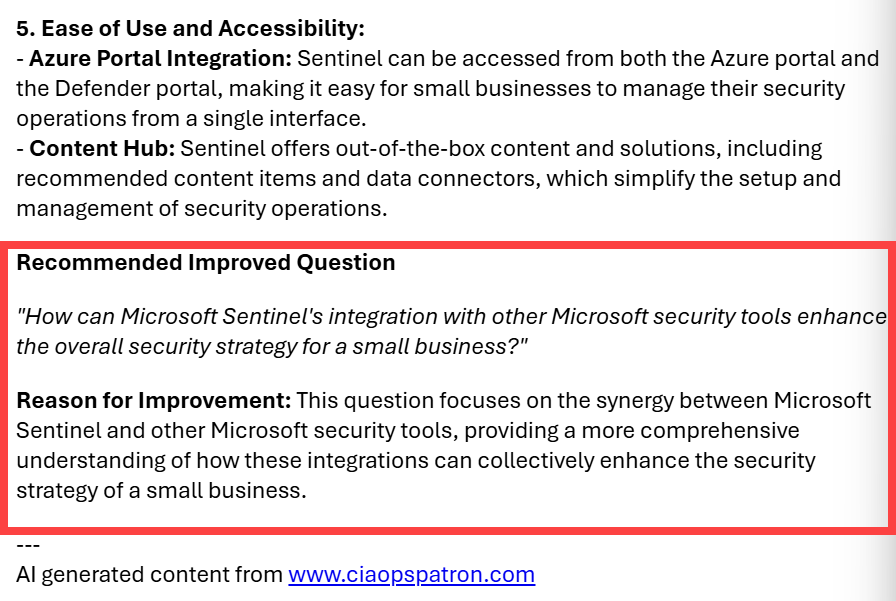
I continue to work on my autonomous email agent created with Copilot Studio. a recent addition is that now you might get a response that includes something like this at the end of the information returned:
It is a suggestion for an improved prompt to generate better answers based on the original question.
The reason I created this was I noticed many submissions were not writing ‘good’ prompts. In fact, most submissions seem better suited to search engines than for AI. The easy solution was to get Copilot to suggest how to ask better questions.
In today’s digital workspace, AI-powered assistants like Microsoft 365 Copilot and traditional search engines serve different purposes and excel in different scenarios. This guide explains why you should not treat an AI tool such as Copilot as a general web search engine, and details when to use AI over a normal search process. We also provide example Copilot prompts that outperform typical search queries in answering common questions.
Understanding AI Tools (Copilot) vs. Traditional Search Engines
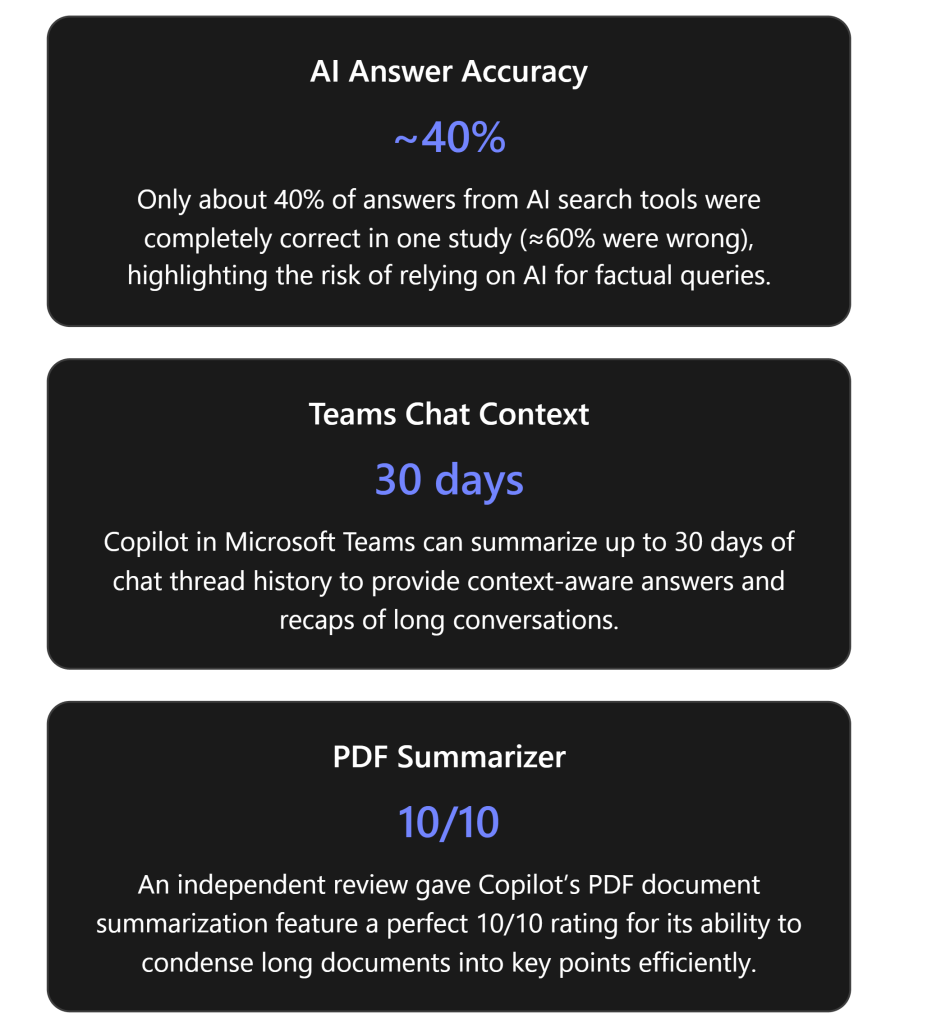
AI tools like Microsoft 365 Copilot are conversational, context-aware assistants, whereas search engines are designed for broad information retrieval. Copilot is an AI-powered tool that helps with work tasks, generating responses in real-time using both internet content and your work content (emails, documents, etc.) that you have permission to access[1]. It is embedded within Microsoft 365 apps (Word, Excel, Outlook, Teams, etc.), enabling it to produce outputs relevant to what you’re working on. For example, Copilot can draft a document in Word, suggest formulas in Excel, summarize an email thread in Outlook, or recap a meeting in Teams, all by understanding the context in those applications[1]. It uses large language models (like GPT-4) combined with Microsoft Graph (your organizational data) to provide personalized assistance[1].
On the other hand, a search engine (like Google or Bing) is a software system specifically designed to search the World Wide Web for information based on keywords in a query[2]. A search engine crawls and indexes billions of web pages and, when you ask a question, it returns a list of relevant documents or links ranked by algorithms. The search engine’s goal is to help you find relevant information sources – you then read or navigate those sources to get your answer.
Key differences in how they operate:
Result Format: A traditional search engine provides you with a list of website links, snippets, or media results. You must click through to those sources to synthesize an answer. In contrast, Copilot provides a direct answer or content output (e.g. a summary, draft, or insight), often in a conversational format, without requiring you to manually open multiple documents. It can combine information from multiple sources (including your files and the web) into a single cohesive response on the spot[3].
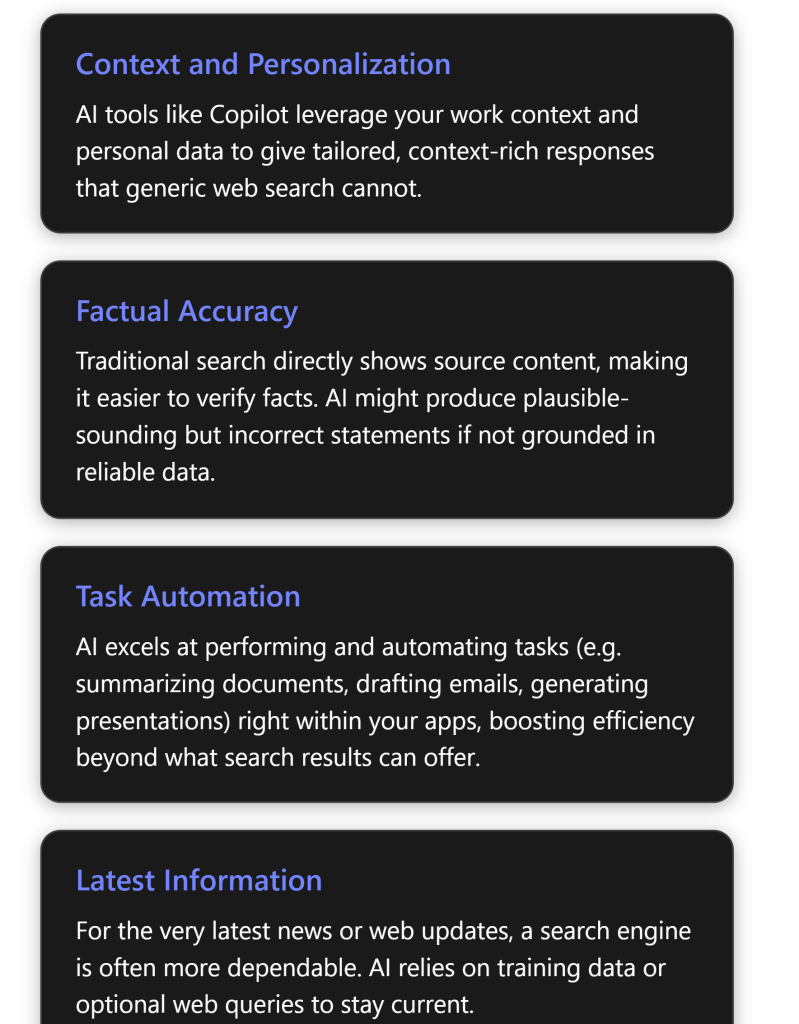
Context and Personalization: Search engines can use your location or past behavior for minor personalization, but largely they respond the same way to anyone asking a given query. Copilot, however, is deeply personalized to your work context – it can pull data from your emails, documents, meetings, and chats via Microsoft Graph to tailor its responses[1]. For example, if you ask “Who is my manager and what is our latest project update?”, Copilot can look up your manager’s name from your Office 365 profile and retrieve the latest project info from your internal files or emails, giving a personalized answer. A public search engine would not know these personal details.
Understanding of Complex Language: Both modern search engines and AI assistants handle natural language, but Copilot (AI) can engage in a dialogue. You can ask Copilot follow-up questions or make iterative requests in a conversation, refining what you need, which is not how one interacts with a search engine. Copilot can remember context from earlier in the conversation for additional queries, as long as you stay in the same chat session or document, enabling complex multi-step interactions (e.g., first “Summarize this report,” then “Now draft an email to the team with those key points.”). A search engine treats each query independently and doesn’t carry over context from previous searches.
Learning and Adaptability:AI tools can adapt outputs based on user feedback or organization-specific training. Copilot uses advanced AI (LLMs) which can be “prompted” to adjust style or content. For instance, you can tell Copilot “rewrite this in a formal tone” or “exclude budget figures in the summary”, and it will attempt to comply. Traditional search has no such direct adaptability in generating content; it can only show different results if you refine your keywords.
Output Use Cases: Perhaps the biggest difference is in what you use them for: Copilot is aimed at productivity tasks and analysis within your workflow, while search is aimed at information lookup. If you need to compose, create, or transform content, an AI assistant shines. If you need to find where information resides on the web, a search engine is the go-to tool. The next sections will dive deeper into these distinctions, especially why Copilot is not a straight replacement for a search engine.
Limitations of Using Copilot as a Search Engine
While Copilot is powerful, you should not use it as a one-to-one substitute for a search engine. There are several reasons and limitations that explain why:
Accuracy and “Hallucinations”: AI tools sometimes generate incorrect information very confidently – a phenomenon often called hallucination. They do not simply fetch verified facts; instead, they predict answers based on patterns in training data. A recent study found that generative AI search tools were inaccurate about 60% of the time when answering factual queries, often presenting wrong information with great confidence[4]. In that evaluation, Microsoft’s Copilot (in a web search context) was about 70% completely inaccurate in responding to certain news queries[4]. In contrast, a normal search engine would have just pointed to the actual news articles. This highlights that Copilot may give an answer that sounds correct but isn’t, especially on topics outside your work context or beyond its training. Using Copilot as a general fact-finder can thus be risky without verification.
Lack of Source Transparency: When you search the web, you get a list of sources and can evaluate the credibility of each (e.g., you see it’s from an official website, a recent date, etc.). With Copilot, the answer comes fused together, and although Copilot does provide citations in certain interfaces (for instance, Copilot in Teams chat will show citations for the sources it used[1]), it’s not the same as scanning multiple different sources yourself. If you rely on Copilot alone, you might miss the nuance and multi-perspective insight that multiple search results would offer. In short, Copilot might tell you “According to the data, Project Alpha increased sales by 5%”, whereas a search engine would show you the report or news release so you can verify that 5% figure in context. Over-reliance on AI’s one-shot answer could be misleading if the answer is incomplete or taken out of context.
Real-Time Information and Knowledge Cutoff:Search engines are constantly updated – they crawl news sites, blogs, and the entire web continuously, meaning if something happened minutes ago, a search engine will likely surface it. Copilot’s AI model has a knowledge cutoff (it doesn’t automatically know information published after a certain point unless it performs a live web search on-demand). Microsoft 365 Copilot can fetch information from Bing when needed, but this is an optional feature under admin control[3][3], and Copilot has to decide to invoke it. If web search is disabled or if Copilot doesn’t recognize that it should look online, it will answer from its existing knowledge base and your internal data alone. Thus, for breaking news or very recent events, Copilot might give outdated info or no info at all, whereas a web search would be the appropriate tool. Even with web search enabled, Copilot generates a query behind the scenes and might not capture the exact detail you want, whereas you could manually refine a search engine query. In summary, Copilot is not as naturally in tune with the latest information as a dedicated search engine[5].
Breadth of Information:Copilot is bounded by what it has been trained on and what data you provide to it. It is excellent on enterprise data you have access to and general knowledge up to its training date, but it is not guaranteed to know about every obscure topic on the internet. A search engine indexes virtually the entire public web; if you need something outside of Copilot’s domain (say, a niche academic paper or a specific product review), a traditional search is more likely to find it. If you ask Copilot an off-topic question unrelated to your work or its training, it might struggle or give a generic answer. It’s not an open portal to all human knowledge in the way Google is.
Multiple Perspectives and Depth: Some research questions or decisions benefit from seeing diverse sources. For example, before making a decision you might want to read several opinions or analyses. Copilot will tend to produce a single synthesized answer or narrative. If you only use that, you could miss out on alternative viewpoints or conflicting data that a search could reveal. Search engines excel at exploratory research – scanning results can give you a quick sense of consensus or disagreement on a topic, something an AI’s singular answer won’t provide.
Interaction Style: Using Copilot is a conversation, which is powerful but can also be a limitation when you just need a quick fact with zero ambiguity. Sometimes, you might know exactly what you’re looking for (“ISO standard number for PDF/A format”, for instance). Typing that into a search engine will instantly yield the precise fact. Asking Copilot might result in a verbose answer or an attempt to be helpful beyond what you need. For quick, factoid-style queries (dates, definitions, simple facts), a search engine or a structured Q\&A database might be faster and cleaner.
Cost and Access: While not a technical limitation, it’s worth noting that Copilot (and similar AI services) often comes with licensing costs or usage limits[6]. Microsoft 365 Copilot is a premium feature for businesses or certain Microsoft 365 plans. Conducting a large number of general searches through Copilot could be inefficient cost-wise if a free search engine could do the job. In some consumer scenarios, Copilot access might even be limited (for example, personal Microsoft accounts have a capped number of Copilot uses per month without an upgrade[6]). So, from a practical standpoint, you wouldn’t want to spend your limited Copilot queries on trivial lookups that Bing or Google could handle at no cost.
Ethical and Compliance Factors: Copilot is designed to respect organizational data boundaries – it won’t show you content from your company that you don’t have permission to access[1]. On the flip side, if you try to use it like a search engine to dig up information you shouldn’t access, it won’t bypass security (which is a good thing). A search engine might find publicly available info on a topic, but Copilot won’t violate privacy or compliance settings to fetch data. Also, in an enterprise, all Copilot interactions are auditable by admins for security[3]. This means your queries are logged internally. If you were using Copilot to search the web for personal reasons, that might be visible to your organization’s IT – another reason to use a personal device or external search for non-work-related queries.
Bottom line:Generative AI tools like Copilot are not primarily fact-finding tools – they are assistants for generating and manipulating content. Use them for what they’re good at (as we’ll detail next), and use traditional search when you need authoritative information discovery, multiple source verification, or the latest updates. If you do use Copilot to get information, be prepared to double-check important facts against a reliable source.
When to Use AI Tools (Copilot) vs. When to Use Search Engines
Given the differences and limitations above, there are distinct scenarios where using an AI assistant like Copilot is advantageous, and others where a traditional search is better. Below are detailed reasons and examples for each, to guide you on which tool to use for a given need:
Scenarios Where Copilot (AI) Excels:
Synthesizing Information and Summarization: When you have a large amount of information and need a concise summary or insight, Copilot shines. For instance, if you have a lengthy internal report or a 100-thread email conversation, Copilot can instantly generate a summary of key points or decisions. This saves you from manually reading through tons of text. One of Copilot’s standout uses is summarizing content; reviewers noted the ability to condense long PDFs into bulleted highlights as “indispensable, offering a significant boost in productivity”[7]. A search engine can’t summarize your private documents – that’s a job for AI.
Using Internal and Contextual Data:If your question involves data that is internal to your organization or personal workflow, use Copilot. No search engine can index your company’s SharePoint files or your Outlook inbox (those are private). Copilot, however, can pull from these sources (with proper permissions) to answer questions. For example, *“What decision did
In this video, I walk you through my step-by-step process for creating a powerful, no-cost Microsoft 365 Copilot chat agent that searches my blog and delivers instant, well-formatted answers to technical questions. Watch as I demonstrate how to set up the agent, configure it to use your own public website as a knowledge source, and leverage AI to boost productivity—no extra licenses required! Whether you want to streamline your workflow, help your team access information faster, or just see what’s possible with Microsoft 365’s built-in AI, this guide will show you how to get started and make the most of your content. if you want a copy of the ‘How to’ document for this video then use this link – https://forms.office.com/r/fqJXdCPAtU
Here’s a detailed breakdown to help you decide when to use Microsoft 365 Copilot (standard) versus a dedicated agent like Researcher or Analyst, especially for SMB (Small and Medium Business) customers. This guidance is based on internal documentation, email discussions, and Microsoft’s public announcements.
Uses Microsoft Graph to access your tenant’s data securely.
Best for lightweight tasks and real-time assistance
Researcher Agent
Designed for deep, multi-step reasoning.
Gathers and synthesizes information from emails, files, meetings, chats, and the web.
Produces structured, evidence-backed reports with citations.
Ideal for market research, competitive analysis, go-to-market strategies, and client briefings.
Analyst Agent
Thinks like a data scientist.
Uses chain-of-thought reasoning and can run Python code.
Ideal for data-heavy tasks: forecasting, customer segmentation, financial modeling.
Can analyze data across multiple spreadsheets and visualize insights.
SMB-Specific Considerations
Licensing: SMBs using Microsoft 365 Business Premium can access Copilot, but Researcher and Analyst require Copilot licenses and are part of the Frontier program.
Security: Business Premium includes tools like eDiscovery, audit logging, and data loss prevention to monitor Copilot usage and protect sensitive data.
Deployment: SMBs should ensure foundational productivity setup, data structuring, and AI readiness before deploying advanced agents.
Simple Guidance for SMBs
Start with M365 Copilot Chat for daily tasks, onboarding, and quick answers.
Use Researcher when you need a comprehensive answer that spans multiple data sources and includes citations.
Use Analyst when you need to analyze or visualize data, especially for strategic planning or reporting.
To deploy Microsoft 365 Copilot, including the Researcher and Analyst agents, in small and medium-sized businesses (SMBs), you’ll need to follow a structured approach that balances licensing, governance, security, and user enablement. Here’s a detailed breakdown based on internal documentation, email guidance, and Microsoft’s official resources.
Deployment Overview for SMBs
1. Licensing Requirements
To use Microsoft 365 Copilot and its advanced agents:
Base License: Users must have one of the following:
Microsoft 365 Business Premium
Microsoft 365 E3 or E5
Office 365 E3 or E5
Copilot Add-on License: Required for access to tenant data and advanced agents like Researcher and Analyst. This license costs approximately \$360/year per user.
2. Agent Availability and Installation
Microsoft provides three deployment paths for agents:
Agent Type
Who Installs
Examples
Governance
Microsoft-installed
Microsoft
Researcher, Analyst
Admins can block globally
Admin-installed
IT Admins
Custom or partner agents
Full lifecycle control
User-installed
End users
Copilot Studio agents
Controlled by admin policy
Researcher and Analyst are pre-installed and pinned for all users with Copilot licenses.
Admins can manage visibility and access via the Copilot Control System in the Microsoft 365 Admin Center.
3. Security and Governance for SMBs
Deploying Copilot in SMBs requires attention to data access and permission hygiene:
Copilot respects existing permissions, but if users are over-permissioned, they may inadvertently access sensitive data.
Use least privilege access principles to avoid data oversharing.
Leverage Microsoft 365 Business Premium features like:
Microsoft Purview for auditing and DLP
Entra ID for Conditional Access
Defender for Business for endpoint protection
4. Agent Creation with Copilot Studio
For SMBs wanting tailored AI experiences:
Use Copilot Studio to build custom agents for HR, IT, or operations.
No-code interface allows business users to create agents without developer support.
Agents can be deployed in Teams, Outlook, or Copilot Chat for seamless access.
5. Training and Enablement
Encourage users to explore agents via the Copilot Chat web tab.
Use Copilot Academy and Microsoft’s curated learning paths to upskill staff.
Promote internal champions to guide adoption and gather feedback.
✅ Deployment Checklist for SMBs
Step
Action
1
Confirm eligible Microsoft 365 licenses
2
Purchase and assign Copilot licenses
3
Review and tighten user permissions
4
Enable or restrict agents via Copilot Control System
Overview: Microsoft 365 Copilot is an AI assistant integrated into the apps you use every day – Word, Excel, PowerPoint, Outlook, Teams, OneNote, and more – designed to boost productivity through natural-language assistance[1][2]. As a small business with Microsoft 365 Business Premium, you already have the core tools and security in place; Copilot builds on this by helping you draft content, analyze data, summarize information, and collaborate more efficiently. This roadmap provides a step-by-step guide for end users to learn and adopt Copilot, leveraging freely available, high-quality training resources and plenty of hands-on practice. It’s organized into clear stages, from initial introduction through ongoing mastery, to make your Copilot journey easy to follow.
Why Use Copilot? Key Benefits for Small Businesses
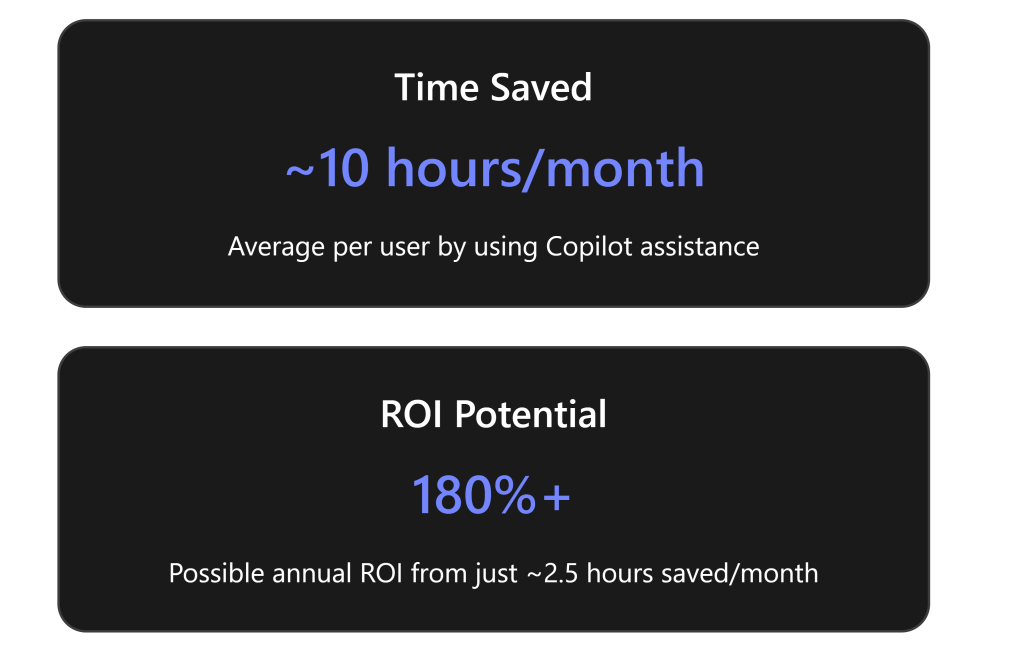
Boost Productivity and Creativity: Copilot helps you get things done faster. Routine tasks like writing a first draft or analyzing a spreadsheet can be offloaded to the AI, saving users significant time. Early trials showed an average of ~10 hours saved per month per user by using Copilot[1]. Even saving 2.5 hours a month could yield an estimated 180% return on investment at typical salary rates[1]. In practical terms, that means more time to focus on customers and growth.
Work Smarter, Not Harder: For a small team, Copilot acts like an on-demand expert available 24/7. It can surface information from across your company data silos with a simple query – no need to dig through multiple files or emails[1]. It’s great for quick research and decision support. For example, you can ask Copilot in Teams Chat to gather the latest project updates from SharePoint and recent emails, or to analyze how you spend your time (it can review your calendar via Microsoft 365 Chat and suggest where to be more efficient[1]).
Improve Content Quality and Consistency: Not a designer or wordsmith? Copilot can help create professional output. It can generate proposals, marketing posts, or slides with consistent branding and tone. For instance, you can prompt Copilot in PowerPoint to create a slide deck from a Word document outline – it will produce draft slides complete with imagery suggestions[3]. In Word, it can rewrite text to fix grammar or change the tone (e.g., make a message more friendly or more formal).
Real-World Example – Joos Ltd:Joos, a UK-based startup with ~45 employees, used Copilot to “work big while staying small.” They don’t have a dedicated marketing department, so everyone pitches in on creating sales materials. Copilot in PowerPoint now helps them generate branded sales decks quickly, with the team using AI to auto-edit and rephrase content for each target audience[3][3]. Copilot also links to their SharePoint, making it easier to draft press releases and social posts by pulling in existing company info[3]. Another challenge for Joos was coordinating across time zones – team members were 13 hours apart and spent time taking meeting notes for absent colleagues. Now Copilot in Teams automatically generates meeting summaries and action items, and even translates them for their team in China, eliminating manual note-taking and translation delays[3][3]. The result? The Joos team saved time on routine tasks and could focus more on expanding into new markets, using Copilot to research industry-specific pain points and craft tailored pitches for new customers[3][3].
Enhance Collaboration: Copilot makes collaboration easier by handling the busywork. It can summarize long email threads or Teams channel conversations, so everyone gets the gist without wading through hundreds of messages. In meetings, Copilot can act as an intelligent notetaker – after a Teams meeting, you can ask it for a summary of key points and action items, which it produces in seconds[3]. This ensures all team members (even those who missed the meeting) stay informed. Joos’s team noted that having Copilot’s meeting recaps “changed the way we structure our meetings” – they review the AI-generated notes to spot off-topic tangents and keep meetings more efficient[3].
Maintain Security and Compliance: As a Business Premium customer, you benefit from enterprise-grade security (like data loss prevention, MFA, Defender for Office 365). Copilot inherits these protections[2]. It won’t expose data you don’t have access to, and its outputs are bounded by your organization’s privacy settings. Small businesses often worry about sensitive data – Copilot can actually help by quickly finding if sensitive info is in the wrong place (since it can search your content with your permissions). Administrators should still ensure proper data access policies (Copilot’s powerful search means any overly broad permissions could let a user discover files they technically have access to but weren’t aware of[4]). In short, Copilot follows the “trust but verify” approach: it trusts your existing security configuration and won’t leak data outside it[2].
Roadmap Stages at a Glance
Below is an outline of the stages you’ll progress through to become proficient with Microsoft 365 Copilot. Each stage includes specific learning goals, recommended free resources (articles, courses, videos), and hands-on exercises.
Each stage is described in detail below with recommended resources and action steps. Let’s dive into Stage 1!
Stage 1: Introduction & Setup
Goal: Build a basic understanding of Microsoft 365 Copilot and prepare your account/applications for using it.
Understand What Copilot Is: Start with a high-level overview. A great first stop is Microsoft’s own introduction:
Microsoft Learn – “Introduction to Microsoft 365 Copilot” (learning module, ~27 min) – This beginner-friendly module explains Copilot’s functionality and Microsoft’s approach to responsible AI[5]. It’s part of a broader “Get started with Microsoft 365 Copilot” learning path[5]. No prior AI knowledge needed.
Microsoft 365 Copilot Overview Video – Microsoft’s official YouTube playlist “Microsoft 365 Copilot” has short videos (1-5 min each) showcasing how Copilot works in different apps. For example, see how Copilot can budget for an event in Excel or summarize emails in Outlook. These visuals help you grasp Copilot’s capabilities quickly.
Check Licensing & Access: Ensure you actually have Copilot available in your Microsoft 365 environment. Copilot is a paid add-on service for Business Premium (not included by default)[1][1].
How to verify: Ask your IT admin or check in your Office apps – if Copilot is enabled, you’ll see the Copilot icon or a prompt (for instance, a Copilot sidebar in Word or an “Ask Copilot” box in Teams Chat). If your small business hasn’t purchased Copilot yet, you might consider a trial. (Note: As of early 2024, Microsoft removed the 300-seat minimum – even a company with 1 Business Premium user can add Copilot now[1][1].)
If you’re an admin, Microsoft’s documentation provides a Copilot setup guide in the Microsoft 365 Admin Center[6]. (Admins can follow a step-by-step checklist to enable Copilot for users, found in the Copilot Success Kit for SMB.) For end users, assuming your admin has enabled it, there’s no special install – just ensure your Office apps are updated to the latest version.
First Look – Try a Simple Command: Once Copilot is enabled, try it out! A good first hands-on step is to use Copilot in one of the Office apps:
Word: Open Word and look for the Copilot () icon or pane. Try asking it to “Brainstorm a description for our company’s services” or “Outline a one-page marketing flyer for [your product]”. Copilot will generate ideas or an outline. This lets you see how you can prompt it in natural language.
Outlook: If you have any lengthy email thread, try selecting it and asking Copilot “Summarize this conversation”. Watch as it produces a concise summary of who said what and any decisions or questions noted. It might even suggest possible responses.
Teams (Business Chat): In Teams, open the Copilot chat (often labeled “Ask Copilot” or similar). A simple prompt could be: “What did I commit to in meetings this week?” Copilot can scan your calendar and chats to list action items you promised[1]. This is a powerful demo of how it pulls together info across Outlook (calendar), Teams (meetings), and so on.
Don’t worry if the output isn’t perfect – we’ll refine skills later. The key in Stage 1 is to get comfortable invoking Copilot and seeing its potential.
Leverage Introductory Resources: A few other freely available resources for introduction:
Microsoft Support “Get started with Copilot” guide – an online help article that shows how to access Copilot in each app, with screenshots.
Third-Party Blogs/Overviews: For an outside perspective, check out “Copilot for Microsoft 365: Everything your business needs to know” by Afinite (IT consultancy)[1][1]. It provides a concise summary of what Copilot does and licensing info (reinforcing that Business Premium users can benefit from it) with a business-oriented lens.
Community Buzz: Browse the Microsoft Tech Community Copilot for SMB forum, where small business users and Microsoft experts discuss Copilot. Seeing questions and answers there can clarify common points of confusion. (For example, many SMB users asked about how Copilot uses their data – Microsoft reps have answered that it’s all within your tenant, not used to train public models, etc., echoing the privacy assurances.)
✅ Stage 1 Outcomes: By the end of Stage 1, you should be familiar with the concept of Copilot and have successfully invoked it at least once in a Microsoft 365 app. You’ve tapped into key resources (both official and third-party) that set the stage for deeper learning. Importantly, you’ve confirmed you have access to the tool in your Business Premium setup.
Stage 2: Learning Copilot Basics in Core Apps ️♀️
Goal: Develop fundamental skills by using Copilot within the most common Microsoft 365 applications. In this stage, you will learn by doing – following tutorials and then practicing simple tasks in Word, Excel, PowerPoint, Outlook, and Teams. We’ll pair each app with freely available training resources and a recommended hands-on exercise.
Recommended Training Resource: Microsoft has created an excellent learning path called “Draft, analyze, and present with Microsoft 365 Copilot”[7]. It’s geared toward business users and covers Copilot usage in PowerPoint, Word, Excel, Teams, and Outlook. This on-demand course (on Microsoft Learn) shows common prompt patterns in each app and even introduces Copilot’s unified Business Chat. We highly suggest progressing through this course in Stage 2 – it’s free and modular, so you can do it at your own pace. Below, we’ll highlight key points for each application along with additional third-party tips:
Copilot in Word – “Your AI Writing Assistant”:
What you’ll learn: How to have Copilot draft content, insert summaries, and rewrite text in Word.
Training Highlights: The Microsoft Learn path demonstrates using prompts like “Draft a two-paragraph introduction about [topic]” or “Improve the clarity of this section” in Word[7]. You’ll see how Copilot can generate text and even adjust tone or length on command.
Hands-on Exercise: Open a new or existing Word document about a work topic you’re familiar with (e.g., a product description, an internal policy, or a client proposal). Use Copilot to generate a summary of the content or ask it to create a first draft of a new section. For example, if you have bullet points for a company About Us page, ask Copilot to turn them into a narrative paragraph. Observe the output and edit as needed. This will teach you how to iteratively refine Copilot’s output – a key skill is providing additional instructions if the initial draft isn’t exactly right (e.g., “make it more upbeat” or “add a call-to-action at the end”).
Copilot in Excel – “Your Data Analyst”:
What you’ll learn: Using Copilot to analyze data, create formulas, and generate visualizations in Excel.
Training Highlights: The Learn content shows examples of asking Copilot questions about your data (like “What are the top 5 products by sales this quarter?”) and even generating formulas or PivotTables with natural language. It also covers the new Analyst Copilot capabilities – for instance, Copilot can explain what a complex formula does or highlight anomalies in a dataset.
Hands-on Exercise: Take a sample dataset (could be a simple Excel sheet with sales figures, project hours, or any numbers you have). Try queries such as “Summarize the trends in this data” or “Create a chart comparing Q1 and Q2 totals”. Let Copilot produce a chart or summary. If you don’t have your own data handy, you can use an example from Microsoft (e.g., an Excel template with sample data) and practice there. The goal is to get comfortable asking Excel Copilot questions in plain English instead of manually crunching numbers.
Copilot in PowerPoint – “Your Presentation Designer”:
What you’ll learn: Generating slides, speaker notes, and design ideas using Copilot in PowerPoint.
Training Highlights: The training path walks through turning a Word document into a slide deck via Copilot[7]. It also shows how to ask for images or styling (Copilot leverages Designer for image suggestions[1]). For example, “Create a 5-slide presentation based on this document” or “Add a slide summarizing the benefits of our product”.
Hands-on Exercise: Identify a topic you might need to present – say, a project update or a sales pitch. In PowerPoint, use Copilot with a prompt like “Outline a pitch presentation for [your product or idea], with 3 key points per slide”. Watch as Copilot generates the outline slides. Then, try refining: “Add relevant images to each slide” or “Make the tone enthusiastic”. You can also paste some text (perhaps from the Word exercise) and ask Copilot to create slides from that text. This exercise shows the convenience of quickly drafting presentations, which you can then polish.
Copilot in Outlook – “Your Email Aide”:
What you’ll learn: Composing and summarizing emails with Copilot’s help in Outlook.
Training Highlights: Common scenarios include: summarizing a long email thread, drafting a reply, or composing a new email from bullet points. The Microsoft training examples demonstrate commands like “Reply to this email thanking the sender and asking for the project report” or “Summarize the emails I missed from John while I was out”.
Hands-on Exercise: Next time you need to write a tricky email, draft it with Copilot. For instance, imagine you need to request a payment from a client diplomatically. Provide Copilot a prompt such as “Write a polite email to a client reminding them of an overdue invoice, and offer assistance if they have any issues”. Review the draft it produces; you’ll likely just need to tweak details (e.g., invoice number, due date). Also try the summary feature on a dense email thread: select an email conversation and click “Summarize with Copilot.” This saves you from reading through each message in the chain.
Copilot in Teams (and Microsoft 365 Chat) – “Your Teamwork Facilitator”:
What you’ll learn: Using Copilot during Teams meetings and in the cross-app Business Chat interface.
Training Highlights: The learning path introduces Microsoft 365 Copilot Chat – a chat interface where you can ask questions that span your emails, documents, calendar, etc.[7]. It also covers how in live Teams meetings, Copilot can provide real-time summaries or generate follow-up tasks. For example, you might see how to ask “What did we decide in this meeting?” and Copilot will generate a recap and highlight action items.
Hands-on Exercise: If you have Teams, try using Copilot in a chat or channel. A fun test: go to a Team channel where a project is discussed and ask Copilot “Summarize the key points from the last week of conversation in this channel”. Alternatively, after a meeting (if transcript is available), use Copilot to “Generate meeting minutes and list any to-do’s for me”. If your organization has the preview feature, experiment with Copilot Chat in Teams: ask something like “Find information on Project X from last month’s files and emails” – this showcases Copilot’s ability to do research across your data[1]. (If you don’t have access to these features yet, you can watch Microsoft Mechanics videos that demonstrate them, just to understand the capability. Microsoft’s Copilot YouTube playlist includes short demos of meeting recap and follow-up generation.)
Additional Third-Party Aids: In addition to Microsoft’s official training, consider watching some independent tutorials. For instance, Kevin Stratvert’s YouTube Copilot Playlist (free, 12 videos) is excellent. Kevin is a former Microsoft PM who creates easy-to-follow videos on Office features. His Copilot series includes topics like “Copilot’s new Analyst Agent in Excel” and “First look at Copilot Pages”. These can reinforce what you learn and show real-world uses. Another is Simon Sez IT’s “Copilot Training Tutorials” (free YouTube playlist, 8 videos), which provides short tips and tricks for Copilot across apps. Seeing multiple explanations will deepen your understanding.
✅ Stage 2 Outcomes: By completing Stage 2, you will have hands-on experience with Copilot in all the core apps. You should be able to ask Copilot to draft text, summarize content, and create basic outputs in Word, Excel, PowerPoint, Outlook, and Teams. You’ll also become familiar with effective prompting within each context (for example, knowing that in Excel you can ask about data trends, or in Word you can request an outline). The formal training combined with informal videos ensures you’ve covered both “textbook” scenarios and real-world tips. Keep note of what worked well and any questions or odd results you encountered – that will prepare you for the next stage, where we dive into more practical scenarios and troubleshooting.
Stage 3: Practice with Real-World Scenarios
Goal: Reinforce your Copilot skills by applying them to realistic work situations. In this stage, we’ll outline specific scenarios common in a small business and challenge you to use Copilot to tackle them. This “learn by doing” approach will build confidence and reveal Copilot’s capabilities (and quirks) in day-to-day tasks. All suggested exercises below use tools and resources available at no cost.
Before starting, consider creating a sandbox environment for practice if possible. For example, use a copy of a document rather than a live one, or do trial runs in a test Teams channel. This way, you can experiment freely without worry. That said, Copilot only works on data you have access to, so if you need sample content: Microsoft’s Copilot Scenario Library (part of the SMB Success Kit) provides example files and prompts by department[8]. You might download some sample scenarios from there to play with. Otherwise, use your actual content where comfortable.
Here are several staged scenarios to try:
Writing a Company Announcement: Imagine you need to write an internal announcement (e.g., about a new hire or policy update).
Task: Draft a friendly announcement email welcoming a new employee to the team.
How Copilot helps: In Word or Outlook, provide Copilot a few key details – the person’s name, role, maybe a fun fact – and ask it to “Write a welcome announcement email introducing [Name] as our new [Role], and highlight their background in a warm tone.” Copilot will generate a full email. Use what you learned in Stage 2 to refine the tone or length if needed. This exercise uses Copilot’s strength in creating first drafts of written communications.
Practice Tip: Compare the draft with your usual writing. Did Copilot include everything? If not, prompt again with more specifics (“Add that they will be working in the Marketing team under [Manager]”). This teaches you how adding detail to your prompt guides the AI.
Analyzing Business Data: Suppose you have a sales report in Excel and want insights for a meeting.
Task: Summarize key insights from quarterly sales data and identify any notable trends.
How Copilot helps: Use Excel Copilot on your data (or use a sample dataset of your sales). Ask “What are the main trends in sales this quarter compared to last? Provide three bullet points.” Then try “Any outliers or unusual changes?”. Copilot might point out, say, that a particular product’s sales doubled or that one region fell behind. This scenario practices analytical querying.
Practice Tip: If Copilot returns an error or seems confused (for example, if the data isn’t structured well), try rephrasing or ensuring your data has clear headers. You can also practice having Copilot create a quick chart: “Create a pie chart of sales by product category.”
Marketing Content Creation: Your small team needs to generate marketing content (like a blog post or social media updates) but you’re strapped for time.
Task: Create a draft for a blog article promoting a new product feature.
How Copilot helps: In Word, say you prompt: “Draft a 300-word blog post announcing our new [Feature], aimed at small business owners, in an enthusiastic tone.” Copilot will leverage its training on general web knowledge (and any public info it can access with enterprise web search if enabled) to produce a draft. While Copilot doesn’t know your product specifics unless provided, it can generate a generic but structured article to save you writing from scratch. You then insert specifics where needed.
Practice Tip: Focus on how Copilot structures the content (it might produce an introduction, bullet list of benefits, and a conclusion). Even if you need to adjust technical details, the structure and wording give you a strong starting point. Also, try using Copilot in Designer (within PowerPoint or the standalone Designer) for a related task: “Give me 3 slogan ideas for this feature launch” or “Suggest an image idea to go with this announcement”. Creativity tasks like slogan or image suggestions can be done via Copilot’s integration with Designer[1].
Preparing for a Client Meeting: You have an upcoming meeting with a client and you need to prepare a briefing document that compiles all relevant info (recent communications, outstanding issues, etc.).
Task: Generate a meeting briefing outline for a client account review.
How Copilot helps: Use Business Chat in Teams. Ask something like: “Give me a summary of all communication with [Client Name] in the past 3 months and list any open action items or concerns that were mentioned.” Copilot will comb through your emails, meetings, and files referencing that client (as long as you have access to them) and generate a consolidated summary[1]. It might produce an outline like: Projects discussed, Recent support tickets, Billing status, Upcoming opportunities. You can refine the prompt: “Include key points from our last contract proposal file and the client’s feedback emails.”
Practice Tip: This scenario shows Copilot’s power to break silos. Evaluate the output carefully – it might surface things you forgot. Check for accuracy (Copilot might occasionally misattribute if multiple similar names exist). This is a good test of Copilot’s trustworthiness and an opportunity to practice verifying its results (e.g., cross-check any critical detail it provides by clicking the citation or searching your mailbox manually).
✅ Meeting Follow-Up and Task Generation: After meetings or projects, there are often to-dos to track.
Task: Use Copilot to generate a tasks list from a meeting transcript.
How Copilot helps: If you record Teams meetings or use the transcription, Copilot can parse this. In Teams Copilot, ask “What are the action items from the marketing strategy meeting yesterday?” It will analyze the transcript (or notes) and output tasks like “Jane to send sales figures, Bob to draft the email campaign.”[3].
Practice Tip: If you don’t have a real transcript, simulate by writing a fake “meeting notes” paragraph with some tasks mentioned, and ask Copilot (via Word or OneNote) to extract action items. It should list the tasks and who’s responsible. This builds trust in letting Copilot do initial grunt work; however, always double-check that it didn’t miss anything subtle.
After working through these scenarios, you should start feeling Copilot’s impact: faster completion of tasks and maybe even a sense of fun in using it (it’s quite satisfying to see a whole slide deck appear from a few prompts!). On the flip side, you likely encountered instances where you needed to adjust your instructions or correct Copilot. That’s expected – and it’s why the next stage covers best practices and troubleshooting.
✅ Stage 3 Outcomes: By now, you’ve applied Copilot to concrete tasks relevant to your business. You’ve drafted emails and posts, analyzed data, prepared for meetings, and more – all with AI assistance. This practice helps cement how to formulate good prompts for different needs. You also gain a better understanding of Copilot’s strengths (speed, simplicity) and its current limitations (it’s only as good as the context it has; it might produce generic text if specifics aren’t provided, etc.). Keep a list of any questions or odd behaviors you noticed; we’ll address many of them in Stage 4.
Stage 4: Advanced Tips, Best Practices & Overcoming Challenges
Goal: Now that you’re an active Copilot user, Stage 4 focuses on optimizing your usage – getting the best results from Copilot, handling its limitations, and ensuring that you and your team use it effectively and responsibly. We’ll cover common challenges new users face and how to overcome them, as well as some do’s and don’ts that constitute Copilot best practices.
Fine-Tuning Your Copilot Interactions (Prompting Best Practices)
Just like giving instructions to a teammate, how you ask Copilot for something greatly influences the result. Here are some prompting tips:
Be Specific and Provide Context: Vague prompt: “Write a report about sales.” ➡ Better: “Write a one-page report on our Q4 sales performance, highlighting the top 3 products by revenue and any notable declines, in a professional tone.” The latter gives Copilot a clear goal and tone. Include key details (time period, audience, format) in your prompt when possible.
Iterate and Refine: Think of Copilot’s first answer as a draft. If it’s not what you need, refine your prompt or ask for changes. Example: “Make it shorter and more casual,” or “This misses point X, please add a section about X.” Copilot can take that feedback and update the content. You can also ask follow-up questions in Copilot Chat to clarify information it gave.
Use Instructional Verbs: Begin prompts with actions: “Draft…,” “Summarize…,” “Brainstorm…,” “List…,” “Format…”. For analysis: “Calculate…,” “Compare…,” etc. For creativity: “Suggest…,” “Imagine…”.
Reference Your Data: If you want Copilot to use a particular file or info source, mention it. E.g., “Using the data in the Excel table on screen, create a summary.” In Teams chat, Copilot might allow tags like referencing a file name or message if you’ve opened it. Remember, Copilot can only use what you have access to – but you sometimes need to point it to the exact content.
Ask for Output in Desired Format: If you need bullet points, tables, or a certain structure, include that. “Give the answer in a table format” or “Provide a numbered list of steps.” This helps Copilot present information in the way you find most useful.
Microsoft’s Learn module “Optimize and extend Microsoft 365 Copilot” covers many of these best practices as well[5][5]. It’s a great resource to quickly review now that you have experience. It also discusses Copilot extensions, which we’ll touch on shortly.
⚠️ Copilot Quirks and Limitations – and How to Manage Them
Even with great prompts, you might sometimes see Copilot struggle. Common challenges and solutions:
Slow or Partial Responses: At times Copilot might take longer to generate an answer or say “I’m still working on it”. This can happen if the task is complex or the service is under heavy use. Solution: Give it a moment. If it times out or gives an error, try breaking your request into smaller chunks. For example, instead of “summarize this 50-page document,” you might ask for a summary of each section, then ask it to consolidate.
“Unable to retrieve information” Errors: Especially in Excel or when data sources are involved, Copilot might hit an error[1]. This can occur if the data isn’t accessible (e.g., a file not saved in OneDrive/SharePoint), or if it’s too large. Solution: Ensure your files are in the cloud and you’ve opened them, so Copilot has access. If it’s an Excel range, maybe give it a table name or select the data first. If errors persist, consider using smaller datasets or asking more general questions.
Generic or Off-Target Outputs: Sometimes the content Copilot produces might feel boilerplate or slightly off-topic, particularly if your prompt was broad[1]. Solution: Provide more context or edit the draft. For instance, if a PowerPoint outline feels too generic, add specifics in your prompt: “Outline a pitch for our new CRM software for real estate clients” rather than “a sales deck.” Also make sure you’ve given Copilot any unique info – it doesn’t inherently know your business specifics unless you’ve stored them in documents it can see.
Fact-check Required: Copilot can sometimes mix up facts or figures, especially if asking it questions about data without giving an authoritative source. Treat Copilot’s output as a draft – you are the editor. Verify critical details. Copilot is great for saving you writing or analytical labor, but you should double-check numbers, dates, or any claims it makes that you aren’t 100% sure about. Example: If Copilot’s email draft says “we’ve been partners for 5 years” and it’s actually 4, that’s on you to catch and correct. Over time, you’ll learn what you can trust Copilot on vs. what needs verification.
Handling Sensitive Info: Copilot will follow your org’s permissions, but it’s possible it might surface something you didn’t expect (because you did have access). Always use good judgment in how you use the information. If Copilot summarizes a confidential document, treat that summary with the same care as the original. If you feel it’s too easy to get to something sensitive, that’s a note for admins to tighten access, not a Copilot flaw per se. Also, avoid inputting confidential new info into Copilot prompts unnecessarily – e.g., don’t type full credit card numbers or passwords into Copilot. While it is designed not to retain or leak this, best practice is to not feed sensitive data into any AI tool unless absolutely needed.
Up-to-date Information: Copilot’s knowledge of general world info isn’t real-time. It has a knowledge cutoff (for general pretrained data, likely sometime in 2021-2022). However, Copilot does have web access for certain prompts where it’s appropriate and if enabled (for example, the case of “pain points in hospitals” mentioned by the Joos team, where Copilot searched the internet for them[3]). If you ask something and Copilot doesn’t have the data internally, it might attempt a Bing search. It will cite web results if so. But it might say it cannot find info if it’s too recent or specific. Solution: Provide relevant info in your prompt (“According to our Q3 report, our revenue was X. Write analysis of how to improve Q4.” – now it has the number X to work with). For strictly web questions, you might prefer to search Bing or use the new Bing Chat which is specialized for web queries. Keep Copilot for your work-related queries.
✅ Best Practices for Responsible and Effective Use
Now that you know how to guide Copilot and manage its quirks, consider these best practices at an individual and team level:
Use Copilot as a Partner, Not a Crutch: The best outcomes come when you collaborate with the AI. You set the direction (prompt), Copilot does the draft or analysis, and then you review and refine. Don’t skip that last step. Copilot does 70-80% of the work, and you add the final 20-30%. This ensures quality and accuracy.
Encourage Team Learning: Share cool use cases or prompt tricks with your colleagues. Maybe set up a bi-weekly 15-minute “Copilot tips” discussion where team members show something neat they did (or a pitfall to avoid). This communal learning will speed up everyone’s proficiency. Microsoft even has a “Microsoft 365 Champion” program for power users who evangelize tools internally[8] – consider it if you become a Copilot whiz.
Respect Ethical Boundaries: Copilot will refuse to do things that violate ethical or security norms (it won’t generate hate speech, it won’t give out passwords, etc.). Don’t try to trick it into doing something unethical – apart from policy, such outputs are not allowed and may be filtered. Use Copilot in ways that enhance work in a positive manner. For example, it’s fine to have it draft a critique of a strategy, but not to generate harassing messages or anything that violates your company’s code of conduct.
Mind the Attribution: If you use Copilot to help write content that will be published externally (like a blog or report), remember that you (or your company) are the author, and Copilot is just an assistant. It’s good practice to double-check that Copilot hasn’t unintentionally copied any text verbatim from sources (it’s generally generating original phrasing, but if you see a very specific phrase or statistic, verify the source). Microsoft 365 Copilot is designed to cite sources it uses, especially for things like meeting summaries or when it retrieved info from a file or web – you’ll often see references or footnotes. In internal documents, those can be useful to keep. For external, remove any internal references and ensure compliance with your content guidelines.
Looking Ahead: Extending Copilot
As an advanced user, you should know that Copilot is evolving. Microsoft is adding ways to extend Copilot with custom plugins and “Copilot Studio”[2]. In the future (and for some early adopters now), organizations can build their own custom Copilot plugins or “agents” that connect Copilot to third-party systems or implement specific processes. For instance, a plugin could let Copilot pull data from your CRM or trigger an action in an external app.
For small businesses, the idea of custom AI agents might sound complex, but Microsoft is aiming to make some of this no-code or low-code. The Copilot Chat and Agent Starter Kit recently released provides guidance on creating simple agents and using Copilot Studio[7][7]. An example of an agent could be one that, when asked, “Update our CRM with this new lead info,” will prompt Copilot to gather details and feed into a database. That’s beyond basic usage, but it’s good to be aware that these capabilities are coming. If your business has a Power Platform or SharePoint enthusiast, they might explore these and eventually bring them to your team.
The key takeaway: Stage 4 is about mastery of current capabilities and knowing how to work with Copilot’s behavior. You’ve addressed the learning curve and can now avoid the common pitfalls (like poorly worded prompts or unverified outputs). You’re using Copilot not just for novelty, but as a dependable productivity aid.
✅ Stage 4 Outcomes: You have strategies to maximize Copilot’s usefulness – you know how to craft effective prompts, iterate on outputs, and you’re aware of its limitations and how to mitigate them. You’re also prepared to ethically and thoughtfully integrate Copilot into your work routine. Essentially, you’ve leveled up from a novice to a power user of Copilot. But the journey doesn’t end here; it’s time to keep the momentum and stay current as Copilot and your skills continue to evolve.
Stage 5: Continuing Learning and Community Involvement
Goal: Ensure you and your organization continue to grow in your Copilot usage by leveraging ongoing learning resources, staying updated with new features, and engaging with the community for support and inspiration. AI tools evolve quickly – this final stage is about “learning to learn” continually in the Copilot context, so you don’t miss out on improvements or best practices down the road.
Stay Updated with Copilot Developments
Microsoft 365 Copilot is rapidly advancing, with frequent updates and new capabilities rolling out:
Follow the Microsoft 365 Copilot Blog: Microsoft has a dedicated blog (on the Tech Community site) for Copilot updates. For example, posts like “Expanding availability of Copilot for businesses of all sizes”[2] or the monthly series “Grow your Business with Copilot”[3] provide insights into newly added features, availability changes, and real-world examples. Subscribing to these updates or checking monthly will keep you informed of things like new Copilot connectors, language support expansions, etc.
What’s New in Microsoft 365: Microsoft also publishes a “What’s New” feed for Microsoft 365 generally. Copilot updates often get mentioned there. For instance, if next month Copilot gets better at a certain task, it will be highlighted. Keeping an eye on this means you can start using new features as soon as they’re available to you.
Admin Announcements: If you’re also an admin, watch the Message Center in M365 Admin – Microsoft will announce upcoming Copilot changes (like changes in licensing, or upcoming preview features like Copilot Studio) so you can plan accordingly.
By staying updated, you might discover Copilot can do something today that it couldn’t a month ago, allowing you to continually refine your workflows.
Leverage Advanced and Free Training Programs
We’ve already utilized Microsoft Learn content and some YouTube tutorials. For continued learning:
Microsoft Copilot Academy: Microsoft has introduced the Copilot Academy as a structured learning program integrated into Viva Learning[9]. It’s free for all users with a Copilot license (no extra Viva Learning license needed)[9]. The academy offers a series of courses and hands-on exercises, from beginner to advanced, in multiple languages. Since you have Business Premium (and thus likely Viva Learning “seeded” access), you can access this via the Viva Learning app (in Teams or web) under Academies. The Copilot Academy is constantly updated by Microsoft experts[9]. This is a fantastic way to ensure you’re covering all bases – if you’ve followed our roadmap, you probably already have mastery of many topics, but the Academy might fill in gaps or give you new ideas. It’s also a great resource to onboard new employees in the future.
New Microsoft Learn Paths: Microsoft is continually adding to their Learn platform. As of early 2025, there are new modules focusing on Copilot Chat and Agents (for those interested in the more advanced custom AI experiences)[7]. Also, courses like “Work smarter with AI”[7] and others we mentioned are updated periodically. Revisit Microsoft Learn’s Copilot section every couple of months to see if new content is available, especially after major Copilot updates.
Third-Party Courses and Webinars: Many Microsoft 365 MVPs and trainers offer free webinars or write blog series on Copilot. For example, the “Skill Up on Microsoft 365 Copilot” blog series by a Microsoft employee, Michael Kophs, curates latest resources and opportunities[7]. Industry sites like Redmond Channel Partner or Microsoft-centric YouTubers (e.g., Mike Tholfsen for education, or enterprise-focused channels) sometimes share Copilot tips. While not all third-party content is free, a lot is – such as conference sessions posted on YouTube. Take advantage of these to see how others are using Copilot.
Community Events: Microsoft often supports community-driven events (like Microsoft 365 Community Days) where sessions on Copilot are featured. These events are free or low-cost and occur in various regions (often virtually as well). You can find them via the CommunityDays website[8]. Attending one could give you live demos and the chance to ask experts questions.
♀️ Connect with the Community
You’re not alone in this journey. A community of users, MVPs, and Microsoft folks can provide help and inspiration:
Microsoft Tech Community Forums: We mentioned the Copilot for Small and Medium Business forum. If you have a question (“Is Copilot supposed to be able to do X?” or “Anyone having issues with Copilot in Excel this week?”), these forums are a good place. Often you’ll get an answer from people who experienced the same. Microsoft moderators also chime in with official guidance.
Social Media and Blogs: Following the hashtag #MicrosoftCopilot on LinkedIn or Twitter (now X) can show you posts where people share how they used Copilot. There are LinkedIn groups as well for Microsoft 365 users. Just be mindful to verify info – not every tip on social media is accurate, but you can pick up creative use cases.
User Groups/Meetups: If available in your area, join local Microsoft 365 or Office 365 user groups. Many have shifted online, so even if none are physically nearby, you could join say a [Country/Region] Microsoft 365 User Group online meeting. These groups frequently discuss new features like Copilot. Hearing others’ experiences, especially from different industries, can spark ideas for using Copilot in your own context.
Feedback to Microsoft: In Teams or Office apps, the Copilot interface may have a feedback button. Use it! If Copilot did something great or something weird, letting Microsoft know helps improve the product. During the preview phase, Microsoft reported that they adjusted Copilot’s responses and features heavily based on user feedback. For example, early users pointing out slow performance or errors in Excel led to performance tuning[1]. As an engaged user, your feedback is valuable and part of being in the community of adopters.
Expand Copilot’s Impact in Your Business
Think about how to further integrate Copilot into daily workflows:
Standard Operating Procedures (SOPs): Update some of your team’s SOPs to include Copilot. For example, an SOP for creating monthly reports might now say: “Use Copilot to generate the first draft of section 1 (market overview) using our sales data and then refine it.” Embedding it into processes will ensure its continued use.
Mentor Others: If you’ve become the resident Copilot expert, spread the knowledge. Perhaps run a short internal workshop or drop-in Q\&A for colleagues in other departments. Helping others unlock Copilot’s value not only benefits them but also reinforces your learning. It might also surface new applications you hadn’t thought of (someone in HR might show you how they use Copilot for policy writing, etc.).
Watch for New Use Cases: With new features like Copilot in OneNote and Loop (which were mentioned as included[1]), you’ll have even more areas to apply Copilot. OneNote Copilot could help summarize meeting notes or generate ideas in your notebooks. Loop Copilot might assist in brainstorming sessions. Stay curious and try Copilot whenever you encounter a task – you might be surprised where it can help.
Success Stories and Case Studies
We discussed one case (Joos). Keep an eye out for more case studies of Copilot in action. Microsoft often publishes success stories. Hearing how a similar-sized business successfully implemented Copilot can provide a blueprint for deeper adoption. It can also be something you share with leadership if you need to justify further investment (or simply to celebrate the productivity gains you’re experiencing!).
For example, case studies might show metrics like reduction in document preparation time by X%, or improved employee satisfaction. If your organization tracks usage and outcomes, you could even compile your own internal case study after a few months of Copilot use – demonstrating, say, that your sales team was able to handle 20% more leads because Copilot freed up their time from admin tasks.
Future-Proofing Your Skills
AI in productivity is here to stay and will keep evolving. By mastering Microsoft 365 Copilot, you’ve built a foundation that will be applicable to new AI features Microsoft rolls out. Perhaps in the future, Copilot becomes voice-activated, or integrates with entirely new apps (like Project or Dynamics 365). With your solid grounding, you’ll adapt quickly. Continue to:
Practice new features in a safe environment.
Educate new team members on not just how to use Copilot, but the mindset of working alongside AI.
Keep balancing efficiency with due diligence (the human judgment and creativity remain crucial).
✅ Stage 5 Outcomes: You have a plan to remain current and continue improving. You’re plugged into learning resources (like Copilot Academy, new courses, third-party content) and community dialogues. You know where to find help or inspiration outside of your organization. Essentially, you’ve future-proofed your Copilot skills – ensuring that as the tool grows, your expertise grows with it.
Conclusion
By following this roadmap, you’ve progressed from Copilot novice to confident user, and even an internal evangelist for AI-powered productivity. Let’s recap the journey:
Stage 1: You learned what Copilot is and got your first taste of it in action, setting up your environment for success.
Stage 2: You built fundamental skills in each core Office application with guided training and exercises.
Stage 3: You applied Copilot to practical small-business scenarios, seeing real benefits in saved time and enhanced output.
Stage 4: You honed your approach, learning to craft better prompts, handle any shortcomings, and use Copilot responsibly and effectively as a professional tool.
Stage 5: You set yourself on a path of continuous learning, staying connected with resources and communities to keep improving and adapting as Copilot evolves.
By now, using Copilot should feel more natural – it’s like a familiar coworker who helps draft content, crunch data, or prep meetings whenever you ask. Your investment in learning is paid back by the hours (and stress) saved on routine work and the boost in quality for your outputs. Small businesses need every edge to grow and serve customers; by mastering Microsoft 365 Copilot, you’ve gained a powerful new edge and skill set.
Remember, the ultimate goal of Copilot is not just to do things faster, but to free you and your team to focus on what matters most – be it strategic thinking, creativity, or building relationships. As one small business user put it, “Copilot gives us the power to fuel our productivity and creativity… helping us work big while staying small”[3][3]. We wish you the same success. Happy learning, and enjoy your Copilot-augmented journey toward greater productivity!
Microsoft 365 Copilot is a powerful AI assistant integrated into the Microsoft 365 apps you already use, designed to boost productivity, creativity, and efficiency. For small businesses, it can act as a virtual team member, automating routine tasks and providing intelligent assistance across various functions.
Here’s a breakdown of practical examples and a step-by-step implementation guide for a small business to leverage Copilot for increased productivity:
Practical Examples of Microsoft 365 Copilot in a Small Business
Here are concrete scenarios where a small business can use Copilot to be more productive:
1. Marketing & Content Creation:
Scenario: A small online retail business needs to create engaging product descriptions for new inventory and draft a marketing email campaign.
Copilot Use:
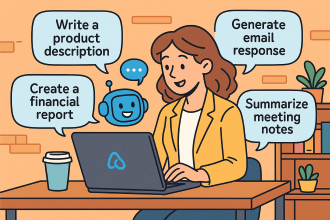
Word: “Draft 10 unique, SEO-friendly product descriptions for a new line of organic bath bombs, highlighting their natural ingredients and calming properties.” Copilot generates initial drafts, which the team can then refine.
Outlook: “Based on the organic bath bomb product descriptions, write a promotional email to our subscriber list, including a special launch discount and a clear call to action to visit our website.” Copilot drafts the email, saving significant time.
PowerPoint: “Create a presentation for an upcoming local market vendor event, showcasing our brand story and top 5 best-selling products. Include images and key benefits.” Copilot helps generate slides, suggest layouts, and even find relevant stock images.
2. Sales & Customer Management:
Scenario: A freelance graphic designer needs to prepare a tailored proposal for a new client and summarize a long email thread about project revisions.
Copilot Use:
Word: “Generate a comprehensive project proposal for [Client Name] for their new brand identity project. Include sections for scope of work, timeline, deliverables, and pricing, referencing our standard pricing guide.” Copilot quickly builds the proposal structure and fills in details.
Outlook: In a long email thread about client feedback, “Summarize the key decisions made and action items from this email conversation regarding the logo design revisions for [Client Name].” Copilot provides a concise summary, preventing missed details.
Teams: After a client meeting, “Summarize this Teams meeting about the website redesign, highlighting key agreements, outstanding questions, and assigned tasks to each team member.” Copilot generates meeting minutes and action items.
3. Finance & Operations:
Scenario: A small consulting firm needs to analyze quarterly sales data in Excel and draft a memo to employees about new expense policies.
Copilot Use:
Excel: “Analyze this sales data in Sheet1 to identify the top 3 performing services and visualize monthly revenue trends.” Copilot can suggest formulas, create charts, and even interpret the data, turning raw numbers into actionable insights.
Word: “Draft a clear and concise memo to all employees outlining the new expense reimbursement policy, effective next month. Emphasize the need for itemized receipts and submission deadlines.” Copilot helps draft the policy document quickly and accurately.
Microsoft 365 Chat: “What are the latest updates to the company’s Q2 budget in the ‘Finance Reports’ SharePoint folder?” Copilot can search across your M365 environment to retrieve and summarize relevant information.
4. Human Resources (HR) & Internal Communications:
Scenario: A small accounting firm needs to create an onboarding checklist for new hires and respond to common employee queries about leave policies.
Copilot Use:
Word: “Create a detailed onboarding checklist for new hires, covering IT setup, HR paperwork, team introductions, and initial training modules.” Copilot provides a structured checklist to ensure a smooth onboarding process.
Outlook: When an employee asks about personal leave, “Draft an email response to [Employee Name] explaining the company’s personal leave policy, referencing the relevant section in the employee handbook, and attaching the leave request form.” Copilot helps generate accurate and consistent responses.
Step-by-Step Implementation of Microsoft 365 Copilot in a Small Business
Implementing Copilot effectively involves more than just enabling licenses. It requires preparation, user adoption strategies, and ongoing monitoring.
Phase 1: Preparation and Readiness
Assess Your Microsoft 365 Environment:
Data Governance: Copilot inherits your existing Microsoft 365 security, privacy, and compliance settings. Ensure your data is well-organized, permissions are correctly set, and sensitive information is protected (e.g., using sensitivity labels). This is crucial to prevent “oversharing” of information through Copilot.
Licensing: Verify you have an eligible Microsoft 365 subscription (e.g., Microsoft 365 Business Standard or Business Premium). Copilot is an add-on, so you’ll need to purchase licenses ($30 per user per month, as of my last update).
Network Readiness: Ensure your internet connection and Microsoft 365 services are robust enough to handle the increased AI processing.
Identify Key Use Cases and Pilot Users:
Define Needs: Pinpoint specific pain points and areas where AI can provide the most immediate value for your business (e.g., slow report generation, repetitive email drafting, meeting summaries).
Select Pilot Group: Choose a small group of enthusiastic users from different departments who are heavy Microsoft 365 users and open to new technologies. These “champions” will be crucial for early feedback and encouraging wider adoption.
Establish an “AI Council” (Even for a Small Business):
This doesn’t need to be formal or large. It could be 1-2 owners/managers and a key IT contact (internal or external).
Their role: Define clear goals for Copilot, oversee implementation, address challenges, and communicate the vision.
Phase 2: Deployment and Onboarding
Assign Copilot Licenses:
Go to the Microsoft 365 admin center.
Navigate to Billing > Licenses.
Select Microsoft 365 Copilot and assign licenses to your chosen pilot users.
Note: It might take up to 24 hours for Copilot to appear in all apps for users. They may need to restart or refresh the apps.
Provide Training and Resources:
Basic Prompting: Train users on how to craft effective prompts. Emphasize clarity, context, and specifying the desired outcome.
Role-Specific Examples: Provide examples of how Copilot can be used in their specific roles (e.g., marketers: “draft a social media post,” sales: “summarize this client email”). Microsoft provides an “SMB Success Kit” and online quick-start training (aka.ms/quickstartcopilot) that can be valuable.
“When to use Copilot” vs. “When not to”: Help users understand when Copilot is a valuable assistant and when human judgment or expertise is still paramount.
Encourage Experimentation: Foster a culture where users feel comfortable experimenting with Copilot.
Establish a User Community (informal):
Even in a small business, create a dedicated chat channel (e.g., in Microsoft Teams) for users to share tips, ask questions, and celebrate “Copilot wins.” This peer-to-peer learning is highly effective.
Phase 3: Monitor, Refine, and Expand
Gather Feedback:
Regularly check in with your pilot users. What’s working well? What are the challenges? What new ideas do they have?
Qualitative feedback (discussions, surveys) is just as important as quantitative data.
Monitor Usage (Microsoft Copilot Dashboard):
The Microsoft Copilot Dashboard provides insights into Copilot usage, including which apps it’s used in most and active user counts. Use this to understand adoption trends and identify areas for further training or focus.
Iterate and Optimize:
Based on feedback and usage data, refine your training materials, prompt guidelines, and use cases.
Address any data governance issues that arise.
Gradual Rollout (or full deployment):
Once the pilot is successful and you’ve addressed initial challenges, gradually expand Copilot access to more users or the entire team.
Continue to provide ongoing support and training as new users come online.
Celebrate Successes:
Share stories of how Copilot has helped employees save time, improve quality, or achieve business goals. This builds enthusiasm and encourages wider adoption.
By following these practical examples and a structured implementation approach, even small businesses can effectively harness the power of Microsoft 365 Copilot to significantly boost their productivity and gain a competitive edge.
In Session 2, we dive into the world of Vibe Coding—a dynamic, intuitive approach to scripting that blends creativity with automation. Using Visual Studio Code and PowerShell, we’ll show you how to save hours every day by automating repetitive tasks and streamlining your workflows.
Whether you’re a seasoned IT pro or just getting started with automation, this session will equip you with practical tools and techniques to boost your productivity.
What You’ll Learn
What is Vibe Coding? Discover how this mindset transforms the way you write and think about code.
Setting Up for Success Learn how to configure Visual Studio Code for PowerShell scripting, including must-have extensions and productivity boosters.
Real-World Automation with PowerShell See how to automate everyday tasks—like file management, reporting, and system checks—with clean, reusable scripts.
AI-Powered Coding Explore how tools like GitHub Copilot can supercharge your scripting with intelligent suggestions and completions.
Time-Saving Tips & Tricks Get insider advice on debugging, testing, and maintaining your scripts like a pro.
️ Who Should Attend?
This session is perfect for:
IT administrators and support staff
DevOps engineers
Microsoft 365 and Azure professionals
Anyone looking to automate their daily grind
Save the Date
️ Date: Friday the 25th of July
Time: 9:30 AM Sydney AU time
Location: Online (link will be provided upon registration)









 CIAOPS