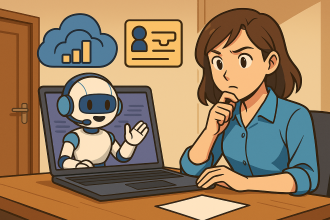
Get your M365 questions answered via email

bp1

Yes, it is true, you can now gain access to my Microsoft Cloud knowledge simply by sending an email. I have achieved this by creating an agent in Copilot Studio that will respond to the query you place in the body of the email.

1. Send your questions to robert.agent@ciaops365.com. The questions need to be in the body of the email. For now the subject line is ignored.

2. After a few minutes you should receive a reply back with an AI generated answer across all my information sources, both public and private.

Some points to remember:

A. Each query is unique. The system current does not have ‘memory’. This means it does not keep track of any previous email or questions that you sent it. Each email is taken as unique.

B. The system is focused on answering questions around Microsoft 365 and the Microsoft Cloud. It has specific instructions to ignore other stuff, so if you ask it something silly at best you should get a polite reply declining to help and at worst no reply at all.

C. The more detailed the question, the better the answer. Simply asking for an answer will not return as comprehensive an answer if you asked for a detailed response, or step by step process.

D. The system is far from perfect. Firstly, it is AI, which means that answers should always be verified. Secondly, part of the reason that I am making this available publicly is to test how well it works at scale.

Hopefully, what you get out of this agent are answers to your question around M365, simply by sending an email. What I get out of this is to test the agent and also see what questions people are asking about M365 so I can create better responses and content.

I will continue to develop and improve the agent as Microsoft makes more capabilities available. For now, I’d really appreciate you asking a question about M365 in the body of the email sent to robert.agent@ciaops365.com.

You can of course reach out to me directly if you have any questions or other feedback for my agent that you’d like to see incorporated.

As an FYI, here is a report I generated based on what teh agents has already received:

Common Questions About Microsoft Cloud

Common Questions About Microsoft Cloud – A Summary and Insights

Introduction
Over the past few months, we’ve received numerous questions about utilizing the Microsoft cloud for business needs. These queries came through our support channels and covered a range of topics – from device management with Intune to security and compliance features in Microsoft 365. We’ve noticed some clear themes in what people are asking. In this blog post, we’ll summarize the most common Microsoft cloud questions, group them into key topic areas, and share brief answers and insights for each. Our goal is to highlight frequent concerns, reveal patterns in cloud adoption challenges, and offer recommendations to help everyone make the most of Microsoft’s cloud services.


1. Managing Devices and Updates with Intune

One of the most common questions is how to use Microsoft Intune (part of Endpoint Manager) to manage devices and deploy software updates across an organization. IT admins want to ensure all laptops and mobile devices are up-to-date without manual intervention.

What was asked: “How can I use Microsoft Intune to update software on devices in my organization?”

What we answered: Intune is a powerful cloud-based endpoint management tool that can centrally push OS and application updates to enrolled devices. We explained that the process involves a few key steps:

  • Prerequisites: First, make sure you have an active Intune subscription and that all target devices are enrolled in Intune under your tenant. Devices should be managed (Intune allows management of Windows, macOS, iOS, and Android devices) and you need the proper admin permissions to configure Intune policies.
  • Create an Update Policy: In the Microsoft Endpoint Manager admin center, you can create update rings (under Devices > Windows > Update rings for Windows 10 and later for Windows updates). This policy defines how and when updates are installed – for example, you can schedule update installation times, set deadlines, and configure user experience (like allowing user deferral or auto-restart behavior).
  • Deploy the Policy to Devices: Once the update ring (or any software update policy) is configured, assign it to the groups of devices or users that need those updates. Intune will then push the update settings to those devices. For app updates (such as line-of-business apps), you can use Apps section in Intune to assign newer app versions to devices/users.
  • Monitor and Troubleshoot: Intune provides reporting tools to monitor update compliance and installation status. We emphasized checking the Reports (for update compliance) to ensure devices are getting patches successfully. If some devices fail to update, Intune logs and error reports can help pinpoint issues (like connectivity problems or insufficient disk space). From there, admins can troubleshoot using the error codes or by ensuring the devices meet prerequisites (e.g. device must be powered on and online to receive updates).

By following these steps, our users learned that they could effectively manage software updates via the cloud, ensuring all endpoints are secure and up-to-date. This question falls under a broader theme: cloud-powered device management. Many organizations are moving away from manual or on-prem update servers, and are leveraging Intune and Windows Update for Business for a more hands-off, scalable approach. The pattern we see is a strong interest in using Microsoft cloud tools to automate device administration tasks.

Insight: If you’re not already using Intune for updates, it’s a good time to consider it. Start by enrolling a pilot group of devices and creating a basic update ring. You’ll gain insight into how smoothly updates roll out in your environment. In addition, ensure you communicate with your end-users about update timing (to avoid surprises). The key recommendation here is to take advantage of Intune’s cloud management capabilities – it saves time and keeps your fleet secure.


2. Securing Endpoints and Protecting Data

Another category of frequent queries revolves around security in the Microsoft cloud, particularly using Intune’s endpoint security features and related Microsoft 365 security tools. Administrators often ask what built-in options exist to protect devices and data beyond just deploying updates.

What was asked: “What does Microsoft Intune provide for endpoint security, and how can I use it to protect our organization’s devices and data?”

What we answered: We clarified that Microsoft Intune isn’t just for pushing apps or updates – it also has robust endpoint security and policy management capabilities. In fact, Microsoft’s cloud offers an integrated suite of security measures that work together. Our summary answer covered several facets:

  • Device Compliance Policies: Intune lets you define compliance requirements – for example, requiring devices to have a PIN/password of a certain complexity, encryption enabled, not jailbroken/rooted, etc. If a device falls out of compliance, Intune can flag it or even block it from corporate resources. We told users to set up compliance policies as a first layer of defense to ensure every device meets basic security hygiene.
  • Configuration Profiles for Security Settings: Through Intune, admins can deploy configuration profiles to enforce security settings on devices. This includes things like enabling BitLocker encryption on Windows, turning on firewall and antivirus (like ensuring Microsoft Defender is active), and configuring automatic screen lock timers. These settings help harden each device according to company security standards.
  • Integration with Defender for Endpoint: Many asked how to get “advanced threat protection” on cloud-managed devices. Intune integrates with Microsoft Defender for Endpoint, a cloud-based enterprise endpoint security platform. This means if you have the proper licensing, you can onboard devices to Defender for Endpoint for continuous monitoring, malware protection, and even threat response (EDR). Alerts from Defender can surface in Intune, creating a unified security dashboard. We recommended taking advantage of this integration to detect and respond to sophisticated threats like ransomware or suspicious behavior on endpoints.
  • App Protection Policies: Some questions went beyond device settings, into protecting the data within apps (especially on mobile devices or BYOD scenarios). Intune’s app protection policies (also known as MAM – Mobile Application Management) can restrict how corporate data is used in apps. For instance, you can prevent users from copying content from a work app into a personal app, or require an app-level PIN to open Outlook on a phone. This way, even if the device isn’t fully managed, the sensitive data is still containerized and secure.
  • Conditional Access (with Azure AD): We often reminded folks that Azure Active Directory Conditional Access works hand-in-glove with Intune compliance. A popular approach is to set Conditional Access policies that say: only allow sign-in to cloud resources (like Exchange Online or SharePoint) from devices that are Intune-compliant or from apps that are protected. This essentially turns away risky devices or sessions. For example, if a device falls out of compliance (as per Intune policy) or is unrecognized, it can be denied access or forced to re-authenticate. This dynamic duo of Intune + Conditional Access greatly reduces the chance of a breach if a device is lost, stolen, or compromised.

By outlining these points, we provided a brief overview of Intune’s security toolkit. The trend behind this question is that businesses are looking to the Microsoft cloud to not only manage devices but also to secure them comprehensively – without needing separate third-party solutions if possible. Microsoft has been expanding these capabilities (like adding more Endpoint Protection and even an Endpoint Privilege Management feature in Intune), and people are eager to utilize them.

Insight: If your organization uses Microsoft 365, make sure you’re leveraging the security features you already have access to. A recommendation is to audit your current setup: Are you using compliance policies? Do you enforce MFA and Conditional Access? Have you enabled Defender for Endpoint if licensed? We encourage users to start with baseline security configurations – Microsoft even provides security baseline templates in Intune that you can deploy for Windows, which is a great starting point. The big takeaway is that cloud-based security can significantly strengthen your defense. It’s easier to enforce uniform policies and to adjust them quickly if new threats emerge. Given the pattern of questions, it’s clear that investing time in Intune’s security configuration pays off in a safer environment.


3. Compliance and Data Retention (Archiving vs. Holding Data)

The third major category of questions centers on Microsoft 365’s compliance and data retention features. As companies move email and content to the cloud, they want to make sure they can retain data for legal purposes and manage mailbox sizes effectively. A representative question we received involves the relationship between mailbox litigation holds and the expanding archive feature in Exchange Online.

What was asked: “Can I enable an auto-expanding archive for a mailbox that’s already on litigation hold, and if so, how?”

What we answered: This question was about Exchange Online Archiving – a Microsoft cloud feature that provides additional storage for users’ mailboxes (commonly used when mailboxes reach capacity or to store older messages) – in conjunction with Litigation Hold (which is a compliance measure to preserve all mailbox content for legal/eDiscovery). The user’s worry was whether turning on an archive would conflict with the litigation hold. Here’s the summary of our guidance:

  • Yes, You Can Do Both: We confirmed that having a mailbox on Litigation Hold does not prevent you from enabling the archive mailbox (including the auto-expanding archive). The systems are designed to work together. The litigation hold ensures all original and deleted mailbox data is retained for legal review, and the archive mailbox simply provides more space to offload emails from the primary mailbox.
  • Steps to Enable Auto-Expanding Archive: In the Microsoft 365 compliance or Exchange admin center, an admin can enable the archive for a user’s mailbox. Once the standard archive is enabled, you can turn on the auto-expanding archive feature. This feature automatically adds additional storage chunks to the archive mailbox as the user’s archive grows (useful for very large or active mailboxes so you never run out of space). We walked through the interface where an admin would click “Enable Archive” for the mailbox, and noted that auto-expanding archive might require the organization to have it turned on globally (in newer versions, it can be enabled per tenant and it expands as needed without further admin intervention).
  • Verify Litigation Hold Status: We advised the user to double-check that the mailbox in question is indeed on hold (which it was) and to understand the hold settings (e.g., indefinite hold or time-based hold). The litigation hold means all items (including those moved to the archive) are preserved for discovery, even if the user deletes them. Enabling the archive doesn’t break that – in fact, any item in the archive mailbox is also held.
  • What to Expect After Enabling: With both litigation hold and an archive, users can continue to use their mailbox normally. New emails will go to their primary mailbox; older emails or auto-archiving policies can move items to the archive mailbox. The hold ensures copies are retained behind the scenes. We noted that admins can monitor archive usage in the Exchange admin center (there are usage reports that show mailbox and archive sizes). Also, if needed, during an eDiscovery process, content from both the primary and archive mailboxes will be available since the hold captures everything.

This answer addressed the practical “how-to” and reassured that compliance would be maintained. It highlighted Microsoft 365’s capability to handle both storage management and legal obligations simultaneously – a key advantage of the cloud platform.

The pattern here is questions about data governance: admins want to manage storage (like huge mailboxes) but must also meet legal retention requirements. We’ve seen queries about retention policies, eDiscovery, and archive mailboxes pop up frequently. It underscores that as companies embrace cloud email and documents, they’re also planning for compliance, regulation, and efficient data management.

Insight: For organizations, it’s important to familiarize yourself with Microsoft Purview (the new name for the compliance suite) features such as Retention Policies, Litigation Hold, and Archive Mailboxes. Our recommendation is to develop a data retention strategy: decide how long you need to keep emails, Teams messages, documents, etc., for business or legal reasons, and then configure the appropriate policies in Microsoft 365. The cloud makes this easier than old on-prem systems – you can globally apply a retention label or hold with a few clicks, and the service will automatically preserve content. Also, take advantage of auto-expanding archives if users have mailboxes over 100 GB; this ensures users don’t have to delete important emails just because of storage limits. The key takeaway is that Microsoft’s cloud provides flexible tools to both control data growth and meet compliance needs. The questions we get show that once people learn they can do both at once, they feel more confident migrating more data to the cloud.


Conclusion and Key Takeaways

Compiling these questions and answers has revealed a couple of clear trends. First, IT professionals are eager to leverage Microsoft cloud services to their full potential – they’re not just asking simple “what does this button do” questions, but really digging into how to implement best practices for device management, security, and compliance. This is a great sign that cloud adoption is maturing. Common threads include automation (automating updates, using policies instead of manual configs) and integration (ensuring security, management, and compliance tools all work together seamlessly).

Second, many of the questions revolve around trusting the cloud to handle critical IT functions. There can be understandable caution around, say, letting Intune automatically patch all your PCs, or believing that an auto-expanding archive will really keep all your important emails safe. But as shown above, with the right configuration, the cloud can greatly simplify these tasks. The pattern of questions shows initial caution turning into confidence as users get guidance and try things out. For example, after implementing Intune update rings as we suggested, admins often report that they spend far less time worrying about who has installed what patch – compliance reports are available and issues can be addressed proactively. Similarly, once an auto-archive is enabled alongside a litigation hold, legal teams breathe easier knowing nothing will be lost, and users are happier not constantly hitting mailbox size limits.

Third, we noticed a strong interest in step-by-step guidance and best practices. It’s not enough to know a feature exists; people want to know “what is the correct or recommended way to use this?” This is a good reminder for Microsoft (and for us as solution providers) that documentation and clear examples are very valuable. Cloud features tend to have tons of flexibility, which can sometimes be daunting. The questions summarized above often boiled down to “please give me a straightforward recipe to achieve my goal.” In response, we find that breaking things into clear steps or a checklist (as we did with each answer) helps a lot.

Recommendations for Readers: If you find yourself with similar questions, know that you’re not alone! The Microsoft cloud ecosystem is broad, but the community and knowledge base is rich. Here are a few closing tips based on the patterns we’ve seen:

  • Embrace cloud management: If you’re still doing things the old manual way, start exploring Intune, Endpoint Manager, and Azure AD features. Begin with a small scope (maybe pilot a set of devices or one department’s accounts) and apply some cloud policies. You’ll gain confidence as you see it in action.
  • Use built-in security features: Don’t let security be an afterthought. Turn on multi-factor authentication, use Conditional Access, require device compliance – these significantly reduce risks and are included in most Microsoft 365 plans. Our summary above barely scratched the surface of security options, but even the basics go a long way.
  • Plan your compliance: Work with your legal/compliance team to configure retention policies and holds before you need them. It’s easier to set the rules early than to scramble when a legal case or audit arises. Microsoft Purview compliance portal has templates and suggestions for common regulations – those can guide you.
  • Keep learning and asking: The cloud updates rapidly. New features and best practices emerge every month. Stay curious – Microsoft’s documentation, tech community blogs, and forums are excellent resources. If something isn’t clear, don’t hesitate to ask experts (as those who contacted us did). Often, the answers are out there and can save you hours of trial and error.

By summarizing these frequently asked questions, we hope we’ve provided a useful reference for others facing similar challenges. The Microsoft cloud is vast, but with each question answered, it becomes a bit more manageable and beneficial to use. As always, feel free to reach out with any new questions you have about making the most of these tools – chances are, if you’re wondering about it, someone else is too. By sharing our questions and solutions, we all help each other succeed in the cloud. Here’s to smooth sailing in your Microsoft cloud journey!

Need to Know podcast–Episode 347

In this episode I take a look at some of the latest announcements from Microsoft Build as well as recent changes to the Microsoft 365 home page. As expected Build gave us lots of new and enhanced capabilities coming to services like Copilot Studio and provide a raft of enhanced ways to better use AI across tenant information. There are still plenty of security updates to be across so listen along for all the details.

Brought to you by www.ciaopspatron.com

you can listen directly to this episode at:

https://ciaops.podbean.com/e/episode-347-right-to-left/

Subscribe via iTunes at:

https://itunes.apple.com/au/podcast/ciaops-need-to-know-podcasts/id406891445?mt=2

or Spotify:

https://open.spotify.com/show/7ejj00cOuw8977GnnE2lPb

Don’t forget to give the show a rating as well as send me any feedback or suggestions you may have for the show.

Resources

@directorcia

Join my shared channel

CIAOPS merch store

Become a CIAOPS Patron

CIAOPS Blog

CIAOPS Brief

CIAOPSLabs

Support CIAOPS

Build 2025 Book of news

Microsoft Build

Introducing Microsoft 365 Copilot Tuning

Multi-agent orchestration, maker controls, and more: Microsoft Copilot Studio announcements at Microsoft Build 2025

The Microsoft 365 Copilot app: Built for the new way of working

What’s new in Microsoft 365 Copilot | May 2025

Automating Phishing Email Triage with Microsoft Security Copilot

Defending against evolving identity attack techniques

What’s new in Microsoft Intune: May 2025

Monitoring & Assessing Risk with Microsoft Entra ID Protection

Discover how automatic attack disruption protects critical assets while ensuring business continuity

Access chats while sharing your screen in Teams meetings

New Russia-affiliated actor Void Blizzard targets critical sectors for espionage

Getting Started with Microsoft 365 Copilot: First Steps for End Users

bp1

This guide outlines how to set up Copilot, integrate it into your daily work, and quickly showcase its value.

1. Confirm Access and Prepare Your Apps

Before diving in, ensure you have access to Copilot and that your Microsoft 365 apps are ready:

  • Check Your License: Verify that your Microsoft 365 Copilot add-on license is active for your account. If you don’t see Copilot features, contact your IT admin to confirm your license is assigned [1].

  • Update Microsoft 365 Apps: Make sure your Office apps (Word, Excel, PowerPoint, Outlook, Teams, etc.) are up to date. Copilot works best with the latest versions of Microsoft 365 Apps[1].

  • Sign In with Work Account: Copilot is integrated with your Microsoft 365 work account, so use your usual work credentials. Once signed in to Office or Teams, look for the Copilot icon or prompts inside the apps.

Tip: In some apps, Copilot appears as a sidebar or an icon (for example, a Copilot symbol in Word’s ribbon or a “Summarize” button in Outlook). If you’re not sure where to find it, check Microsoft’s support guides or ask IT for guidance on accessing Copilot in each app.

2. Find Copilot in Your Favorite Apps

Copilot is built into the Microsoft 365 tools you already use daily, making it easy to get started. Here’s how to access it in key applications:

  • Outlook: Open any email thread – you’ll see a Copilot option (such as a Summarize icon) in the toolbar. Clicking it will prompt Copilot to generate a summary of the email conversation[2]. You can also ask Copilot to draft emails; for example, “Draft an email to Jane Doe about the project delay, and make it concise and friendly.”[2].

  • Teams: In Microsoft Teams, start a Copilot chat during or after a meeting. Copilot can recap meeting discussions and list action items. Simply type a prompt like “Recap the meeting so far” in the Copilot pane to get an instant summary of key points and decisions[2].

  • Word: Look for the Copilot sidebar or icon. You can use it to generate content or improve your document. Try prompts like “Brainstorm ideas for the introduction of my report” or use the “Rewrite with Copilot” feature to polish a draft paragraph[2].

  • Excel: Click the Copilot icon in Excel to analyze or visualize data. For example, ask “What are the trends in this sales data?” and Copilot will create summaries or even suggest charts and PivotTables based on your dataset.

  • OneDrive/Word Online: When viewing a document in OneDrive or Word for web, Copilot is available to summarize or answer questions about the content (no additional setup needed, since your license covers it)[3]. This is handy for getting up to speed on lengthy docs.

By checking each app for the Copilot assistant, you ensure you’re ready to leverage its capabilities wherever you work – in email, chat, documents, spreadsheets, and meetings.

3. Try Quick “Win” Scenarios First

To quickly boost productivity and impress your team, start with high-impact Copilot scenarios that save time:

  1. Summarize Lengthy Emails: Instead of reading through long email threads, use Copilot in Outlook to get a concise summary with key points and decisions extracted in seconds[2]. This helps you respond faster without missing details.

  2. Draft Responses and Content: Suffering from writer’s block? Ask Copilot to draft a reply or create a first draft of a document. For instance, dictate a few bullet points and have Copilot draft a formatted Word report or an email response in a polished, ready-to-send format[4][2]. You can then fine-tune the tone or details.

  3. Recap Meetings in Teams: If you join a meeting late or need to share notes afterward, use Copilot in Teams to recap the meeting. It will produce a summary of what was discussed and list any action items or decisions made, so you don’t have to replay the recording[1][2].

  4. Brainstorm and Generate Ideas: In Word or OneNote, prompt Copilot to help brainstorm. For example: “Give me 5 ideas for our marketing campaign” or “Help me outline a project proposal.” Copilot will produce creative suggestions or an outline that you can build upon[2].

  5. Analyze Data Instantly: In Excel, use Copilot to get insights from data. You might ask: “Explain the sales performance this quarter” – Copilot can highlight trends, outliers, or create a chart for you. This turns a tedious analysis into a quick review.

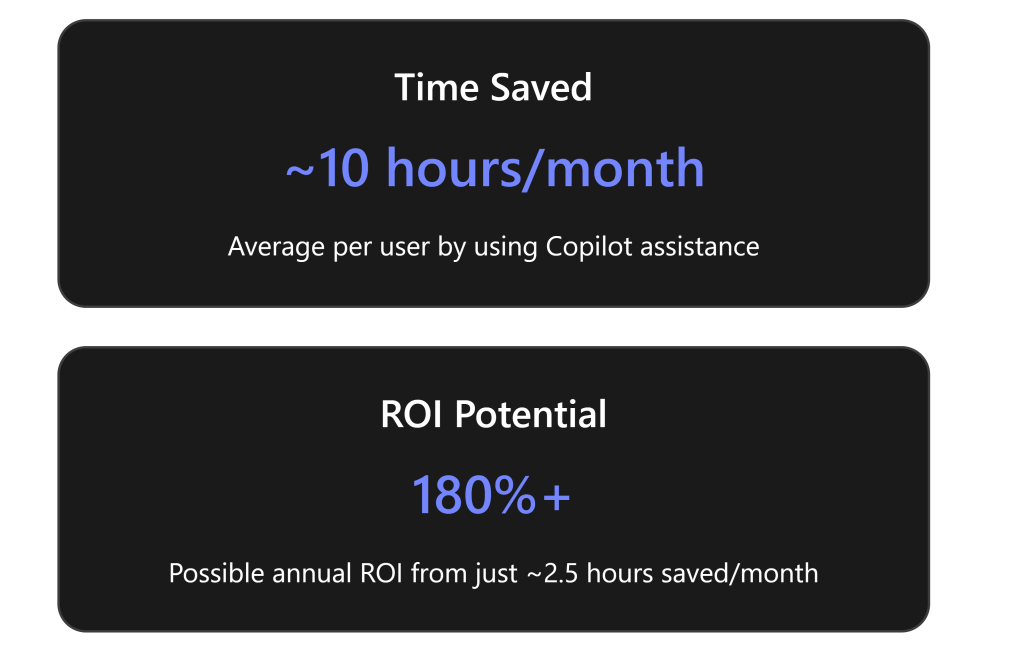
These quick wins let you experience immediate value. Many users report that Copilot helps them accomplish tasks like email summarization and draft creation much faster than before – freeing up hours each week[5]. By starting with these, you’ll build confidence and see tangible time savings.

4. Incorporate Copilot into Daily Workflow

Make Copilot a habit in your routine so you continuously improve productivity. Here’s how to weave Copilot into your day-to-day work:

  • Begin Your Day with Copilot: Check your morning emails with Copilot summaries. Use it to triage your inbox by quickly understanding which threads are important[2]. In Microsoft 365 Copilot Chat (the enterprise chat interface), you can even ask, “What are the latest updates on Project X from emails and chats?” and Copilot will aggregate information from across Outlook, Teams, and SharePoint that you have access to[2]. This gives you a rapid briefing to start your day informed.

  • During Work Sessions: Whenever you start a significant task – writing a document, analyzing data, responding to customers – think “How can Copilot assist me?” For example, if you’re preparing a report, let Copilot generate a draft or an outline first[2]. If you’re stuck on a slide in PowerPoint, have Copilot suggest an image or even draft speaking notes. Using Copilot as a first pass for mundane parts of tasks lets you focus on review and creative tweaks, rather than starting from scratch.

  • End-of-Day Wrap Up: Use Copilot to help summarize what you accomplished. For instance, in Teams or OneNote, ask “Summarize today’s meeting notes and action items” to ensure you didn’t overlook anything. Or in Copilot Chat, ask “What did I commit to today?” to have it pull out your promises from meetings and emails so you can follow up. This helps you stay organized and prepared for the next day.

By integrating Copilot at these touchpoints, you turn it into a personal AI assistant that works alongside you throughout the day. Over time, you’ll likely discover more workflows where Copilot can step in to save time or improve quality.

5. Customize and Refine Your Copilot Experience

Every user and business is different – Copilot offers settings and best practices to tailor its help to your needs:

  • Adjust Copilot Settings: Copilot may allow some customization of tone or response preferences. For example, you might set a default tone (professional, casual, etc.) or specify the length/detail of answers. Make it your own: ensure the style of Copilot’s outputs aligns with your company’s voice. If you’re not sure how to change these settings, check Copilot’s help menu or ask IT for any available customization options[4]. A well-tuned Copilot will produce outputs that require minimal editing.

  • Learn Prompting Best Practices: Copilot works best when given clear instructions, much like guiding a colleague. Be specific in your requests – e.g. “Summarize the last 10 emails from the client and highlight any action items” will yield a more focused result than “Summarize my emails.” Include context in your prompt if needed (such as names, dates, or desired format). This specificity helps Copilot return more accurate and relevant answers[4].

  • Use Polite and Clear Language: While Copilot doesn’t require polite phrasing, some users find that framing requests conversationally (e.g. “Please draft a response thanking the team for their work on project Y”) can improve the tone of the output[4]. In any case, write instructions as if you’re talking to an assistant: state what you need and any constraints (tone, length, points to cover).

  • Verify and Edit Outputs: Always remember that Copilot’s suggestions are a starting point. Review its outputs carefully – especially for critical or client-facing content. Copilot uses AI to pull from your data and general knowledge, which can occasionally produce incorrect or nonspecific information. Treat the Copilot draft as a first draft: check facts, adjust wording, and make sure it conveys exactly what you want. You remain the editor-in-chief, and a quick proofread ensures the final product is accurate[4].

By customizing Copilot’s behavior and applying these best practices, you’ll get better results and smoother integration into your workflow. The more you use Copilot and fine-tune your approach, the more value it will provide.

6. Leverage Training Resources and Communities

To make the most of Copilot, take advantage of the training materials and support available:

  • Microsoft Learn Courses: Microsoft has published an official “Get Started with Microsoft 365 Copilot” learning path[6]. This is a beginner-friendly online course with modules that walk you through Copilot basics, versatility across apps, and tips for maximizing its potential. Completing this 3-module course can quickly ramp up your skills and ensure you’re aware of all Copilot features.

  • How-To Videos: Check out short tutorial videos on Microsoft Support and YouTube (such as “How to start using Microsoft 365 Copilot”[2]). These show Copilot in action within various apps. Watching a 2-minute demo of Copilot summarizing a meeting or analyzing data can give you new ideas for usage in your own role.

  • Copilot Success Kit (For Organizations): If your company provided the Copilot license, they may also have access to Microsoft’s Copilot Success Kit with user guides, FAQs, and scenario playbooks[2]. Ask your manager or IT team if there are internal trainings or “Copilot champions” in the organization. Often early adopters will share tips or host Q&A sessions to help colleagues get started quickly.

  • Community and Feedback: Microsoft’s Tech Community forums have a Copilot section where users post questions, share tips, and discuss new features. Engaging with the community can answer common “How do I do X with Copilot?” questions and let you learn from others’ experiences. Additionally, don’t hesitate to use the feedback option in Copilot (usually a little thumbs-up/down or feedback form) to send Microsoft input. Your feedback can help improve Copilot, and Microsoft often publishes updates based on user suggestions.

By educating yourself and tapping into resources, you’ll become confident and proficient with Copilot in no time. This not only boosts your productivity but also enables you to help teammates who are just starting out.

7. Showcasing ROI: Demonstrate Copilot’s Value

To justify the investment in Microsoft 365 Copilot, it’s important to demonstrate tangible benefits. Here are ways you, as an end user, can help show ROI (Return on Investment) for your business:

  • Track Time Saved: Pay attention to tasks that Copilot accelerates. For example, if writing a report draft normally takes you 3 hours and Copilot helped you create a solid draft in 1 hour, that’s a 2-hour savings. Keep a simple log of such wins over a few weeks. Even saving 3 hours per week by using Copilot adds up – some companies found that equates to reclaiming about 10% of the workweek for those employees[5]. Multiply that across many users and the value is clear.

  • Improve Quality and Outcomes: Note improvements in your work quality or throughput. Maybe Copilot’s assistance means you produce more polished emails or you’re able to handle 15% more customer inquiries by drafting responses faster. Microsoft’s early data showed 85% of users wrote better quality drafts faster with Copilot’s help[1]. If you experience something similar – like fewer revisions needed on your documents – call that out. Quality gains can be just as important as time savings.

  • Use the Copilot Dashboard (for Metrics): If your organization has enabled the Microsoft 365 Copilot Dashboard via Viva Insights, managers can see usage and impact metrics. This dashboard shows how many people are actively using Copilot and how it’s affecting work patterns, including aggregate measures of time saved on emails, meetings, etc.[5][5]. Encourage your team to use Copilot consistently, as higher adoption and usage will make these metrics more impressive. For instance, increasing the percentage of your team actively using Copilot (the “AI adoption” metric) is a quick win to show engagement.

  • Share Success Stories: Don’t underestimate anecdotal ROI. If Copilot helped you finish a proposal before a tight deadline or gave you insights that won a deal, share that story with your manager and colleagues. Concrete examples — “Copilot helped me create a client presentation in half the time, which helped us respond to the client faster and win the project” — make the value real for leadership. Consider sharing tips in a team meeting on how you achieved that with Copilot, which also encourages others to try it out.

  • Measure Key Business Metrics: Align Copilot use with metrics the business cares about. For example, if your department tracks customer satisfaction or sales cycle time, see if Copilot’s help (like faster email responses or better proposals) is moving those needles. Some organizations tie Copilot usage to dollar values: one company estimated Copilot would save their sales team $50 million per year in efficiency[5]. While your role might not see millions, even small improvements (like resolving internal support tickets faster, or reducing the need for overtime) contribute to ROI.

By actively using Copilot and highlighting these benefits, you help the business see a return on the Copilot licenses. Over time, these efficiency gains and quality improvements reinforce why Copilot is worth the investment.

8. Continue Expanding Copilot’s Use (and Stay Secure)

Finally, as you get comfortable, look for more opportunities to leverage Copilot – and do so responsibly:

  • Explore Advanced Scenarios: Beyond the basics, Copilot can assist in complex workflows. For instance, in Teams you can use Copilot in group chats to summarize project updates, or in PowerPoint to generate speaker notes for slides. Microsoft is also rolling out Copilot in Loop and OneNote, and even Copilot Lab experiences for learning prompt techniques[7]. Stay on the lookout for new features and try them out – they could open up new ways to save time.

  • Integrate with Business Data (if available): If your company enables Copilot Chat with plugins or connects internal data, you might be able to ask Copilot questions that go beyond Office documents – such as querying a knowledge base or an internal CRM. This can further boost productivity by bringing enterprise data into your Copilot answers. Make sure you follow any training or guidelines your IT provides for these advanced integrations.

  • Security and Privacy Reminders: Copilot adheres to your organization’s security policies – it only has access to data you can normally access and respects document permissions. Still, use Copilot responsibly: avoid asking it to summarize content you shouldn’t be sharing, and don’t copy sensitive information into prompts unnecessarily. Trust Copilot with day-to-day content, but continue to apply good judgment with confidential data as you would normally[8]. If in doubt, consult your company’s Copilot usage policy (many organizations include guidance as part of Copilot rollout).

  • Provide Feedback & Update: Keep your Copilot (and Office apps) updated to get the latest improvements. Microsoft is rapidly updating Copilot with new capabilities and better accuracy. Also, use the feedback mechanism – if Copilot gives an incorrect or unhelpful result, flag it. This helps Microsoft improve the service. You may even see your feedback addressed in a future update.

In summary, embrace Copilot as a powerful assistant. Start with the simple steps and quick wins outlined above, integrate it into your routine, and continuously learn and expand how you use it. By doing so, you’ll not only make your own work easier but also help prove the value of Microsoft 365 Copilot to your business through consistent productivity gains and real results.


By following these steps, end users can hit the ground running with Microsoft 365 Copilot. The journey begins with enabling Copilot in everyday tasks and leads to significant time savings and creativity boosts. With each email summarized and each document drafted, you’re not only working smarter but also gathering proof points of Copilot’s ROI. Happy prompting![5][1]

References

[1] Unlock your productivity: Here are our Top 10 tips for using Microsoft …

[2] Top 10 things to try first with Microsoft 365 Copilot

[3] Microsoft 365 Videos

[4] Copilot tutorial: Start using Copilot – Microsoft Support

[5] Driving adoption and measuring impact with the Microsoft 365 Copilot …

[6] Get started with Microsoft 365 Copilot – Training

[7] CSP Masters Copilot Technical Part 02. SMB Partner Readiness

[8] deploying-copilot-for-microsoft-365-for-executives-0517

Expertise as a Commodity in the AI Era

bp1

Introduction
Artificial Intelligence (AI) is reshaping how we value and access human expertise. As AI expert Andrew Ng observed, “AI is the new electricity,” meaning it is transforming virtually every industry much like electricity did a century ago
[5]. Traditionally, expertise – the deep knowledge and skill acquired through experience and education – has been a scarce and highly valued resource. Experts (such as master craftsmen, doctors, or financial advisors) commanded respect and high fees because their specialized knowledge was not easily obtained by others. When knowledge was hard to come by, it was perceived as more valuable[13]. Businesses, too, built competitive advantage on unique expert capabilities – for example, Toyota’s mastery of lean manufacturing or Nvidia’s skill in chip design[12][1]. In essence, expertise has long been a key differentiator that individuals and companies leveraged for success[1].

However, the rapid advancement of AI is fundamentally changing this picture. AI systems can now learn from vast datasets and perform complex tasks that previously required seasoned human experts. This has made knowledge and know-how far cheaper and easier to access[12]. As a result, expertise is increasingly becoming a commodity – a widely available resource – rather than the exclusive domain of a few. This article explores how AI is commoditizing expertise, examining its traditional definition and value, the role of AI in this transformation, examples across industries, the benefits and challenges involved, and implications for professionals, industries, and society’s future.


Defining Expertise and Its Traditional Value

What is “expertise”? In simple terms, expertise is a combination of deep theoretical knowledge and practical know-how in a specific domain[12]. An expert possesses extensive understanding of a subject as well as the ability to apply that knowledge effectively to solve problems. For instance, a surgeon’s expertise lies not only in medical facts but also in years of refined surgical skill; a software engineer’s expertise includes computer science theory plus coding experience. This blend of knowledge + experience + skill allows experts to perform at an exceptionally high level in their field.

Historically, expertise has been highly valued because it was relatively scarce. Developing true expertise often requires many years of education, training, and practice, so not many people achieve it in any given domain. Scarcity drives value – much like rare diamonds fetch a premium price, rare skills and knowledge have commanded premium salaries and fees[13]. Moreover, before the digital age, information was limited; experts were gatekeepers to vital knowledge. A few centuries ago, people had to rely on scholars, artisans or professionals for information and services that are readily available today. When knowledge was harder to access, society placed greater importance on those who possessed it[13].

In business, expertise traditionally served as a key competitive differentiator. Companies that cultivated unique expertise could outperform competitors. For example, firms like Toyota, Walmart and Procter & Gamble historically thrived by excelling in a particular area of expertise (manufacturing efficiency, distribution logistics, consumer marketing, respectively) that others could not easily replicate[12][1]. Similarly, professionals such as consultants or lawyers built careers on specialized expertise that clients paid top dollar to access. In short, expertise has long been synonymous with competitive advantage and professional prestige.

AI’s Role in Transforming Expertise into a Commodity

Artificial Intelligence is dramatically lowering the cost and barriers to obtaining expertise. AI systems – from machine learning algorithms to advanced “AI assistants” – can ingest and learn from enormous amounts of data, enabling them to mimic or even exceed human expert performance in certain tasks. As a result, knowledge and skills that once took years to acquire can now be accessed by anyone via AI tools at a fraction of the cost[2]. A Harvard Business School analysis notes that generative AI is “lowering the cost of expertise,” eroding one of the core factors that used to set firms and individuals apart[2]. If expertise becomes cheap and ubiquitous, it is no longer a unique differentiator – in other words, it turns into a commodity-like utility.

Several factors explain how AI is commoditizing expertise:

  • Abundant Knowledge Data: In the digital era, humanity’s collective knowledge is recorded in databases, libraries, and online. AI can be trained on this global knowledge base, giving it access to far more information than any single human could master. The volume of specialized knowledge is growing exponentially, and AI helps keep up with this explosion[1]. For example, in biotech research, the number of papers is far beyond what a lone scientist can read, but AI can rapidly analyze such literature to extract expert insights[1].
  • Advanced AI Models: Modern AI models (like deep neural networks and large language models) not only retrieve information, they simulate expert reasoning and decision-making. They can diagnose illnesses from medical images, write software code, draft legal documents, or translate languages – tasks that formerly required domain experts. These models encapsulate expert knowledge in their training and can apply it on demand.
  • Decreasing Cost of AI: The cost of computing and AI model training has been falling, and AI services are increasingly affordable to use. The cost of using a top-tier AI (such as OpenAI’s GPT-4) has dropped by over 99% in the last couple of years[1]. What was once expensive proprietary expertise can now be obtained through low-cost or free AI applications. Organisations of any size can rent or utilize “expert” AI services cheaply, narrowing the gap between those with access to expert talent and those without.
  • Instant, Scalable Access: AI-driven expertise is available on-demand, 24/7, and at scale. Instead of scheduling time with a specialist, people can query an AI chatbot or run an algorithm and get answers in seconds. AI systems can serve thousands of users simultaneously with consistent quality. This makes expert knowledge highly accessible to all, rather than bottlenecked by human availability.

To illustrate the differences between traditional human expertise and AI-powered expertise, consider the following comparison:

Aspect Traditional Human Expertise AI-Powered Expertise
Accessibility Limited and location-bound – requires finding or hiring an expert, often during working hours. Broad and on-demand – available to anyone with an internet connection, anytime, anywhere.
Cost High cost for expert services (salary, consultation fees) due to scarcity of skill. Lower cost per use – AI tools automate expertise at scale, reducing marginal cost dramatically.
Scalability Not easily scalable – one expert can serve only a limited number of people at once. Highly scalable – a single AI system can serve many users simultaneously without quality loss.
Consistency Varies by individual; human performance can be inconsistent or subjective. Consistent outputs given the same input; no fatigue or mood variations (though may lack contextual nuance).
Personalisation Personalised by an expert’s intuition and experience on a case-by-case basis. Data-driven personalisation – AI analyses user data to tailor solutions, doing so rapidly across many cases.
Knowledge Scope Often deep but narrow – experts specialize in one domain. Broad and expanding – AI can be trained on multiple domains, possessing expansive cross-disciplinary knowledge.

Table: Traditional human expertise vs AI-driven expertise in key dimensions. Human experts provide intuition, empathy and context that AI may lack, but AI offers speed, scale and breadth that no individual can match.

In essence, AI is democratizing expertise – taking it from the hands of the few and distributing it to the masses. Just as the printing press democratized access to information, AI is now doing the same for expert knowledge and skills. Even small businesses or individuals can leverage AI tools to perform tasks that once required teams of specialists[1]. This is fundamentally altering how we think about the value of expertise in society.

However, it’s important to note that not all expertise is fully replicable by AI (for example, complex strategic judgment or emotional intelligence remain human strengths). But within many domains, AI is undoubtedly eroding the exclusivity of expertise by making high-level capabilities more widespread.


Impact on Key Industries Where AI Commoditizes Expertise

The commoditization of expertise via AI is playing out in various sectors. Here are some notable examples across different industries:

Healthcare

AI is revolutionising healthcare by bringing expert-level diagnostic capabilities to clinicians and patients alike. Medical diagnosis and imaging analysis – tasks traditionally done by highly trained specialists – are now being automated. For example, AI algorithms can examine X-rays or MRIs for signs of disease with impressive accuracy. In one case, a machine learning model was able to detect breast cancer from mammogram images more accurately than a panel of six human radiologists[11]. Such AI diagnostic tools enable earlier and more accurate detection of conditions, potentially improving outcomes.

Importantly, AI is bridging gaps in healthcare access. In regions with shortages of specialists, AI-powered diagnostic systems act as “virtual experts,” bringing expert knowledge to underserved areas. As one industry expert noted, AI can “democratize access to accurate diagnostics and medical care,” helping populations that live in healthcare deserts[11]. For instance, an AI symptom checker or a triage chatbot can guide a patient in a remote village, providing advice that approximates what a doctor might say. By harnessing vast medical data – patient histories, lab results, medical literature – AI can assist general practitioners with specialist-level insights at the point of care. This means medical expertise is no longer confined to hospitals or clinics; it’s becoming available on any digital device. While human doctors remain crucial for treatment, empathy and complex decision-making, AI is now handling many rote expert tasks, from analyzing scans to suggesting diagnoses, effectively commoditizing portions of medical expertise.

Finance

The finance industry has seen a surge of AI tools that make financial expertise available to the general public. A prominent example is the rise of robo-advisors in wealth management. These are AI-driven platforms providing automated investment advice and portfolio management that was once the realm of human financial advisors. Robo-advisory services democratise investment management, making advanced strategies and financial planning accessible to all[10]. Even individuals with modest savings can now get tailored investment portfolios, risk assessments, and financial advice at low or no cost through apps. What’s happening is that the sophisticated knowledge of asset allocation, once offered only by pricey advisors to wealthy clients, has been encoded into algorithms available to anyone.

AI in finance also works at super-human speed and scale. Trading algorithms and risk assessment models can analyze market data in real time, something a human analyst could never do so broadly. This automation of financial expertise reduces costs – algorithms don’t earn commissions – and enables personalised advice at scale. Banks and fintech companies leverage AI to offer services (like loan approvals or fraud detection) that mimic an expert’s decision process almost instantaneously. For instance, credit decisions that used to rely on a loan officer’s expertise can be made by AI analyzing credit scores and economic data in seconds. The result is that many financial decisions and advices are no longer dependent on individual expert judgment; they’ve been standardized and commoditized via AI, available on-demand to customers. This has lowered fees (many robo-advisors charge a fraction of traditional advisor fees)[10] and broadened participation in financial markets. However, human financial experts still play a role for complex, personalised strategies – often focusing on higher-level planning while routine advising is handled by machines.

Education

Education is another arena where AI is turning expertise into a readily available utility. Traditionally, only students with means could afford personal tutors or specialised educational support. Now, AI-powered intelligent tutoring systems are providing one-on-one tutoring experiences at virtually zero incremental cost. For example, a large language model like ChatGPT can act as a personal tutor for any student with an internet connection. Research in education technology suggests that generative AI has the “potential to give every student a personalized tutoring experience on any topic,” serving as a scalable, affordable learning aid[9]. In the classroom, teachers are using AI tools for everything from grading assistance to lesson plan recommendations, effectively outsourcing some expert tasks to machines.

AI in education also empowers teachers by democratizing pedagogical expertise. Tools now exist that can generate high-quality curriculum materials, suggest instructional strategies, or adapt content for different learning needs – tasks that might have required a team of curriculum specialists or instructional coaches in the past. As one analyst put it, AI is evolving beyond just providing information to “democratizing expertise – empowering every teacher with tools once reserved for curriculum developers, instructional coaches, or special education experts.”[7] In practice, this means a classroom teacher can use AI to obtain expert-level suggestions for teaching a difficult concept, or to differentiate instruction for struggling learners, essentially having a “coach” on hand.

From the student perspective, AI tutors and educational chatbots offer expert help on demand. A student stuck on a calculus problem at 10 pm can get a step-by-step explanation from an AI tutor that has mastered vast math knowledge. This was unimaginable decades ago without a human tutor. Through AI, high-quality educational support is becoming a commodity available to anyone, not just those at elite schools or with private tutors. Of course, challenges remain – AI might provide incorrect information at times, and the guidance on using these tools effectively is still evolving – but the trend is clear: expert educational assistance is far more widely attainable due to AI.

Other Domains and Examples

Many other fields are experiencing similar shifts:

  • Software Development: AI coding assistants (like GitHub Copilot) have absorbed knowledge from millions of software repositories and can generate code or suggest solutions to programming problems. This augments developers’ expertise and even enables novices to accomplish tasks that previously required veteran programmers. By having a tool with “expansive expertise” in many programming languages and frameworks[12], coding know-how is partly commoditized – developers everywhere can tap into a vast pool of coding expertise via an AI assistant.
  • Content Creation and Creative Work: Creating high-quality graphics, videos, or written content once took significant skill and training. Today, AI-based tools allow amateurs to produce professional-quality content, lowering the barrier to entry in creative industries[1]. For instance, smartphone apps with AI filters and editing can make an ordinary video look studio-polished, and AI art generators can create illustrations without a human artist. This democratization of creative expertise means design and multimedia skills are more “commodified” – available through software – though truly original creative vision remains a human strength.
  • Legal and Professional Services: AI is also making inroads into domains like law and customer service. Automated legal research tools can comb through case law and provide analysis in seconds, a task that occupied junior lawyers for hours. Chatbots handle customer inquiries with expert-like accuracy in many common scenarios (for example, troubleshooting tech support or answering tax questions), reducing the need for large support staffs. In each case, specialist knowledge is encoded in AI and delivered at scale, making the service more uniform and affordable.

Across these examples, the pattern is that AI systems leverage massive datasets and computational power to replicate elements of human expertise, and then provide it as a widely available service. This does not mean human experts are obsolete – rather, their role is shifting. But it does mean that the baseline capabilities in many professions have been elevated by AI and made accessible to non-experts.


Benefits of AI-Driven Commoditization of Expertise

The transformation of expertise into a more universally accessible resource comes with numerous benefits and opportunities:

  • Wider Access to Knowledge and Services: Perhaps the greatest benefit is the democratization of expertise, allowing far wider access to expert knowledge and services than ever before. People who previously had little access to specialists can now obtain expert-level assistance via AI tools. For example, AI-driven apps can bring medical or legal advice to remote communities that lack professionals, and students globally can learn from AI tutors as if each had a personal teacher. In healthcare, this means improved diagnostics and care for underserved populations[11]; in education, it means personalised learning for students who would otherwise struggle alone[9]. Overall, society gains from a reduced knowledge divide – more people can benefit from what experts know.
  • Cost Reduction and Efficiency: By automating expert work, AI significantly lowers the cost of many services. Routine tasks that once required paid expert hours can be done by AI in seconds. For businesses, this drives down operating costs; for consumers, it means cheaper (or even free) services. For instance, algorithms can manage investments for a fraction of the fee of a human advisor, and an AI legal tool can draft a basic contract without the billable hours of a lawyer. Lower costs make expert services more affordable to more people[10][2]. Additionally, AI systems work tirelessly and quickly – performing analyses, writing reports, or scanning data far faster than a human – leading to huge efficiency gains. Tasks that took days of expert effort might be completed in minutes by AI, saving time and boosting productivity.
  • Scalability and Consistency: AI-driven expertise can scale almost limitlessly, which is a boon for large-scale needs. For example, a single AI customer support agent can handle thousands of queries at once, maintaining a consistent quality of response. This scalability ensures that help or knowledge is available exactly when and where needed, without queue times or scheduling constraints. Moreover, AI provides consistent outputs – unlike humans, it doesn’t have off days or cognitive bias in the same way. A diagnostic AI will apply the same criteria to every case reliably (though it may reflect biases in training data – see challenges). Consistency can improve quality control in processes like manufacturing or data analysis, where reliance on variable human expertise used to lead to inconsistent results.
  • Augmentation of Human Capabilities: Rather than simply replacing experts, AI often augments human experts, allowing them to work more effectively. Professionals can offload tedious or time-consuming parts of their job to AI and focus on higher-level tasks. For instance, doctors freed from manually reviewing every scan can spend more time on patient care and complex cases; teachers who use AI to grade homework can devote energy to in-depth teaching. Businesses using AI copilots find their employees can handle a broader scope of work. This enhancement of productivity leads to what some call a “triple product advantage” – efficiency gains, a more productive workforce, and ability to focus on core creative competencies[1]. In short, when humans and AI collaborate, output and outcomes improve.
  • Innovation and Knowledge Expansion: With AI handling routine expertise, human experts have more bandwidth to drive innovation. Also, when expert knowledge is widely accessible, it can be combined in new ways. A researcher in a small startup can utilize AI to get insights from fields outside their own expertise, potentially sparking cross-disciplinary innovations. We see this in biotech, where AI helps smaller firms design drugs or analyze genomic data on par with large pharma companies[1]. The commoditization of expertise lowers barriers to entry, allowing new entrants to compete and contribute ideas in fields previously dominated by a few experts or big players. This can accelerate overall progress and creative solutions to complex problems.
  • Addressing Skill Shortages: In fields with talent shortages (like healthcare or cybersecurity), AI can fill the gap by handling tasks that there aren’t enough experts for. This helps alleviate bottlenecks in critical services. For example, if there are not enough radiologists in a region, an AI can step in to read scans, mitigating the shortage. Similarly, AI can monitor networks for security threats continuously, supplementing limited cybersecurity teams. By scaling expert functions, AI ensures essential work gets done even when human experts are in short supply.

In summary, commoditizing expertise with AI has the potential to create a more equitable and efficient society: knowledge is no longer a privilege of the few, and many processes become faster and cheaper. Companies benefit from new capabilities and consumers benefit from improved access and choice. These advantages, however, come paired with significant challenges that need to be managed.


Challenges and Risks of Expertise Commoditization

While the widespread availability of AI-driven expertise offers clear benefits, it also raises challenges and concerns on multiple fronts:

  • Quality Control and Accuracy: Reliability of AI outputs is a key concern. AI systems are not infallible – they can make errors or produce “hallucinations” (incorrect answers that a human expert would catch). Blindly trusting an AI’s expertise can lead to mistakes, some with serious consequences (e.g. a misdiagnosis or flawed financial advice). For instance, in education, it’s noted that while AI tutors show promise, there is a “substantial risk of AI-generated fabrications,” meaning students could be misled by incorrect information if not carefully monitored[9]. Unlike a human expert who can be questioned and can explain reasoning, AI might not always provide transparency or rationale for its conclusions. This makes human oversight and verification crucial. As one AI expert warned, current AI models may confidently go beyond their remit – “LLMs love to freelance… Smart people with good AI often ‘fall asleep at the wheel.’” It’s important to use AI as a “thought partner, not a thought dispenser,” implying that users must apply their own expertise and critical thinking to validate AI’s output[2]. Ensuring quality means developing better AI explainability, as well as training users to double-check AI-provided solutions.
  • Loss of Uniqueness and Value Erosion: If everyone has access to the same baseline of AI-provided expertise, then expert insights that were once special become commonplace. This can erode the value of human experts in the marketplace. For example, consultants have raised the point that if “everyone has the same insights, those insights are no longer valuable,” cautioning that clients won’t pay high fees for commoditized expertise[5]. Professionals who built their identity and income around exclusive knowledge may find demand for their services declining. This pushes human experts to redefine their value proposition, focusing on what goes beyond the AI’s common knowledge (such as proprietary insight, creativity, or personal connection). In essence, the “premium” on standard expertise is shrinking – an issue for those whose livelihoods depend on scarcity of their skill.
  • Job Displacement and Workforce Impact: AI’s encroachment into expert domains contributes to fears of job displacement. If tasks that used to require dozens of skilled workers can be done by one AI, the workforce needs will change. We already see this in areas like customer support and basic legal work. Over time, roles like medical technicians, financial analysts, or even teachers could be partially displaced or require far fewer personnel because AI handles much of the load. Studies by economists and organizations warn that AI could potentially displace millions of jobs, not only blue-collar work but also white-collar expert roles, raising concerns about unemployment and economic disruption[8]. Entire industries might be restructured; for example, travel agencies have largely disappeared in face of AI-driven booking systems[1]. While AI will also create new jobs and augment others, the transition may be painful for those whose expertise becomes less needed. This risk requires proactive adaptation (addressed in the next section).
  • Ethical and Bias Issues: Ethical considerations are paramount when AI starts acting with expert authority. AI systems can inadvertently perpetuate biases present in their training data. A commoditized expert that’s biased can cause widespread harm – “biased algorithms can promote discrimination or inaccurate decision-making” on a large scale[3]. For instance, if an AI medical system has mostly trained on data from one ethnic group, it might be less accurate for others, leading to unequal care. Additionally, unequal access to AI could exacerbate societal inequalities[3]. If advanced AI tools (and thus expertise) are only available to wealthy individuals or countries with infrastructure, the knowledge gap could actually widen for those left behind. Privacy is another ethical concern: providing AI with sensitive data (medical records, personal finances) in exchange for expert advice requires trust that the information will be handled responsibly. There are also questions of accountability – if an AI gives poor advice, who is liable? Ethically, as we rely on AI experts, we have to ensure they are fair, transparent, and used in a way that respects human rights and privacy. Policymakers and researchers are actively working on guidelines to prevent AI-related harms and bias, as will be noted later[3].
  • Over-reliance and Skill Atrophy: A more subtle risk is that people may become overly reliant on AI and let their own skills wane. If an AI always provides the answer, individuals might stop learning or maintaining expertise themselves. For example, junior accountants who always use AI to find errors might not develop the same sharp auditing skills, or medical trainees might rely on diagnostic AI and lose practice in critical thinking. In education, experts caution that using AI too readily can “short-circuit critical student learning processes,” meaning if students outsource thinking to AI, they may not develop deeper understanding[7]. In the long run, society could suffer a form of “de-skilling.” Human expertise could degrade when not exercised, leaving us vulnerable if AI systems fail or if novel problems arise that AI hasn’t seen. Maintaining a healthy balance – using AI as support while still cultivating human talent – is a challenge we must manage.
  • Security and Trust: When expertise is delivered via AI, new security concerns arise. AI systems could be targets of hacking or manipulation, which in turn could lead to incorrect outputs on a mass scale. There is also the matter of trust – convincing users to trust AI advice (when appropriate) is non-trivial, especially if the AI is a black box. Gaining public trust in AI “experts” will require transparency, proven accuracy, and a track record of safety. Any high-profile failures could make people rightfully skeptical of relying on AI for critical matters.

In sum, the commoditization of expertise through AI is a double-edged sword. It democratizes knowledge but also disrupts traditional roles. The key challenges revolve around maintaining quality and ethical standards, preserving the human element where it counts, and navigating the economic shifts that result. Addressing these issues is crucial to fully harness the benefits of AI-driven expertise without incurring undue harm.


Adapting to the New Expertise Landscape

Given the profound changes AI is bringing, how can professionals, businesses, and policymakers adapt to thrive in an era where expertise is abundant and commoditized? This section outlines strategies for various stakeholders to navigate the new landscape.

Professionals: Upskilling and Differentiating

For individual professionals, the age of commoditized expertise demands a proactive approach to remain relevant and valued. The strategy for workers is twofold: continuously upskill (especially in collaboration with AI) and focus on uniquely human strengths.

  • Embrace Lifelong Learning (Reskilling/Upskilling): As AI takes over basic expert tasks, professionals should move up the value chain by learning new skills. This might mean developing technical skills to work alongside AI, or transitioning into areas that AI finds difficult (creative strategy, interpersonal roles, etc.). Experts advise that as AI becomes integrated into workflows, professionals must stay ahead by seeking out opportunities for reskilling or upskilling[6]. For example, a radiologist might learn to interpret AI outputs and focus on more complex diagnoses, or a teacher might train in using AI tools to better manage a classroom. A survey shows the majority of workers are willing to retrain to improve future career prospects[6]. By acquiring new competencies (like data analysis, prompt engineering, or AI oversight techniques), professionals can augment their expertise with AI instead of being replaced by it. Essentially, humans should learn to do what AI cannot, and also learn to use AI for what it can do – creating a complementary skill set.
  • Leverage AI as a Tool, Not a Crutch: Experts who integrate AI into their work can greatly enhance their productivity and scope. The key is to use AI strategically. For instance, consultants have found that those who learn to effectively leverage AI will outperform (or even replace) those who do not[5]. This means incorporating AI for research, analysis, first drafts, etc., to save time – but then adding one’s own insight to deliver superior results. A lawyer might use an AI to quickly gather case precedents, then apply human judgment to craft the argument. By treating AI as an assistant, professionals can take on more complex projects than before. In contrast, those who ignore AI may find themselves outpaced by peers who are essentially “cyborg” experts (AI-empowered humans).
  • Cultivate Unique Human Qualities: Since AI provides generic expertise to everyone, the human factor becomes the differentiator. Professionals should invest in skills that AI lacks: creativity, emotional intelligence, empathy, ethical judgment, leadership, and culturally nuanced communication. For example, doctors can emphasize bedside manner and patient trust, aspects an AI cannot replicate; teachers can focus on mentorship and inspiration; consultants can provide customised strategic vision rather than cookie-cutter analysis. In the medical field above, even as AI handles image diagnosis, doctors are advised to enhance their “human-centric” skills – like empathy and collaboration – to stay relevant[1]. Likewise, any professional should highlight personal experience, imagination and critical thinking in their work. These human elements – the “soft skills” and holistic thinking – will complement AI and provide value that a purely AI-driven service cannot. In short, being able to do what AI can’t (or doing it with a personal touch) is key to maintaining an edge.
  • Develop Domain Expertise Further: Paradoxically, even as AI shares common knowledge, there is still value in being at the cutting edge of a field, where AI might not yet be up to date. Professionals should stay abreast of the latest advancements in their domain (which might involve working with AI!). Those who push the frontier (through research, innovation, or creative practice) will retain a level of expertise beyond the commodity level. Additionally, experts can channel their knowledge into improving AI (for instance, helping to train or refine AI systems), thereby taking on new roles such as AI oversight, AI ethics specialist, or data trainer, which are emerging as important new expert roles themselves.

By reskilling, collaborating with AI, and doubling down on human strengths, professionals can transform this challenge into an opportunity. In many cases, AI will automate the lower-level work and free up experts to focus on higher-level tasks – if they are prepared to step into those tasks. Those who adapt will find their work more interesting and impactful, while those who resist risk obsolescence in commoditized tasks.

Businesses: Rethinking Competitive Strategy

Organisations must also adjust their strategies in the face of abundant expertise. If every company has access to the same AI-driven knowledge, the question becomes: What will set your business apart? Companies need to identify new sources of competitive advantage beyond just having expert know-how, and they should integrate AI in ways that amplify their strengths.

  • Focus on Unique Assets: When technical expertise is available to all via AI, businesses will differentiate themselves through other assets and capabilities. As one analysis notes, durable advantages like strong brand loyalty, customer relationships, proprietary data, and unique IP become even more critical in the AI era[1]. For example, two competing firms might both use the same AI tools (thus have similar technical expertise), but the one with a more trusted brand or a larger, richer dataset can outperform the other. Companies should invest in building these unique assets. Proprietary datasets, in particular, can feed AI models that deliver insights competitors cannot easily copy. Similarly, a loyal customer community or superior user experience can keep a company ahead even if everyone has similar technology. Rethinking value propositions is crucial: firms should ask, “What can we offer that an AI-enabled competitor cannot simply replicate?” The answer might lie in combining AI with proprietary content or delivering personalized service grounded in human connection.
  • Embed AI to Enhance Efficiency and Innovation: Businesses should actively integrate AI throughout their operations to reap the efficiency gains and innovative capabilities it offers. Adopting AI can lead to a “triple product advantage” of better efficiency, productivity, and focus if done properly[1]. This could mean using AI for customer service, data analytics, product design, supply chain optimization – essentially any area where it can add speed and intelligence. Early adopters can gain a head start in productivity. However, merely doing the same things a bit faster is not enough; companies should also explore new business models enabled by AI. With AI handling much of the grunt work, organisations can restructure teams, break silos, and pursue projects that were previously beyond reach. For example, an architecture firm might use AI to generate dozens of design prototypes overnight, allowing architects to iterate more and take on more clients. Companies that infuse AI and continuously iterate their processes will stay competitive. Management must champion these changes; as experts warn, leaders cannot delegate AI transformation entirely – they need to be involved to overcome internal friction and drive cultural acceptance of AI[2].
  • Evolve the Role of Experts in the Organisation: Businesses should reposition their human experts to work alongside AI. Rather than seeing AI as a threat to staff, leading companies treat it as a tool to supercharge their talent. This might involve retraining employees to use AI systems effectively. It also means redefining job roles – for instance, an engineer’s job might shift from manual drafting to supervising AI-generated designs and adding creative refinements. By doing so, the company ensures that its experts are focusing on tasks that truly add value (like custom solutions, client interactions, innovation decisions) while AI takes care of standardizable tasks. In industries like consulting, firms are encouraging consultants to use AI for research and initial analysis, but maintain that the final recommendations must include the consultant’s bespoke insights[5]. In essence, businesses should create a synergy between human expertise and AI capabilities, leading to output that is better than either could achieve alone.
  • Maintain Quality and Trust: Offering AI-driven services requires maintaining client trust. Businesses should be transparent about how AI is used and put in place rigorous quality checks. For example, if a law firm uses an AI tool to draft contracts, it must have lawyers review and customise the output to ensure accuracy and instill client confidence. Companies that effectively combine AI efficiency with human assurance of quality will build trust with customers. This trust can become a competitive advantage in itself. There is also a branding aspect: positioning your product or service as “AI-enhanced” can be a selling point, but only if it genuinely improves the customer experience.
  • Innovate New Services: The commoditization of expertise opens doors to new offerings. Smart businesses will ask: what new customer needs or markets emerge when expert knowledge is readily available? For instance, an insurance company might develop personalized micro-insurance products using AI risk assessment that would have been too costly to underwrite manually. Or educational companies might offer AI-driven personal mentors as a subscription service. By leveraging the widespread availability of expertise, companies can create products that were not feasible before (because they would have required too many scarce experts). Innovation will be a key differentiator – those who use AI to create novel value, rather than just streamline existing operations, will lead in the market.

In conclusion, businesses must rethink and refocus their strategies. They should double-down on the non-commoditized aspects of their business (brand, relationships, proprietary innovations) and fully embrace AI to stay efficient and inventive. Those that fail to adapt could find themselves losing their edge, as their once-unique expertise becomes something any competitor can purchase off-the-shelf.

Policy and Society: Navigating the Transition

Policymakers, educational institutions, and society at large also have roles to play to ensure that the commoditization of expertise by AI yields broad benefits and mitigates harms. Key considerations include:

  • Education System Reform: To prepare future generations for a world where routine expertise is automated, education should emphasize skills that AI cannot easily replicate (creative thinking, problem-solving, teamwork, digital literacy). There is also a need to teach students how to effectively use AI tools – effectively treating AI as a fundamental skill. Just as computer literacy became essential, AI literacy must become a core part of curricula. This helps produce a workforce comfortable working with AI, and one that can continuously learn as technology evolves.
  • Workforce Transition and Safety Nets: Governments and industries need to support workers affected by AI-driven shifts. Investment in reskilling programs is critical so that workers whose jobs are disrupted can transition to new roles. Policymakers are urged to expand flexible, next-generation training programs that prepare workers for the evolving demands of AI and the jobs of the future[4]. This might include subsidies for AI education, partnerships with tech companies for skill training, or incentives for companies to upskill rather than lay off employees. Some policy analysts suggest treating AI disruption similarly to past industrial transitions – offering pathways like micro-credentialing and vocational training for those in at-risk occupations[4]. The aim is to turn disruption into opportunity by helping workers migrate into new, fulfilling careers rather than simply being displaced.
  • Lifelong Learning Culture: Beyond formal reskilling, a cultural shift towards lifelong learning will help society cope with rapid changes. This means encouraging mid-career professionals to continuously update their skills, perhaps by making educational resources more accessible (online courses, learning stipends, etc.). It also means valuing adaptability and curiosity as key traits in the workforce.
  • Ethical AI Governance: Strong policy frameworks are needed to govern the use of AI especially as it takes on quasi-expert roles in sensitive areas. Governments should develop and enforce regulations around AI transparency, accountability, and fairness. For example, requiring that AI medical tools are rigorously tested and approved, or mandating disclosures when AI (rather than a human) is advising a consumer. Issues like data privacy, algorithmic bias, and safety need to be addressed through a combination of legislation and industry standards. We are seeing initial steps: governments are drafting laws (such as the EU’s upcoming AI Act) and executive orders to ensure “safe, secure, and trustworthy AI” in society[3]. Ongoing oversight will be necessary as the technology evolves. The ethical deployment of AI will help prevent misuse (like AI being used to manipulate or spread disinformation under the guise of expertise) and protect against systemic biases that could harm certain groups. Policymakers essentially must keep the playing field fair and the technology’s use responsible, to maintain public trust and maximize societal benefit.
  • Ensuring Equity in Access: To truly fulfill the promise of democratized expertise, equitable access to AI tools must be a priority. This may involve investing in infrastructure (so that rural or less developed areas have internet and computing access), subsidizing essential AI services (maybe providing AI educational tutors freely to low-income students), and supporting open-source or public-interest AI projects. Without conscious effort, the risk is that wealthy individuals or nations gain huge advantages from AI expertise, while others lag behind. Policies that promote access and inclusion can help prevent an AI-driven knowledge gap.
  • Public-Private Collaboration: Addressing these issues often requires collaboration between government, industry, and academia. For instance, tech companies can partner in workforce development initiatives, and governments can fund research into AI safety and societal impact. Open dialogues on how AI is affecting various sectors can lead to proactive measures rather than reactive ones.

Society has weathered technological shifts before, from the industrial revolution to the information age. The AI revolution’s effect on expertise is another significant shift that society can navigate with informed policies and a commitment to shared prosperity. By updating education, protecting workers, and guiding ethical AI use, policymakers can help ensure that the commoditization of expertise benefits all of society while minimising the downsides.


Future Outlook and Implications

AI’s commoditization of expertise is still in its early stages. Looking ahead, we can expect this trend to accelerate. AI models will continue to grow more powerful, more knowledgeable, and more integrated in our daily workflows. In the near future, it’s plausible that most professionals will have an AI “co-pilot” for their work – much like an assistant who provides instant expertise on demand. For example, emerging concepts include individuals having personal AI agents that learn their specific needs and help them in real time. Some experts envision new graduates entering the workforce with their own AI assistants “in tow,” essentially augmenting their capabilities from day one[2]. This could redefine what an entry-level employee can do, and it raises questions about how teams will collaborate when some members come with advanced AI companions.

We will also likely see new forms of human-AI collaboration that we haven’t yet imagined. As routine expertise becomes automated, human roles may shift to oversight, design, and exceptional cases. New hybrid roles will emerge, such as “AI ethicist,” “human-AI team manager,” or “AI-enhanced creative”, which blend expertise with managing AI outputs. The definition of expertise itself might evolve – perhaps being an expert will be less about memorising facts (since AI does that) and more about asking the right questions and applying knowledge in novel ways.

In industry, competition might increasingly revolve around who can best harness AI and who possesses unique resources (data, brand, creativity) that amplify AI. We could see a scenario where baseline services are all AI-powered and similar, and competitive edge comes from personalisation and trust. This might drive an even greater focus on customer experience and innovation beyond what AI offers.

There is also the possibility of expertise inflation – as basic tasks become automated, the bar for what counts as valuable expertise rises. Society may come to expect higher qualifications or more advanced problem-solving from human experts, because the simpler parts are handled by AI. Professions might split into a small number of super-specialized human experts at the top, supported by AI handling the rest. For instance, maybe a small cadre of diagnosticians handle the toughest medical cases while AI GP bots handle common ailments for everyone.

On the positive side, a future with commoditized expertise could be a more enlightened and efficient world: people everywhere can get advice and answers quickly, leading to better decisions in health, finance, and daily life. Innovation could blossom with everyone empowered by knowledge. Consider how the internet made information abundant – it led to an explosion of new content and connectivity. AI could do the same for applied expertise, potentially helping solve global challenges by distributing know-how widely.

However, the need for human wisdom will remain critical. If AI gives us answers, humanity still must decide what to ask and what to do with the knowledge. Ethical dilemmas will persist and possibly grow – we will need collective wisdom to manage AI’s impact (issues like employment, bias, and even psychological impacts of interacting with AI advisers). The importance of adaptability cannot be overstated: individuals and institutions must remain agile learners in the face of continuous AI advancements.

In conclusion, expertise becoming a commodity thanks to AI is a transformative development with far-reaching implications. It promises a future where knowledge is plentiful and accessible, which could drive tremendous progress and equity. Yet it also challenges us to rethink the role of human expertise, to safeguard quality and ethics, and to reinvent education and work for a new era. Those who anticipate and adapt to these changes will thrive, while those who cling to old models may struggle. By embracing AI’s capabilities and simultaneously reinforcing the irreplaceable qualities of human experts, we can ensure that this new age of abundant expertise is one that elevates society as a whole. The commoditization of expertise doesn’t diminish the value of knowledge – it multiplies its reach. The task now is to channel this reach for the greater good, steering through the disruptions and seizing the opportunities it presents[1]

References

[1] Strategy in an Era of Abundant ExpertiseHow to thrive when AI makes …

[2] AI Lowers the Cost of Expertise. How Does that Impact Business?

[3] Addressing equity and ethics in artificial intelligence

[4] Policy Solutions to Future-proof Workforces Against AI Displacement

[5] ChatGPT & AI for Consultants: What You Need To Know

[6] How to Keep Up with AI Through Reskilling

[7] AI in Education Can Democratize Expertise—But Only If Systems Evolve

[8] Human-Centered Artificial Intelligence and Workforce Displacement

[9] AI as Personal Tutor | Harvard Business Publishing Education

[10] Financial Robo-Advisory: Harnessing Agentic AI

[11] The Role Of AI In Democratizing Healthcare: From Diagnosis To … – Forbes

[12] Strategy in an Era of Abundant Expertise

[13] The scarcity and value of knowledge | Ollie Lovell

How hackers are leveraging Artificial Intelligence (AI) to target small businesses (SMBs)

image

It’s important to understand that AI isn’t necessarily creating entirely new *types* of attacks, but it’s making existing methods **more effective, scalable, personalized, and harder to detect.**

Think of AI as a powerful assistant or force multiplier for malicious actors. Here’s how they’re using it against SMBs:

  1. Hyper-Personalized Phishing & Social Engineering:

    • How AI Helps: AI can rapidly analyze vast amounts of public data (social media, company websites, news articles, LinkedIn) to craft highly convincing and personalized phishing emails, SMS messages (smishing), or voice calls (vishing).

    • Impact on SMBs: Instead of generic scam emails, an employee might receive a message that perfectly mimics their CEO’s writing style, references a recent company event, or addresses a specific project they’re working on, making it much harder to spot as fake. AI can do this at scale, targeting many employees simultaneously with unique, tailored messages.
  2. AI-Enhanced Malware & Evasion:

    • How AI Helps: AI algorithms can help create polymorphic and metamorphic malware that constantly changes its code signature to evade traditional antivirus detection. AI can also analyse security software to find weaknesses or ways to bypass it.

    • Impact on SMBs: SMBs often rely on standard, signature-based antivirus solutions which are less effective against this adaptive malware. An infection can go undetected for longer, causing more damage.
  3. Automated Vulnerability Discovery & Exploitation:

    • How AI Helps: AI can scan networks and software code far faster and more efficiently than humans to identify potential vulnerabilities, including zero-day exploits (previously unknown flaws). It can prioritize targets based on discovered weaknesses.

    • Impact on SMBs: SMBs often lack dedicated resources to constantly patch systems and monitor for vulnerabilities. AI-powered scanning allows attackers to quickly find these weaknesses in SMB networks that might otherwise go unnoticed.
  4. Deepfake Technology for Fraud (Voice & Video):

    • How AI Helps: AI can generate realistic fake audio or video (deepfakes). Hackers can use this to impersonate executives or trusted partners.

    • Impact on SMBs: Imagine receiving a voice message or even a short video call seemingly from the CEO urgently requesting a wire transfer or sensitive login credentials. In smaller, often less formal SMB environments, this can be particularly effective.
  5. Optimized Password Cracking & Brute-Forcing:

    • How AI Helps: AI can learn common password patterns, analyze password dumps from previous breaches, and intelligently guess passwords much more effectively than traditional brute-force or dictionary attacks.

    • Impact on SMBs: Employees at SMBs might reuse passwords or use weaker ones. AI significantly increases the speed and success rate of cracking these accounts.
  6. Intelligent Attack Automation & Adaptation:

    • How AI Helps: AI can automate complex attack sequences. For example, if one method of entry fails, an AI-driven attack tool could automatically pivot and try a different vulnerability or technique based on the target’s defenses, adapting in real-time.

    • Impact on SMBs: This increases the speed, persistence, and sophistication of attacks, potentially overwhelming the limited security resources of an SMB.
  7. Efficient Target Selection & Reconnaissance:

    • How AI Helps: AI can sift through massive datasets (industry reports, financial filings, web data) to identify SMBs that might be easier targets (e.g., using outdated software visible online) or particularly valuable targets (e.g., holding specific types of customer data or intellectual property).

    • Impact on SMBs: Even seemingly low-profile SMBs can be identified and targeted if AI analysis flags them as vulnerable or valuable based on certain criteria.

Why are SMBs Particularly Vulnerable to AI-Powered Attacks?

  • Limited Resources: Fewer IT/security staff, smaller budgets for advanced security tools.

  • Less Security Awareness Training: Employees may be less equipped to spot sophisticated AI-generated phishing or deepfakes.

  • Reliance on Standard Tools: Often use basic security measures that AI is specifically designed to overcome.

  • Perception of Being “Too Small”: A mistaken belief that they won’t be targeted leads to complacency. AI makes targeting en masse much easier, meaning size is less of a deterrent.

In essence, AI lowers the bar for launching sophisticated attacks and increases the efficiency and effectiveness of existing cybercrime methods, making the already challenging cybersecurity landscape even tougher for small businesses.

Need to Know podcast–Episode 345

Join me for the latest news an updates from the Microsoft Cloud just on eve of Microsoft Build. Microsoft 365 Copilot Wave 2 is upon u and I provide some thoughts and information on what to expect as well as some thoughts around why data is the important thing to consider with AI rather than which model might currently be better. Listen along and let me know your thoughts.

Brought to you by www.ciaopspatron.com

you can listen directly to this episode at:

https://ciaops.podbean.com/e/episode-345-its-all-about-the-data/

Subscribe via iTunes at:

https://itunes.apple.com/au/podcast/ciaops-need-to-know-podcasts/id406891445?mt=2

or Spotify:

https://open.spotify.com/show/7ejj00cOuw8977GnnE2lPb

Don’t forget to give the show a rating as well as send me any feedback or suggestions you may have for the show.

Resources

@directorcia

Join my shared channel

CIAOPS merch store

Become a CIAOPS Patron

CIAOPS Blog

CIAOPS Brief

CIAOPSLabs

Support CIAOPS

Microsoft 365 Copilot Wave 2 Spring updates

Microsoft 365 Copilot: Built for the era of human–agent collaboration

2025 release wave 1 brings hundreds of updates to Microsoft Dynamics 365 and Power Platform

What’s new in Copilot Studio: April 2025

Researcher agent in Microsoft 365 Copilot

Analyst agent in Microsoft 365 Copilot

What’s new in the Microsoft 365 Copilot app – April 2025

Announcing Public Preview of DLP for M365 Copilot in Word, Excel, and PowerPoint

Explore practical best practices to secure your data with Microsoft Purview​​

Project Manager in Planner Demo

What’s new in Microsoft Intune: April 2025

Introducing ActorInfoString: A New Era of Audit Log Accuracy in Exchange Online

Advanced deployment guide for Conditional Access Policy templates

Creating an Automated Agent to Post Historical Computer Events in Teams Daily

image

I recently did a video here –

Video link = https://www.youtube.com/watch?v=KZkhK41lynI

but I’ve now been able to produce the following steps for your to replicate this.

Automate Daily Updates in Teams with Copilot Studio & Power Automate: A Step-by-Step Guide

Ever wanted a little bot to automatically post daily updates, fun facts, or important reminders into your Microsoft Teams channel? Maybe a “This Day in History” update, a daily project status reminder, or a motivational quote?

In this guide, we’ll walk through how to build an automated agent using Microsoft Copilot Studio and Power Automate that posts information to a Teams channel on a daily schedule. We’ll use the example from the video: creating a bot that posts significant computer history events for the current day.

What You’ll Need:

  1. A Microsoft 365 account.

  2. Appropriate licenses to use Power Automate and Copilot Studio.

  3. Access to Microsoft Teams and permission to post in a specific channel.

The Overall Process:

We’ll create a system with a few interconnected parts:

  1. Power Automate Flow #1 (Trigger): Runs once a day on a schedule.

  2. Copilot Studio Agent: Receives a prompt from Flow #1, uses its general knowledge (AI) to find the relevant information (e.g., historical events).

  3. Copilot Studio Topic: Takes the AI-generated response and triggers another flow.

  4. Power Automate Flow #2 (Action): Receives the formatted response from the Copilot Topic and posts it to a designated Teams channel.

Let’s break it down!

Step 1: Create Your Copilot in Copilot Studio
  1. Navigate to Microsoft Copilot Studio.

  2. Create a New Copilot. Let’s name it “History Bot” for this example (the video used “History”).

  3. Configure Basic Details:

    • Name: History Bot

    • Description: An agent that posts historical events daily.

    • General Instructions: Use general knowledge to create a list of historical events that happened on this day relating to computers. (Adapt this instruction based on the type of information you want the bot to post).

  4. Enable Orchestration: Ensure the “Use generative AI to determine how best to respond…” toggle under Orchestration is Enabled. This allows the Copilot to understand the instructions and use AI.

  5. Configure Knowledge:

    • Go to the Knowledge section (you might need to scroll down or find it in the left navigation).

    • Ensure “Allow the AI to use its own general knowledge” is Enabled. This lets the bot search the web based on your instructions. We won’t add specific documents for this example.

Step 2: Create the Daily Trigger Flow (Power Automate Flow #1)

This flow starts the process each day.

  1. Go to Microsoft Power Automate.

  2. Create a New Flow > Scheduled cloud flow.

  3. Configure the Trigger:

    • Give your flow a name (e.g., “Daily History Trigger”).

    • Set the schedule: Repeat every 1 Day.

    • Choose a specific time for it to run (e.g., 12:45 PM as shown in the video).

  4. Add Action: Send Prompt to Copilot:

    • Click “+ New step”.

    • Search for and select the “Copilot Studio” connector.

    • Choose the action “Sends a prompt to the specified copilot for processing (Preview)”.

    • Select your Copilot: Choose the “History Bot” (or whatever you named it) from the dropdown.

    • Prompt: Enter the text you want to send to the Copilot each day. Based on the video and our Copilot instructions, this would be something like: Please tell me about today in history with computers.

  5. Save this flow.

Step 3: Create the Posting Topic in Copilot Studio

This topic handles the response from the AI and sends it to the next flow for posting.

  1. Go back to your History Bot in Copilot Studio.

  2. Navigate to the Topics section.

  3. Optional Cleanup: The video creator removed the default/generic system topics. You might want to do this for a dedicated bot like this to keep things clean, but it’s not strictly necessary.

  4. Create a New Topic > From blank.

  5. Name the Topic: Call it “Post Result”.

  6. Configure the Topic Trigger:

    • Click on the default “Phrase” trigger and delete it.

    • Add a new trigger. Select the trigger type: AI response generated (or similar wording like “On Generated Response”). This means the topic starts after the Copilot AI has formulated its answer based on the prompt from Flow #1.

  7. Add Action: Call Power Automate Flow:

    • Click the + below the trigger and select Call an action > Create a flow. This will open Power Automate in a new tab to create Flow #2.

Step 4: Create the Posting Flow (Power Automate Flow #2)

This flow takes the Copilot’s response and posts it to Teams.

  1. Power Automate should have opened with a trigger “When an agent calls the flow (Preview)”. This trigger will have an input field ready.

  2. Define Input:

    • Click on the trigger step.

    • Add an input of type Text. Name it something descriptive like CopilotResponseContent. This is where the Copilot topic will pass the AI’s generated text.

  3. Add Action: Post to Teams:

    • Click “+ New step”.

    • Search for the “Microsoft Teams” connector.

    • Select the action “Post message in a chat or channel”.

    • Post as: Choose Flow bot.

    • Post in: Select Channel.

    • Team: Select the Team you want to post to.

    • Channel: Select the specific Channel within that Team.

    • Message: Click in the message box. The dynamic content panel should appear. Select the CopilotResponseContent input variable you defined in the trigger step. This inserts the text generated by the Copilot.

  4. Add Action: Respond to Agent:

    • Click “+ New step”.

    • Search for “Copilot Studio” connector.

    • Select the action “Respond to the agent”. (This step simply tells the Copilot topic that the flow has finished). You usually don’t need to add outputs here for this simple scenario.

  5. Save this flow. Give it a name like “Post History Bot Result to Teams”.

Step 5: Connect the Topic to the Flow
  1. Go back to the Copilot Studio tab where you were editing the “Post Result” topic.

  2. The “Call an action” step should now let you select the flow you just created (“Post History Bot Result to Teams”). Select it.

  3. Map Inputs: You’ll see the CopilotResponseContent input field you created in Flow #2. You need to tell the topic what to send to this input.

    • Click the input field.

    • Select the lightning bolt icon (Insert variable).

    • Go to the System variables.

    • Find and select Response.FormattedText. This variable holds the final, formatted answer from the Copilot’s AI generation process.

  4. End the Topic: Add a final step to the topic: End conversation > End current topic.

  5. Save the topic.

Step 6: Testing and Troubleshooting
  1. Test Flow #1: In Power Automate, open the “Daily History Trigger” flow. Click Test > Manually > Run flow. This simulates the daily schedule.

  2. Check Copilot Activity: In Copilot Studio, go to the Activity tab for your “History Bot”. You should see a new session started by the “History Trigger”. It will show steps like “Knowledge sources used” and eventually call the “Post Result” topic.

  3. Check Teams: Look in the designated Teams channel. The message should appear shortly after the flows run successfully.

  4. Troubleshooting Connection Issues (Common Problem):

    • Symptom: In the Copilot Studio Activity > Transcript view, you might see the process get stuck on “Waiting for user” and display a card saying “Additional permissions are required to run this action. To proceed, please select ‘Connect’…” This usually means the connection for Flow #2 (posting to Teams) isn’t working correctly.

    • Problem: The “Connect” button on that card might not work reliably.

    • Workaround 1 (Recommended): In Copilot Studio, go to the Test your agent pane > click the More options (…) menu > Manage connections. This opens the connection management page. Find the connection related to your “Post History Bot Result to Teams” flow (it will likely show an error or ask for reconnection) and fix it, ensuring it’s properly authenticated to Teams.

    • Workaround 2 (Advanced): As shown in the video, you can use your browser’s Developer Tools (F12). Inspect the non-working “Connect” button element in the transcript view. Find the aria-label or similar attribute containing a URL (it will look something like https://copilotstudio.microsoft.com/c2/tenants/…/user-connections). Copy this URL, paste it into a new browser tab, and follow the prompts to fix the connection.

    • After fixing the connection, you may need to re-test Flow #1.

Conclusion

That’s it! You’ve now built an automated system where Power Automate triggers a Copilot Studio agent daily, the agent uses AI to generate content, and another Power Automate flow posts that content into Teams.

You can adapt the Copilot’s instructions, the trigger schedule, and the final Teams message formatting to suit countless automation needs. Happy automating!

Creating an Automated Agent to Post Historical Computer Events in Teams Daily

Video link = https://www.youtube.com/watch?v=KZkhK41lynI

In this video, I walk you through the process of creating an automated agent that posts daily historical computer events in a Teams channel. Starting from copilotstudio.microsoft.com, I show you how to set up the agent, configure triggers, and manage connections. Learn how to troubleshoot common issues and ensure your agent runs smoothly. Join me as I share tips and insights to help you leverage AI for regular updates in your business. Don’t miss out on this practical guide to enhancing your team’s productivity with automation!