
One of the biggest blockers I see with Copilot adoption isn’t cost.
It’s confusion.
Too many organisations think Copilot is something you buy, flip a switch on, and magically productivity goes up. Then they see the Microsoft 365 Copilot licence price and either panic… or over‑hype it internally and guarantee disappointment.
Here’s the part most people miss:
Copilot Chat is already included with Microsoft 365.
No extra licence. No commitment. No risk. [support.mi…rosoft.com]
And it’s the best place to start evaluating Copilot—as long as you set the right expectations.
What Copilot Chat Actually Is
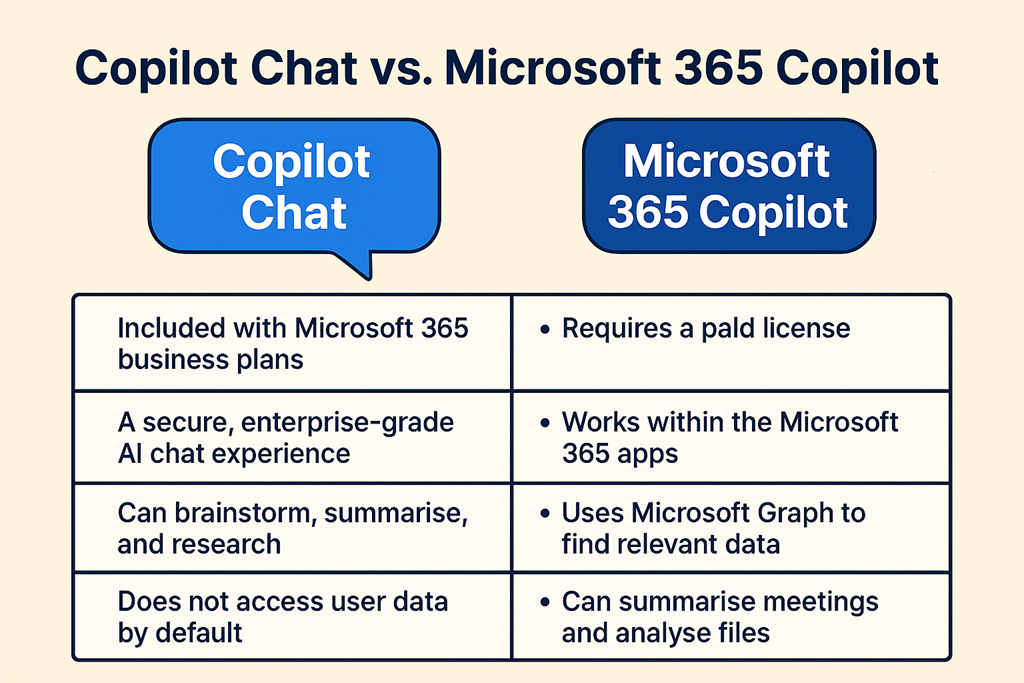
Copilot Chat is a secure, enterprise-grade AI chat experience that comes with eligible Microsoft 365 business plans. It’s available through the Copilot app, browser, and inside Microsoft 365 surfaces. [support.mi…rosoft.com]
Think of it as:
- A safe, work-friendly alternative to public AI tools
- A place to learn how to prompt properly
- A way to introduce AI thinking without touching business data
It’s excellent for:
- Brainstorming
- Drafting content
- Summarising uploaded documents
- Research and idea validation
- Learning how AI responds to different prompts
What it doesn’t do is magically understand your tenant.
And that’s where expectations matter.
What Copilot Chat Does Not Do
Copilot Chat does not have access to your Microsoft 365 data by default.
That means:
- It can’t see your emails
- It can’t summarise your Teams meetings
- It can’t analyse your SharePoint files
- It can’t act inside Word, Excel, Outlook or Teams using live context
Those capabilities require a Microsoft 365 Copilot licence. [support.mi…rosoft.com]
This is the mistake I see over and over again:
“We tried Copilot and it wasn’t very impressive.”
No—you tried Copilot Chat and expected Microsoft 365 Copilot.
They are related, but they are not the same thing.
Why Copilot Chat Is Still the Right Starting Point
Even with those limitations, Copilot Chat is a brilliant on‑ramp to AI adoption.
Why?
Because Copilot success has very little to do with licences—and everything to do with behaviour.
Copilot Chat lets organisations:
- Learn how to ask better questions
- Understand AI strengths and limitations
- Build internal confidence with generative AI
- Establish safe usage patterns and governance conversations
All before spending a dollar on add‑on licensing.
For MSPs, this is gold. You can:
- Run Copilot Chat workshops
- Teach prompt engineering fundamentals
- Identify which roles would actually benefit from full Copilot
- Reduce the risk of failed rollouts later
What Changes When You Buy Microsoft 365 Copilot
Microsoft 365 Copilot is where AI stops being a chat tool and becomes a workflow tool.
With the paid licence, Copilot:
- Works directly inside Word, Excel, PowerPoint, Outlook and Teams
- Understands emails, meetings, chats, files and calendars
- Uses Microsoft Graph to reason across your tenant
- Can summarise meetings, draft replies, analyse spreadsheets and build decks
In short:
Copilot Chat helps you think.
Microsoft 365 Copilot helps you do. [support.mi…rosoft.com]
But that power only delivers value if users already know how to work with AI.
Set Expectations First. Licence Later.
The smartest Copilot projects I’ve seen all follow the same path:
- Start with Copilot Chat
- Train people how to prompt and think with AI
- Identify high‑value roles and use cases
- Then—and only then—license Microsoft 365 Copilot
Copilot Chat isn’t a “cut‑down demo”.
It’s a training ground.
Use it properly, and when you do buy licences, Copilot won’t feel expensive—it’ll feel obvious.
And that’s how Copilot adoption should work.
 CIAOPS