

This is part of a series on MSP priorities for 2026.
AI-Driven Automation Program for MSPs (SMB Clients)
Objective: Enable SMB clients to embrace AI-driven solutions and automation using Microsoft 365 Business Premium, through a phased program with clear steps, timelines, roles, and measurable outcomes. The program focuses on quick wins in efficiency and security, structured adoption of AI (e.g. Microsoft 365 Copilot, Power Automate), and ongoing optimization – all delivered in an executive-friendly, outcome-focused manner.
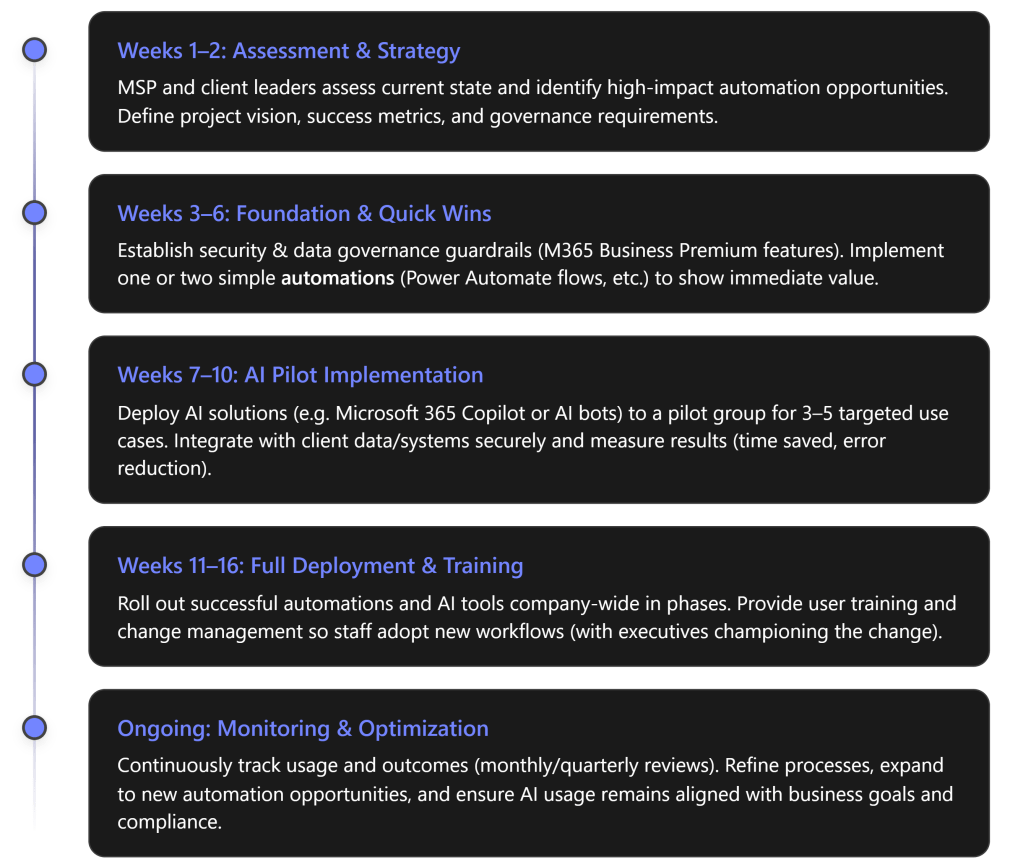
Phase 1: Assessment & Strategy (Weeks 1–2)
Key Actions: Kick off the program with a joint MSP–client assessment of the client’s current processes, pain points, and readiness for AI. The MSP conducts an AI readiness audit covering technology and workflow gaps, while client stakeholders (business managers and IT leads) catalog repetitive, labor-intensive processes and key data sources. Together, define 3–5 high-impact use cases where AI or automation can add value – focusing on tasks with heavy manual effort, clear rules, and measurable outcomes (e.g. time saved, fewer errors). For example, candidates might include automating invoice approvals, using an AI assistant for helpdesk ticket triage, or auto-generating routine reports. Additionally, establish success criteria for each use case (such as “reduce invoice processing time by 50%” or “save 10 hours/month on helpdesk responses”). Finally, align on scope, timeline, and sponsorship: ensure an executive sponsor is in place to communicate vision and support change management. The output of this phase is a clear automation roadmap (target use cases, required Microsoft 365 tools, and KPIs) and a shared understanding of responsibilities. [eatonassoc.com]
Roles: The MSP leads the assessment by bringing templates and expertise (e.g. conducting workshops to surface improvement areas). The client’s executives and process owners provide business context: for instance, “Office managers list the top 10 repetitive processes… IT leaders map where data resides”. This collaboration ensures the strategy focuses on relevant business priorities. The MSP also identifies which Microsoft 365 Business Premium capabilities will be leveraged for each opportunity – for example, Power Automate for workflow automation, Teams + Power Virtual Agents or Copilot for AI-driven assistance, and Azure AD/Intune for identity or device needs. Both parties agree on a high-level plan before moving forward. [eatonassoc.com]
Phase 2: Foundation & Quick Wins (Weeks 3–6)
Key Actions: Before rolling out advanced AI, the environment must be “AI-ready.” In this phase, the MSP establishes a strong foundation on the client’s Microsoft 365 Business Premium tenant. This includes implementing critical security and compliance controls and any pre-requisites for safe AI usage. For example, enforce Azure AD Conditional Access and MFA for all users if not already in place, and enable data protection policies (sensitivity labels, DLP for sensitive info) – essentially “minimum governance guardrails” to ensure AI is deployed on a secure identity and data foundation. Business Premium’s built-in tools (like Defender for Business, Intune, Conditional Access) are utilized here to harden security and manage devices, since successful AI adoption requires trust that corporate data is handled safely. The MSP also sets up an early win by deploying one or two simple automations immediately. For example, using Power Automate to streamline a common task: perhaps an approval workflow or an email alert integration that addresses a known pain point. These quick wins demonstrate tangible improvement within weeks. As one guide notes, introducing basic automations for common repetitive tasks can “deliver a quick efficiency win” and open clients’ eyes to the power of their M365 tools.
In parallel, the MSP finalizes any needed licensing or tool enablement for AI. Notably, Microsoft has introduced “Microsoft 365 Copilot Business” SKUs for SMBs (including one for Business Premium) that add AI capabilities. If the client opts for Copilot, the MSP ensures those licenses are in place and initial Copilot configurations (permissions, content accessibility) are set according to best practices. By the end of Phase 2, the client’s tenant should have a solid security posture and one or two automated workflows live – boosting confidence and setting the stage for broader AI rollout. [connectwise.com]
Roles: The MSP takes charge of technical execution in this phase. They configure M365 Business Premium features for security (e.g. enabling MFA, Intune policies, Defender) and build the initial Power Automate flows or other scripts. The MSP also advises on governance policies – for instance, deciding which data sources Copilot can access or which users should get early AI access. The client’s IT stakeholders assist by providing necessary approvals or information (e.g. which compliance policies apply, who should be in pilot groups). Client leadership should communicate to employees about upcoming improvements (“We are implementing new tools to eliminate manual drudgery and improve security”), helping set expectations and a positive tone. Early user involvement might be limited, but any quick-win automation that goes live should be explained to affected staff so they understand the new, easier process. [connectwise.com], [eatonassoc.com]
Measurable Outcomes (Phase 2): Quick security improvements and initial efficiency gains can be tracked. For example, after enforcing MFA and security baselines, the client’s Microsoft Secure Score should jump upward (a quantifiable security metric). A quick-win automation might be measured by the reduction in time to complete that process. Although Phase 2 is largely foundational, it should already yield visible results – e.g. “automated alerting for form submissions eliminated an hour of manual email sorting per week” – to build momentum.
Phase 3: AI Pilot Implementation (Weeks 7–10)
Key Actions: With the groundwork laid, the program moves to an AI pilot phase. The MSP now implements the core AI-driven solutions for the prioritized use cases, initially on a small scale. This typically involves:
- Deploying AI Tools to a Pilot Group: For instance, enabling Microsoft 365 Copilot for a set of pilot users (such as a few people in sales, finance, or HR who will exercise it in their daily work), or developing a prototype AI chatbot in Teams for the helpdesk, or using Power Automate with GPT-based actions. The pilot group should be representative and enthusiastic, and they should have clear objectives for what to try (e.g. sales team uses Copilot to draft proposals and get data insights; helpdesk uses an AI assistant to classify and respond to common tickets).
- Integrating and Configuring AI Workflows: Ensure the AI solutions are properly integrated with the client’s data and workflows. For example, if rolling out Copilot, the MSP checks that it’s grounded in the client’s SharePoint/OneDrive content in a governed way (respecting permissions set in Phase 2). If building a custom automation, connect it to relevant data sources (e.g. linking Outlook, Teams, or a third-party system via connectors). Business Premium provides a robust base here – identity and device management from Phase 2 help ensure only authorized, compliant data feeds into AI, addressing a key concern that AI adoption “must be built on the right identity controls, data permissions, and governance”. The MSP might use tools like the new Copilot Studio or Power Platform capabilities to create tailored AI agents or flows, and leverage their expertise to handle any API or integration work needed. [connectwise.com] [eatonassoc.com]
- Executing the Pilot and Collecting Feedback: The pilot users start using the AI-driven solutions in real scenarios, while the MSP closely monitors usage and outcomes. It’s critical to measure baseline vs. post-pilot metrics to validate the impact. For each use case, track things like: time to complete a task (before vs. after automation), number of manual steps or touchpoints eliminated, and quality indicators (e.g. error rates or response accuracy). Also gather subjective feedback: are users finding the AI helpful? Any confusion or adjustments needed? The program should allow for quick iteration – if the AI workflow isn’t yielding the expected result, tweak the prompts or logic. For example, if an AI helpdesk agent is piloted, measure if first-response resolution rates improve or if it correctly routes issues, and refine it if it’s missing certain categories. [eatonassoc.com]
During this phase, success means proving out value on a small scale. A well-run pilot will show, for instance, that generating a monthly report with Copilot takes 5 minutes instead of 2 hours, or that an automated approval cuts a three-day waiting process down to same-day. These results should be documented as they will justify expansion. Notably, MSPs are encouraged to “make Copilot outcomes measurable” – define concrete metrics and track them – so that the AI rollout is tied to business value from the start. [connectwise.com]
Roles: In the pilot, MSP experts build and oversee the AI solutions, while pilot users (client employees) actively participate and provide feedback. The MSP’s responsibilities include technical development (e.g. configuring Copilot, creating Power Automate flows with AI integrations) and ensuring the solution works within the client’s environment (taking care of any integration with line-of-business systems or adjusting security settings as needed). The MSP also acts as a coach: training the pilot users in how to use the new AI tools effectively (for example, showing them how to ask Copilot for certain analyses, or how to trigger and monitor the new automated workflow). The client stakeholders during this phase should include the business owners of each pilot use case – they will validate that the AI is producing acceptable outputs. For instance, the finance manager in the pilot can confirm that the AI-generated invoice summaries are accurate. These stakeholders help set the acceptance criteria for the pilot (“we need at least 90% accuracy on categorizing helpdesk tickets” or “proposal drafts should require minimal editing”). They work closely with the MSP to tweak rules or provide sample data to train/guide the AI if needed. Importantly, the client’s IT and compliance officers verify that all pilot activities stay within policy – e.g. that AI is not accessing restricted data or that any sensitive outputs are handled properly. This collaborative pilot execution ensures that by the end of Phase 3, there is solid evidence (in performance metrics and user satisfaction) that the AI-driven solutions deliver the promised outcomes.
Measurable Outcomes (Phase 3): Each pilot use case will have its own success measures, but collectively the pilot should demonstrate at least some of the following improvements: significantly reduced cycle times for the targeted processes, reduction in manual workload (e.g. “we eliminated 5 manual data entry steps in onboarding”), and improved responsiveness (e.g. “customer emails are now answered by the AI assistant within seconds, with an option for human follow-up”). Quantitatively, the team should capture things like “X hours of work saved per week” or “Y% increase in output per staff member” for pilot tasks. Early indications of user adoption are also key: if the majority of pilot users stick with the AI tool and find it beneficial, that’s a green light. (Many organizations see over 80% user adoption within 3 months when AI pilots are well-scoped and demonstrably improve daily work – the pilot phase aim is to hit such high adoption and enthusiasm in the test group.) [eatonassoc.com]
Phase 4: Full Deployment & Training (Weeks 11–16)
Key Actions: After a successful pilot, the program scales the AI-driven solutions to the broader organization. This phase is about deployment at scale, change management, and ensuring all users are enabled to use the new tools effectively. Key activities include:
- Gradual Rollout: The MSP and client plan a phased rollout of the AI and automation solutions to additional departments or the entire company as appropriate. Rather than a big bang, it’s wise to sequence the deployment. For example, if an AI automation was piloted in Accounts Payable, extend it next to the Purchasing team, then to other finance functions. If Copilot was piloted with a handful of users, consider rolling it out to a larger group in waves (perhaps all managers first, then all knowledge workers). This staged approach allows any minor issues to be addressed and avoids overwhelming the support capacity. Microsoft 365 Business Premium with Copilot (if in use) will now be broadly enabled – this is where having Business Premium pays off, as it “already has identity, device management, and security controls in place, making secure AI adoption easier to operationalize”. In other words, scaling up Copilot or Power Automate usage is straightforward because the necessary licenses and security measures were handled in earlier phases. [eatonassoc.com] [connectwise.com]
- Comprehensive User Training & Awareness: A critical focus in Phase 4 is getting users comfortable and proficient with the new AI-driven processes. The MSP (or a training specialist) delivers targeted training sessions for different user groups. For instance, host a workshop for all employees on “Using Microsoft 365 Copilot for daily tasks” covering how to ask it to draft documents, find information, or generate insights. Likewise, if automated workflows affect certain roles, provide documentation or live demos of the new process (e.g. “how expense approvals happen in Teams now via automation”). It’s important to convey not just the how but the why – reassure staff that automation isn’t a threat but a means to eliminate drudgery so they can focus on higher-value work. Also set guidelines (especially for AI tools): clarify appropriate use, data handling, and any limitations. For example, train sales and marketing teams on how to review and refine AI-generated content to maintain quality. Executive sponsorship is crucial here: leadership should visibly endorse the changes, for example by using Copilot themselves in meetings and sharing success stories, which “sets an example that motivates employees”. When employees see managers actively embracing the new AI tools, it reinforces cultural adoption.
- Governance and Policy Refinement: As AI usage becomes widespread, formalize the governance policies. In Phase 2 and 3, interim guardrails were set; now the MSP helps the client institute lasting policies and documentation. For instance, update the company IT policies to include AI acceptable use (what cannot be asked of Copilot, data categories that shouldn’t be fed into prompts, etc.), and ensure audit logging is enabled for AI-related activities for compliance. Microsoft 365 provides auditing and DLP tools that can track sensitive data usage even in AI scenarios. If not already done, define data access boundaries for AI – essentially confirming “what data AI tools can and cannot access” and setting any needed restrictions. Also, establish an internal support process: if users have questions or if the AI produces uncertain output, how should they escalate it? The MSP might set up a feedback channel (like a Teams channel for AI Q\&A or issues) to gather user inputs post-rollout. [eatonassoc.com]
By the end of Phase 4, the AI-driven solutions should be fully embedded in daily operations. All intended users have access, have been trained, and are actively using them for their work. The organization should start realizing the broader benefits: faster workflows across the board, more consistent outputs, and employees leveraging AI as a “copilot” in various tasks.
Roles: During full deployment, MSP responsibilities include technical rollout (e.g. pushing any required client-side updates or ensuring all targeted user accounts have the necessary licenses and access) and acting as the program manager for adoption. They will coordinate training sessions, prepare user guides or cheat-sheets, and remain on standby to troubleshoot any technical snags as user counts grow. The MSP continues to ensure security as new users come online – for example, confirming new users adhere to MFA and that any new devices are Intune-compliant, so the expansion doesn’t introduce vulnerabilities. The client’s leadership and managers hold a vital role in change management: they must encourage their teams to embrace the new ways of working. For example, a sales director might mandate that the team uses the AI proposal generation tool for all new proposals, or an operations manager might set a goal that 90% of routine service requests go through the AI triage bot. Managers should also celebrate early successes (e.g., “Our finance team closed the books in 3 days instead of 5, thanks to the automation – kudos to the team!”). Meanwhile, end-users are responsible for integrating these tools into their routine and providing feedback if something is not working well. The client’s IT support should now be prepared to handle basic inquiries about the AI tools (with the MSP as Tier-2 support for more complex issues). Essentially, in this phase the MSP gradually hands over day-to-day operation of the solution to the client (while still overseeing it), so clearly documented SOPs (Standard Operating Procedures) are created for the client’s IT team regarding the maintenance of these new systems. [eatonassoc.com]
Measurable Outcomes (Phase 4): By the end of the full deployment phase, the program should be hitting its targeted outcomes on a broad scale. Key metrics to look at include: User Adoption Rate – e.g. what percentage of employees are actively using Copilot or following the new automated process. The goal is high adoption; as a benchmark, >75% of the target users consistently using the AI tools is excellent (studies show many SMBs reach ~80% AI adoption in a few months with the right training and incentives). Productivity/Efficiency Gains – quantify the overall impact, such as “automated workflows now handle 100+ transactions per week that used to be manual” or “the average helpdesk ticket resolution time dropped from 4 hours to 1 hour after AI triage.” If the program included customer-facing improvements (like faster responses), customer satisfaction scores could be measured (e.g. an uptick in CSAT due to quicker service). Financial impact should also start to emerge: for example, if each hour saved is reinvested, calculate the notional cost savings. It’s not unrealistic to see on the order of $500–$2,000 per month in savings for an SMB through efficiencies and error reduction, as 66% of AI-adopting SMBs in one survey reported within a few months. The outcomes should be compiled into a report or dashboard – something an executive can glance at to see that, say, “AI automation has saved 50 worker-hours this month, prevented 10 potential errors, and improved our proposal turnaround by 2 days.” These concrete results validate the investment and set a baseline for continuous improvement. [eatonassoc.com]
Phase 5: Ongoing Monitoring & Optimization (Continuous)
Key Actions: The final “phase” is an ongoing effort that runs indefinitely once the solutions are in place. Achieving the outcomes is not a one-time event; sustaining and expanding them requires continuous monitoring and improvement. In this stage, the MSP transitions into a steady-state support and optimization role (often as part of a managed service agreement), and the client’s teams continue to refine their use of AI. Key activities:
- Performance Monitoring & Support: The MSP (or client IT) should track key metrics on an ongoing basis – usage statistics, success rates of automations, system performance – using dashboards or reports. Regular reviews (e.g. monthly) are scheduled with client stakeholders to review these metrics and any incidents. For example, if Copilot usage data shows some departments lagging, the MSP can arrange additional training or investigate if there’s a blockage. If an automated workflow fails or is bypassed frequently, troubleshoot why and enhance it. It’s advisable to hold quarterly executive checkpoints focusing on AI/automation outcomes: in these, discuss ROI realized to date and decide on any course corrections or further investments. [connectwise.com]
- Continuous Improvement & New Use Cases: With the first wave of AI solutions delivering value, identify further opportunities to leverage AI across the business. The MSP should help the client plan the next set of improvements. This might mean iterating on the current solutions (e.g. expanding an AI chatbot’s knowledge base to handle more queries) or applying AI to new domains in the organization. For instance, after seeing success in internal operations, the client may want to explore an AI-driven customer FAQ bot, or use Power BI with AI visuals for advanced analytics. Because technology evolves, new features in Microsoft 365 (especially around AI) will continue to emerge – the MSP keeps the client informed of relevant updates (for example, if Microsoft releases a new Copilot capability or integration, the MSP evaluates if it can help the client). Essentially, the MSP and client establish a cycle of innovation: pilot, rollout, measure, optimize, then repeat with new ideas. This prevents stagnation and ensures the client continues to benefit from the latest improvements. It also turns the initial project into a long-term partnership, where the MSP acts as a virtual CIO continuously aligning tech advances with the client’s business strategy.
- Roles & Responsibilities Formalization: Over time, some responsibilities may shift more to the client’s internal team. Part of optimization is ensuring the client can manage day-to-day operations of the automations (with runbooks or admin guides provided by the MSP). However, areas like advanced AI tuning, major updates, or building new automations might remain the MSP’s role. It’s important to clearly define this in the ongoing phase to avoid gaps. Typically, the MSP handles system health, updates, and complex changes, while the client handles basic user administration and identifies business needs. Regular governance meetings should also ensure compliance is maintained – e.g. review audit logs to ensure AI usage is within policy, and update policies if regulations or business needs change.
Measurable Outcomes (Ongoing): In the long run, the program’s success is gauged by sustained and improved metrics. Efficiency gains should accumulate – for example, if in the first quarter 200 hours were saved, aim for 300+ hours saved in the next with further optimizations. User adoption should remain high or even increase as new features are added (you might target near-100% adoption for applicable roles after ample time and improvements). Business impact can be measured in higher-level terms too: perhaps the SMB client can handle a greater volume of business without adding headcount, or employees report higher satisfaction because they can focus on more creative tasks instead of routine work (this could be measured via employee surveys). The ultimate outcome is that the client organization is now more agile, efficient, and AI-augmented than before: they have, as the blog put it, truly “embraced AI-driven solutions and automation” in their day-to-day operations. The MSP should also track the ROI of the project for the client (e.g. productivity gains quantified in dollar value versus the cost of the solution over time), as well as for the MSP’s own business (since a successful outcome often leads to contract renewals, referrals, and case studies for the MSP).
Roles and Responsibilities Overview
To ensure clarity, the table below summarizes the key roles and responsibilities for the MSP and the client throughout this program:
| MSP (Service Provider) | Client (SMB Stakeholders) | ||
|---|---|---|---|
| Strategic Advisor & Project Lead: Drive the overall program plan, phase by phase. MSP consultants perform the initial environment and process audit, uncovering automation opportunities [eatonassoc.com]. They define the solution architecture (which M365 Premium tools and AI services to use) and set success KPIs in consultation with client executives. | Executive Sponsor & Stakeholder Alignment: Assign a senior sponsor (e.g. CEO or Principal) to champion the initiative and communicate its importance. Ensure department heads are engaged to define business pain points and priorities. For example, finance and operations managers enumerate the manual processes and pain points that need improvement [eatonassoc.com], providing clear goals for the MSP to target. | ||
| Technical Implementation & Integration: Configure Microsoft 365 Business Premium security features, deploy Copilot/AI tools, and build Power Automate flows or bots as needed. The MSP handles all technical setup, from enabling licenses to integrating AI with line-of-business data [eatonassoc.com], ensuring solutions work seamlessly in the client’s environment. They maintain a secure and compliant configuration throughout (e.g. enforcing identity controls, data access limits as defined). | IT Coordination & Data Provisioning: Client’s IT staff or primary IT contact works with the MSP to provide access to systems and data required for automation (e.g. ensuring the MSP can connect to a CRM or database if needed). They validate that security and compliance requirements are met from the client’s perspective, approving changes like security policy updates. IT also prepares to support the new tools post-deployment (with documentation from MSP). | ||
| Training & Enablement: Educate and guide users on the new AI-driven processes. The MSP creates user-friendly documentation and conducts training sessions (live demos, Q&A) for various teams. | They also set usage guidelines (in line with company policies) for AI tools, so employees know how to use Copilot or automated workflows effectively and responsibly. | Employee Adoption & Change Management: The client’s management ensures that employees attend trainings and actually use the new tools. Leaders lead by example – e.g. management demonstrates its own use of AI tools in meetings – to foster a culture that embraces automation. | Department heads monitor their teams’ adoption and address any resistance or issues (with feedback to the MSP for further support if needed). |
| Monitoring & Optimization: Continuously monitor solution performance and results. The MSP tracks metrics (usage, time saved, errors prevented, etc.) and reports these to the client in regular reviews [connectwise.com]. They proactively fine-tune workflows or AI configurations to improve outcomes. The MSP also keeps the client informed about new Microsoft 365 features or AI updates that could enhance the solution, proposing enhancements over time. | Feedback & Continuous Improvement: Client stakeholders provide ongoing feedback on what’s working or where further improvements are needed. For instance, end-users report if an AI-generated report needs tweaking or if an automated process could cover more scenarios. Business units also identify new areas where automation could help. This feedback loop allows the program to adapt and expand, keeping the automation roadmap aligned with evolving business needs. |
Measurable Outcomes and Success Metrics
By following this structured program, MSPs and their SMB clients can achieve concrete outcomes. Below are key success metrics to track, which tie back to the goals of “embracing AI-driven solutions and automation”:
- Productivity Gains: Significant reduction in manual effort and process cycle times. Aim for on the order of 20+ hours per month of routine work eliminated for key teams (e.g. through automated workflows) – indeed, over half of SMBs using AI report saving at least 20 hours monthly by automating repetitive tasks. For example, if an approval process that used to take 3 days (with human reminders) is now done in half a day via Power Automate and Teams notifications, that translates to faster results and labor hours returned to the business. We should document such improvements for each automated process (e.g. “X process now 70% faster, saving Y hours per week”). Over a year, these efficiency gains should reflect as either capacity to handle more work with the same staff or cost savings by reallocation of effort. [eatonassoc.com]
- User Adoption & Engagement: High adoption of AI tools across the organization, indicating user buy-in. A successful outcome is when a substantial majority of employees (75%+) in scope are actively using the provided AI-driven solutions in their day-to-day work. As a benchmark, many SMB deployments have seen around 80% of users adopting AI tools within 3 months when those tools clearly help in their job. We will track metrics like number of Copilot queries per user, number of tasks run through the automated workflows vs. old manual way, etc. A rising trend and broad usage means the workforce has embraced the change. Qualitatively, positive employee feedback – e.g. users saying “the new system saves me an hour each day” – signals cultural acceptance of AI. [eatonassoc.com]
- Process Accuracy and Quality: Automation and AI should not only speed things up but also reduce errors and improve consistency. We will measure error rates or rework instances before vs. after. For example, if manual data entry in a report often had mistakes, and now an AI-driven process generates that report, the error rate should drop to near-zero. Similarly, an AI helpdesk triage might decrease misrouting of tickets. These quality improvements may be seen in metrics like a reduction in corrections needed or higher compliance (since automated steps occur the same way each time). In surveys, employees might report that outputs from AI (emails, analyses, etc.) meet quality standards most of the time, which is an improvement over previous human variability.
- Business Impact & ROI: Ultimately, the program’s success will reflect in business-level outcomes. This can include cost savings, capacity for growth, and better service delivery. We will translate efficiency metrics into financial terms – for instance, 20 hours saved per month in a department is equivalent to approximately 0.5 FTE, which for an SMB might mean ~$1,000 in cost saved or re-deployable value (in line with findings that ~66% of AI-using SMBs save $500–$2,000 monthly through such optimizations). If automation allowed the company to avoid hiring an additional employee despite growth, that’s a direct cost avoidance benefit. Additionally, faster response times and improved deliverable quality can enhance customer satisfaction, which may lead to revenue retention or growth (though harder to measure short-term, we can use customer feedback or NPS as indicators if available). The MSP and client should agree on a few top-level KPIs that matter to leadership – for example, average project delivery time, monthly sales proposals completed, or customer ticket resolution rate – and see how those move after the AI implementations. These tie the technological outcomes to business outcomes like revenue growth or risk reduction. [eatonassoc.com]
- Security & Compliance Posture: An often overlooked but crucial outcome of introducing automation under Business Premium is that it can increase security and compliance rather than risking it. By using M365’s secure ecosystem, the client’s data is now more centrally governed. We will note improvements such as an improved Microsoft Secure Score, 100% MFA coverage (if it was lower before), and adherence to data handling policies even as AI tools are used (verified via audit logs). A secure foundation means the AI-driven operations run without incidents – success is measured by the absence of security breaches or compliance violations despite increased automation. In other words, the client achieves efficiency without sacrificing security, thanks to the MSP’s careful governance (this addresses a key requirement that AI adoption be “measurable, compliant, and built to scale”). [connectwise.com]
In summary, by the end of this program the MSP-enabled initiative should deliver clear, executive-level results: faster workflows, empowered employees, and tangible savings. For example, an executive report might read: “Through AI-driven automation, the organization improved operational efficiency by 30%, saving an estimated 120 hours of work per month and $XV in costs. User adoption of the new tools is at 85%, and error rates in key processes have dropped to near zero. These enhancements were achieved while strengthening security (Secure Score up by 15 points), enabling the company to scale effectively into 2026.” Such outcomes demonstrate that the MSP’s step-by-step program not only met the objectives of item three (“Embracing AI-Driven Solutions and Automation”) but did so in a structured, risk-managed way that delivers value to the SMB client’s bottom line. [eatonassoc.com]
 CIAOPS
One thought on “Step-by-Step Program to Achieve Priority #3 with Microsoft 365 Business Premium”