

This is part of a series on MSP priorities for 2026.
Priority #1 (2026): Elevate SMB Cybersecurity and Resilience. The first key priority for MSPs serving SMBs in 2026 is to strengthen clients’ security posture in the face of rising cyber threats. Microsoft 365 Business Premium – a comprehensive productivity and security suite for up to 300 users – is an ideal foundation for this goal, as it includes Office apps, Teams, advanced security (Microsoft Defender), and device management (Intune) in one package. Below is a practical step-by-step program leveraging Business Premium to achieve the outcomes outlined in Priority #1, focusing on identity protection, device and data security, threat prevention, and continuous improvement. The most critical actions (enabling MFA, device compliance, threat protection) are presented first, followed by supporting measures for sustainment. [techcommun…rosoft.com]
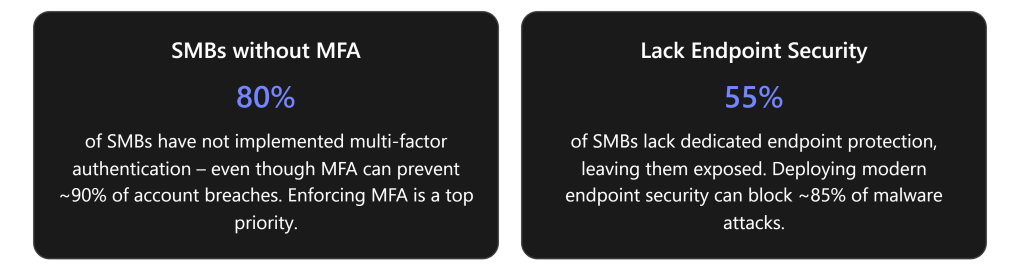
Step 1: Enable MFA and Conditional Access for All Users
Action: Immediately protect user identities by requiring multi-factor authentication (MFA) on all accounts and applying Azure AD Conditional Access policies (enabled by Business Premium’s Entra ID Premium P1 license). Start by turning on MFA for every user, ideally via Conditional Access rather than per-user settings. For example, define a policy in Entra ID that requires MFA for all logins and blocks access from risky sign-in locations or legacy authentication protocols. Use Conditional Access “trusted locations” and device compliance conditions to fine-tune access (e.g. skip MFA on known safe networks, but enforce it elsewhere). Also enable self-service password reset with MFA (another Entra ID P1 feature) so users can securely reset credentials without helpdesk intervention. [prescripti….solutions] [prescripti….solutions], [dev.to] [dev.to]
Outcome: Dramatically reduced risk of account breaches. By implementing MFA and intelligent access rules, stolen passwords alone can’t compromise the business. This is critical given that the vast majority of SMB breaches involve compromised credentials – enabling MFA can prevent ~90% of such attacks. Conditional Access gives precise control over who and what conditions can access cloud resources, moving beyond basic security defaults to a true Zero Trust stance. Administrators gain visibility and control, rather than relying on implicit trust. [totalassure.com] [prescripti….solutions]
Best Practices: Roll this out tenant-wide using Azure AD Security Defaults off + custom policies on. Start with a baseline policy (e.g. require MFA for all users) and test using the “What If” tool in Conditional Access to verify the rules before enforcing. Educate users about the new MFA requirement in advance to ensure smooth adoption. For MSPs, standardize a template Conditional Access policy that you can deploy across all client tenants for consistency. (Microsoft 365 Business Premium is the only Business SKU that supports these Conditional Access policies, unlocking this enterprise-grade security for SMBs.) [prescripti….solutions]
Step 2: Onboard and Secure All Devices with Intune
Action: Establish device management and compliance enforcement using Microsoft Intune (included in Business Premium). Enroll every work device – laptops, desktops, and mobile devices – into Intune for centralized management. Configure automatic enrollment for Azure AD-joined or hybrid AD-joined devices so that any new device a user signs in to is prompted to enroll in Intune. For BYOD scenarios, use App Protection Policies (MAM) for mobile apps to secure company data without full device enrollment. Once devices are under management, apply compliance policies: require a minimum OS version/patch level, enable BitLocker encryption on Windows 10/11, enforce password complexity, and block jailbroken or non-compliant devices. Tie these policies back into Conditional Access – e.g. allow access to corporate apps only from compliant (Intune-managed, policy-adherent) devices. [dev.to] [dev.to], [dev.to]
Outcome: Only trusted, secure devices can access company data. Intune enrollment and compliance policies ensure every PC or mobile device meets security standards (up-to-date OS, encryption on, malware protection) before it accesses email or files. Lost or stolen devices can be remotely wiped to protect data. BYOD users get secure access via app sandboxes without risking a data leak. Uniform device management reduces the chance of an unpatched laptop or unauthorized device becoming a breach entry point. For SMBs, this brings enterprise-level endpoint governance – a major step up from the unregulated device access many had before. [dev.to]
Best Practices: Use Intune’s security baselines or template profiles for SMB-friendly settings (there are recommended baseline configurations for Windows, Edge, etc.). Implement Microsoft Defender antivirus policies via Intune to ensure real-time protection is active on all endpoints (Business Premium’s Defender for Business will also cover this – see Step 3). Leverage Windows Autopilot for zero-touch provisioning of new devices to streamline onboarding for new hires or hardware refreshes. MSPs should document a standard device configuration (OS build, required apps, policies) and apply it uniformly across clients for efficiency. Prerequisite: Ensure each Windows device is Windows Pro or higher (Business Premium includes Windows 11 Pro upgrade rights), which is required for Azure AD join and Intune MDM enrollment. [dev.to]
Step 3: Deploy Advanced Threat Protection for Email and Endpoints
Action: Now protect data, email, and endpoints from threats using Business Premium’s built-in Microsoft Defender solutions. In the Microsoft 365 Defender portal, configure Microsoft Defender for Office 365 (Plan 1) – included in Business Premium – to guard against phishing and malware in Exchange, OneDrive, SharePoint, and Teams. Enable Safe Attachments and Safe Links policies so that email attachments and URLs are scanned in real time for threats. Turn on anti-phishing policies to use machine learning for detecting spoofed or suspicious emails. Next, deploy Microsoft Defender for Business (endpoint protection) to all workstations and supported mobile devices. Onboard devices to Defender via Intune security tasks or local script: Intune can push the Defender agent onboarding configuration to each PC automatically. This provides next-generation antivirus, endpoint detection and response (EDR), and threat intelligence on those devices, equivalent to enterprise Defender for Endpoint P1. Ensure that Microsoft 365 Apps (Office desktop apps) are also deployed and kept updated (this can be done via Intune app deployment) so that users have the latest security-enhanced versions of Office. [prescripti….solutions] [prescripti….solutions], [prescripti….solutions] [dev.to]
Outcome: Proactive threat prevention and detection across email and devices. Phishing emails and malicious links are neutralized before users click on them, greatly reducing successful breaches via email (the #1 attack vector for SMBs). Every managed endpoint runs enterprise-grade antivirus/EDR, alerting you to malware or abnormal behavior and allowing quick response (isolation, remediation) via the Defender portal. This closes the gap where over half of SMBs had no endpoint monitoring. By using the integrated Defender suite, threats are tracked holistically – for example, if a user clicks a phishing link, you can see if that device later showed odd behavior, all in one dashboard. Overall, SMB clients get a dramatically improved security posture: common threats like ransomware and credential-stealing malware are stopped in real time, and any incidents are flagged immediately for investigation. [totalassure.com], [prescripti….solutions] [totalassure.com]
Best Practices: Customize anti-phishing rules to protect high-risk users (like execs) by enabling impersonation protection and adding trusted senders/domains to prevent false positives. Use Attack Simulation Training (if available as an add-on or via Defender for Office P2) to run simulated phishing campaigns and educate users – human error is still a leading cause of incidents. In Defender for Business (endpoint), set up automated investigation and remediation so that when an alert fires, the system can attempt to quarantine files or rollback changes automatically. Also configure alerting to MSP administrators (via email or Teams) for high-severity incidents so nothing slips by. If clients use additional security products (firewalls, etc.), integrate those signals where possible or at least ensure roles are clear to avoid gaps.
Step 4: Protect Sensitive Data and Ensure Compliance
Action: Implement basic data protection policies using Microsoft 365’s built-in capabilities, to prevent accidental data leaks and bolster compliance with any industry regulations. In the Microsoft Purview compliance portal (accessible with Business Premium), configure Data Loss Prevention (DLP) policies for common sensitive data types – for example, prevent emails or Teams chats from sharing credit card numbers, social security numbers, or other PII outside the organization. Even the base Business Premium license allows setting up Exchange Online DLP rules to detect sensitive info and either warn the user or block the message. Enable BitLocker drive encryption via Intune (as noted in Step 2) to ensure data on laptops is safe even if lost. Encourage use of OneDrive/SharePoint for file storage instead of local disks, so that data benefits from cloud security controls and backups. Also consider applying Sensitivity Labels (if available) to classify documents – for instance, tag files as “Confidential” vs “Public” – and apply encryption or access restrictions based on those labels. Sensitivity labeling (via Azure Information Protection Plan 1, included in EMS) lets protection travel with the file (the label policies can encrypt files or prevent external sharing). Finally, if clients have compliance requirements (like HIPAA, GDPR, or cyber insurance mandates), use the Compliance Manager in Purview to assess and track adherence to various control frameworks. [techcommun…rosoft.com], [techcommun…rosoft.com] [dev.to] [techcommun…rosoft.com]
Outcome: Minimized risk of data leakage and compliance violations. DLP policies will automatically block or report attempts to send sensitive customer data where it doesn’t belong (e.g. someone accidentally emailing a client’s credit card info). Encryption and labeling ensure that even if files are stolen or misdirected, unauthorized parties can’t read them. These measures give SMBs protections similar to large enterprises, keeping client trust and meeting legal requirements without heavy overhead. In sectors like finance or healthcare, these safeguards are essential and can be a selling point for the MSP’s services. Even for less regulated businesses, showing that strong data controls are in place differentiates your offering and reduces the chance of costly incidents. [techcommun…rosoft.com]
Best Practices: Start with pre-built templates in the DLP policy creation wizard (e.g. template for GDPR data, or US Financial Data) and customize as needed, rather than building rules from scratch. Pilot the DLP policies in audit mode first – this logs potential violations without blocking – to fine-tune the rules and minimize false positives. Educate the client’s employees about what the policies mean if they trigger (e.g. if they see a popup that they’re about to share sensitive info, they should heed it). Keep the compliance configuration lean: focus on a few high-impact policies rather than trying to cover every scenario at once. As a managed service, periodically review policy reports and adjust them to the client’s evolving needs. Additional tip: If clients require more advanced compliance features (insider risk management, encryption customer key, etc.), Microsoft now offers add-on suites for Business Premium – you can plan for these as an upsell, but the base Business Premium already provides a solid starting point. [techcommun…rosoft.com], [techcommun…rosoft.com]
Step 5: Continuous Monitoring, Improvement, and User Education
Action: Operationalize security as an ongoing program. Leverage Microsoft Secure Score to continuously assess each client tenant’s security posture and identify improvement actions. Secure Score aggregates recommendations across Azure AD, Intune, Defender, and more – use it monthly to track progress (for example, after deploying MFA and device compliance, the score will rise) and to spot any regressions. For MSPs managing many customers, set up Microsoft 365 Lighthouse – a free tool for partners – which provides a unified dashboard to monitor security alerts, device compliance, and user risk across all your Business Premium customer tenants. In Lighthouse, configure alerts and incident queues so your team can respond quickly to any customer’s issues from one screen. Additionally, implement a routine of security awareness training for users: deliver short training modules or phishing simulation (third-party tools or Microsoft’s Attack Simulator if available) on a regular basis. Users should learn to recognize phishing attempts, use MFA properly, and follow clean device practices, reinforcing the technology measures with good behavior. Perform periodic security reviews (e.g. quarterly business reviews focused on security) with each client: show them improvements (metrics like Secure Score increase, or number of threats blocked), discuss new threats or Microsoft feature updates, and plan next steps. This keeps the client engaged and aware of the value being delivered. [cloudpartn…rosoft.com] [prnewswire.com], [totalassure.com]
Outcome: Sustained high security posture and adaptability. By treating security as a continuous cycle, MSPs ensure that the initial gains from deploying Business Premium do not erode over time. The organization’s defenses stay current with emerging threats – for instance, if new ransomware tactics appear, you adjust policies or training accordingly. Centralized tools like Secure Score and Lighthouse provide measurable validation of security improvements and help catch any gaps (e.g. if an admin turned off a policy by mistake, score would drop). Regular user training fosters a security-first culture, attacking the human element of risk (notably, 95% of breaches involve some human error as a factor). Overall, the MSP can demonstrate ongoing value through reports and dashboards, and SMB clients maintain confidence that their protection is always up-to-date. In practical terms, this reduces incident rates and ensures faster response when issues do occur, limiting damage and downtime. [totalassure.com]
Best Practices: Automate what you can – for example, set Secure Score reports to email out monthly and use Lighthouse’s task automation or Azure scripts for common remediations (some Secure Score improvement actions can even be triggered via Graph API). Keep a runbook for incident response so that if an alert comes in (e.g. a detected malware outbreak), your team knows the steps to investigate and remediate promptly. Engage in Microsoft’s partner security communities or training (Microsoft offers MSP-specific workshops and bootcamps for Business Premium security) to stay ahead of new features (like recent additions in Entra ID or Defender). Finally, regularly revisit Priority #1’s objectives with the client’s leadership – as you improve their baseline, the conversation can evolve from “fixing vulnerabilities” to enabling new capabilities securely (e.g. deploying Microsoft 365 Copilot or other advanced tools in a secure manner), aligning security improvements with business goals. [cloudpartn…rosoft.com]
Summary of Steps, Tools, and Outcomes: The table below summarizes each step in the program, the key Microsoft 365 Business Premium tools used, expected outcomes, and prerequisites or setup notes for each step:
| Step | Microsoft 365 Business Premium Tools | Expected Outcome | Prerequisites/Notes |
|---|---|---|---|
| 1. Enforce MFA & Conditional Access | Azure AD (Entra ID) Premium P1 – Conditional Access policies; Microsoft Authenticator app for MFA | All user logins are protected by MFA and risk-based policies, drastically reducing unauthorized access [totalassure.com]. Only compliant, verified sign-ins are allowed (Zero Trust) [prescripti….solutions]. | Business Premium licenses assigned to all users. Disable legacy auth and inform users about MFA rollout. Have break-glass admin account excluded from CA (for safety). |
| 2. Manage & Secure Devices (Intune) | Microsoft Intune (Endpoint Manager); Azure AD join; Compliance Policy and Configuration Profile features; Autopilot deployment | 100% of PCs and mobile devices accessing corporate data are inventoried and meet security standards (encrypted, updated, protected) [dev.to]. Ability to remotely wipe lost devices. No unmanaged or outdated device can access data. | Devices running supported OS (Win 10/11 Pro, iOS, Android). Users sign in with Entra ID accounts. Configure baseline policies (enrollment required, BitLocker ON, etc.) before enforcement. |
| 3. Deploy Threat Protection (Email & Endpoint) | Microsoft Defender for Office 365 (Plan 1) – Safe Links, Safe Attachments, Anti-phishing; Microsoft Defender for Business (endpoint AV/EDR) via Intune or script; Microsoft 365 Defender security portal | Phishing emails and malware are actively blocked or quarantined before causing harm [prescripti….solutions]. Every endpoint has next-gen antivirus and is monitored for threats (with alerts to IT) [prescripti….solutions]. Rapid detection and response to incidents, reducing breach impact. | Exchange Online mailboxes in use (for Defender for O365 to apply). Endpoint devices enrolled in Intune or accessible to run onboarding script. Admins should familiarize with Defender portal and set notification rules. |
| 4. Protect Data & Compliance | Microsoft Purview compliance portal – Data Loss Prevention policies; Sensitivity Labels (AIP); BitLocker (via Intune); Exchange Online retention and data encryption settings | Sensitive data (financial, personal, etc.) is identified and controlled – preventing accidental leaks via email or Teams [techcommun…rosoft.com]. All laptops have encrypted drives, and company data is safer in cloud storage. Supports regulatory compliance and client data privacy commitments. | Identify key data types to protect (e.g. HIPAA data, credit cards). Business Premium includes basic DLP; for advanced needs, consider add-ons [techcommun…rosoft.com]. Roll out in stages to avoid user friction. |
| 5. Monitor & Improve Continuously | Microsoft Secure Score (security.microsoft.com); Microsoft 365 Lighthouse (multi-tenant management); Azure AD risk reports; User training content (Microsoft Learn or third-party) | Sustained security posture with quantifiable improvements (higher Secure Score). Threats and alerts across all clients are centralized for fast response [cloudpartn…rosoft.com]. Users are more security-aware, reducing risky behavior. The MSP can proactively address issues and demonstrate ongoing value. | Set a schedule (monthly/quarterly) for reviews. Lighthouse requires CSP partner access to customer tenants. Use reports to show value to clients. Keep admins and users updated on new features and threats (e.g., via newsletters or training sessions). |
Each of these steps builds upon the previous to form a comprehensive security program. By standardizing on Microsoft 365 Business Premium across their SMB clientele, MSPs can deliver enterprise-grade protection in a repeatable, cost-effective way. The result for Priority #1 is clear: stronger defenses against cyberattacks, improved compliance, and a more resilient business for clients, all achieved with the integrated toolset that Business Premium provides, backed by Microsoft’s latest innovations. This step-by-step roadmap not only fulfills the outcomes detailed in item one of the outlook, but also creates a platform for MSPs to continue expanding services (such as advanced compliance, analytics, or AI solutions) in a secure manner throughout 2026 and beyond. [prescripti….solutions].
 CIAOPS