
Recently, I discovered that Copilot pages were not appearing in Edge inprivate.

You can see the example above: Edge, inprivate and no Copilot pages.

It seems that a control in the Microsoft 365 administration portal (Copilot | Settings | Pin Copilot) plays a role somehow. Initially mine was set to Do not pin Microsoft Copilot to the navigation bar.
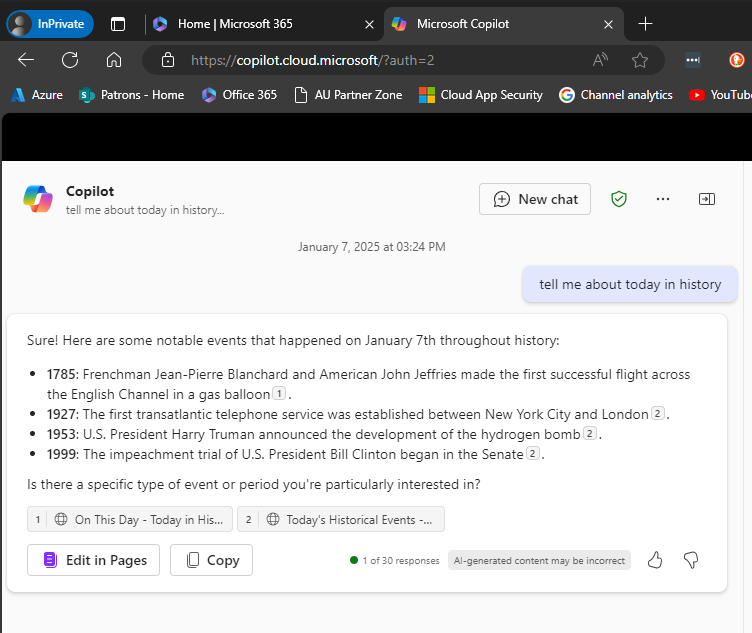
However, when I changed the setting to Pin Copilot to the navigation bar (recommended) and after a browser refresh or two (or close down/reopen browser), the Edit in Pages now appears within Edge inprivate as shown above.
What I also didn’t appreciate is that if you don’t have a paid version of Copilot for Microsoft 365 and simply use the free version of Copilot with your Microsoft 365 environment you can also get access to the Edit in Pages capabilities, which I thought required a fully paid Copilot for Microsoft 365. However, that doesn’t appear to be the case as the above screen shot came from a tenant with no paid Copilot for Microsoft 365 and the Edit in Pages is available, PROVIDED it seems, you turn on the pin Copilot option!
Of course, I can’t find this documented anywhere and only stumbled across it playing around. I have found the Edit in Pages button appearance to be somewhat unreliable when it did appear, but I have been turning the setting on and off to test, which have contributed to that unreliability.
After all this testing, my advice would be, based on the tests I’ve run, that even if you don’t have a pad version of Copilot for Microsoft 365 in your environment you want the option to Pin Copilot to the navigation bar enabled as I detailed above. That should allow the Edit in Pages to always appear regardless of a paid version of Copilot being in the tenant or not and regardless of browser or browser session you use.
Another observation is that with the pinned option set, the free version of Copilot returns more information as you can see when you compare the screen shots. With the pinned option enabled you get citations and hyperlinsk to the citation. Interesting.
It would be nice to know for sure if this setting does what I have found but for now you’ll have to take my word for it based on what I have found in my testing.
 CIAOPS