
If you are interested to see how many failed logins your Microsoft 365 environment has had in the past 30 days you can run the following KQL query in Sentinel:
SigninLogs
| where ResultType == 50126
| where TimeGenerated >= ago(30d)
| extend Country = tostring(LocationDetails[“countryOrRegion”])
| summarize FailedLoginsCount = count() by Country
| order by FailedLoginsCount desc
you can then make a slight change and get all the successful logins
SigninLogs
| where ResultType == 0
| where TimeGenerated >= ago(30d)
| extend Country = tostring(LocationDetails[“countryOrRegion”])
| summarize LoginsCount = count() by Country
| order by LoginsCount desc
In my case, I found that only around 1% of my total logins were failed logins and all of these came from countries outside Australia.
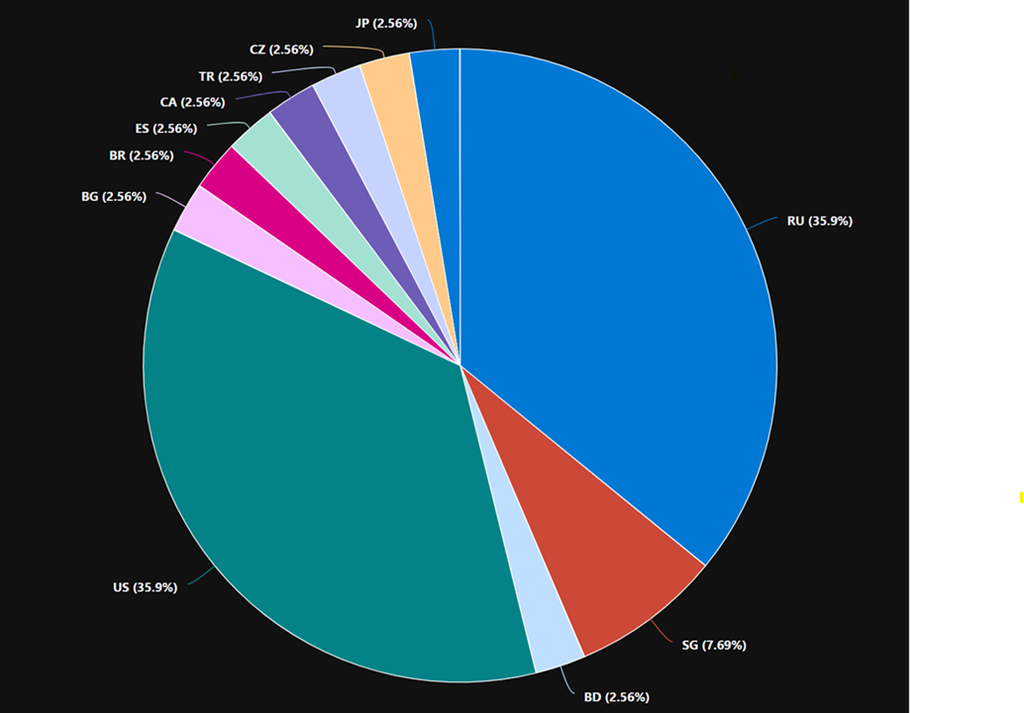
Here is also a visualisation of the location of failed logins by country
Note: if you copy and paste directly from here you will probably have the change the “ around countryorregion when you paste into your own environment as teh wrong “ gets taken across!
 CIAOPS