CIAOPS M365 Best Practice Repo is now available

One of the big challenges I have found with securing a Microsoft 365 environment is determining and setting best practices settings for the environment. Recommendations can be found in many different locations from many different sources. I have always done my best to pull all these together and convert them into a single place that I can apply.

With that in mind I am happy to announce the availability of a new CIAOPS Best Practices repository for Microsoft 365here:

https://github.com/directorcia/bp/tree/main

The aim is for it to be the one place you can go that centralizes all the best practice information, security and otherwise, for Microsoft 365.

Let me give you an example of the benefits of this. In the repo you’ll find the following JSON file for an Entra ID authorization policy:

https://github.com/directorcia/bp/blob/main/EntraID/authorization.json

The idea is that you can use a script like I just uploaded:

https://github.com/directorcia/Office365/blob/master/graph-idauthpolicy-get.ps1

To read these settings and compare them to your own environment.
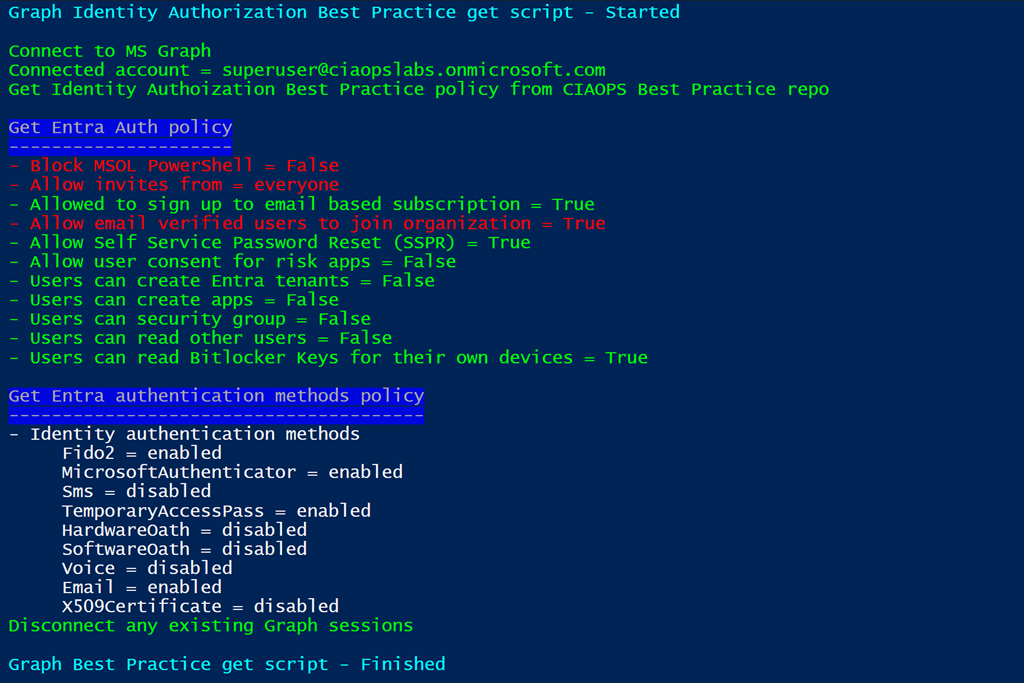
image

You can see the results above when you run this script. The items that are in red do not match the best practice settings that are in repo.

Not only can you use the repo to compare settings but you can also use it to apply settings. Again, you’d just read the JSON setting in the repo and apply that to your environment. Thus, you could take the Entra ID authorization policy JSON and use a script to actually apply, or write,  those settings to your environment. CIAOPS Patron subscribers will have access to the scripts that I develop that will do both the reading and setting of these parameters. Thus, if you don’t to actually write the code to do all this then become a CIAOPS Patron subscriber.

Having these settings available publicly also means people can examine and comment on them and help develop what is best practices in the Microsoft 365 environment. Remember, that best practices are not absolute, they are what works best for the majority of people. You may want to take these as a base and modify them to suit your needs. The benefits of using Github is that is easy to achieve. Thus, you could create your own repo, based on mine, and that as you base for your environment.

The repo also contains links to best practices I have found like this :

https://github.com/directorcia/bp/blob/main/best-practices.txt

That you can also use. Again, the idea is to bring all these resources for Microsoft 365 into a single location.

This best practices repo is far from complete but I wanted to get it out there so people can provide me feedback and we can all build this out to make all our lives easier. Going forward, I plan to spend time developing the repo wiki to provide documentation for all this. However, feel free to take a look at what is there and provide any suggestions for improvement or addition. I’m all ears.

CIA Brief 240309

image

More unified with Microsoft Intune –

https://www.youtube.com/watch?v=BKyCRvYnz8w

MDTI Standalone Portal Retirement and Transition to Defender XDR –

https://techcommunity.microsoft.com/t5/microsoft-defender-threat/mdti-standalone-portal-retirement-and-transition-to-defender-xdr/ba-p/4077806

What’s New in Microsoft EDU | 22 updates for March 2024 –

https://techcommunity.microsoft.com/t5/education-blog/what-s-new-in-microsoft-edu-22-updates-for-march-2024/ba-p/4077642

Choose a Microsoft 365 for business subscription –

https://www.youtube.com/watch?v=eH0bqov5sgw

Data residency in the AI era: New capabilities to manage your data –

https://www.microsoft.com/en-us/microsoft-365/blog/2024/03/07/data-residency-in-the-ai-era-new-capabilities-to-manage-your-data/

Troubleshoot and Manage Microsoft Purview Data Loss Prevention for your Endpoint Devices –

https://techcommunity.microsoft.com/t5/security-compliance-and-identity/troubleshoot-and-manage-microsoft-purview-data-loss-prevention/ba-p/4077992

Reimagining the Microsoft Certification exam UI experience –

https://techcommunity.microsoft.com/t5/microsoft-learn-blog/reimagining-the-microsoft-certification-exam-ui-experience/ba-p/4075312

Improving Threat Hunting Efficiency using Copilot for Security –

https://techcommunity.microsoft.com/t5/microsoft-security-copilot-blog/improving-threat-hunting-efficiency-using-copilot-for-security/ba-p/4077527

Introducing Restricted SharePoint Search to help you get started with Copilot for Microsoft 365 –

https://techcommunity.microsoft.com/t5/copilot-for-microsoft-365/introducing-restricted-sharepoint-search-to-help-you-get-started/ba-p/4071060

Navigate a seamless cloud modernization with Microsoft assessment tools –

https://azure.microsoft.com/en-us/blog/navigate-a-seamless-cloud-modernization-with-microsoft-assessment-tools/

Enhancing protection: Updates on Microsoft’s Secure Future Initiative –

https://www.microsoft.com/en-us/security/blog/2024/03/06/enhancing-protection-updates-on-microsofts-secure-future-initiative/

Announcing persistent views and UX enhancements in Threat Explorer –

https://techcommunity.microsoft.com/t5/microsoft-defender-for-office/announcing-persistent-views-and-ux-enhancements-in-threat/ba-p/4075679

Use the new investigation and response capabilities for macOS and Linux –

https://techcommunity.microsoft.com/t5/microsoft-defender-for-endpoint/use-the-new-investigation-and-response-capabilities-for-macos/ba-p/4054492

Permissions Management: Defender XDR’s RBAC Walkthrough for Microsoft Defender for Office 365 –

https://techcommunity.microsoft.com/t5/microsoft-defender-for-office/permissions-management-defender-xdr-s-rbac-walkthrough-for/ba-p/4064288

Microsoft Defender XDR Monthly news –

https://techcommunity.microsoft.com/t5/microsoft-defender-xdr-blog/monthly-news-march-2024/ba-p/4075876

Securing the Clouds: Achieving a Unified Security Stance and threat-based approach to Use Cases –

https://techcommunity.microsoft.com/t5/security-compliance-and-identity/securing-the-clouds-achieving-a-unified-security-stance-and/ba-p/4073446

Human-operated ransomware (HumOR) –

https://www.youtube.com/watch?v=q1UuDnBHgK8&t=6s

Defender XDR embedded Copilot to standalone Copilot investigation –

https://www.youtube.com/watch?v=iPtb5DZOWg0

Extended user account investigation with Copilot (accelerated) –

https://www.youtube.com/watch?v=Vd_URX7aRbA

Defender XDR embedded Copilot to standalone Copilot investigation –

https://www.youtube.com/watch?v=iPtb5DZOWg0

Defend against human-operated ransomware attacks with Microsoft Copilot for Security –

https://www.microsoft.com/en-us/security/blog/2024/03/04/defend-against-human-operated-ransomware-attacks-with-microsoft-copilot-for-security/

After hours

Caine’s Arcade– https://www.youtube.com/watch?v=faIFNkdq96U

Editorial

If you found this valuable, the I’d appreciate a ‘like’ or perhaps a donation at https://ko-fi.com/ciaops. This helps me know that people enjoy what I have created and provides resources to allow me to create more content. If you have any feedback or suggestions around this, I’m all ears. You can also find me via email director@ciaops.com and on X (Twitter) at https://www.twitter.com/directorcia.

If you want to be part of a dedicated Microsoft Cloud community with information and interactions daily, then consider becoming a CIAOPS Patron – www.ciaopspatron.com.

Watch out for the next CIA Brief next week.

CIAOPS Need to Know Microsoft 365 Webinar – March

laptop-eyes-technology-computer_thumb

Join me for the free monthly CIAOPS Need to Know webinar. Along with all the Microsoft Cloud news we’ll be taking a look at Microsoft Forms.

Shortly after registering you should receive an automated email from Microsoft Teams confirming your registration, including all the event details as well as a calendar invite.

You can register for the regular monthly webinar here:

March Webinar Registrations

(If you are having issues with the above link copy and paste – https://bit.ly/n2k2403

The details are:

CIAOPS Need to Know Webinar – March 2024
Thursday 28th of March 2024
11.00am – 12.00am Sydney Time

All sessions are recorded and posted to the CIAOPS Academy.

The CIAOPS Need to Know Webinars are free to attend but if you want to receive the recording of the session you need to sign up as a CIAOPS patron which you can do here:

http://www.ciaopspatron.com

or purchase them individually at:

http://www.ciaopsacademy.com/

Also feel free at any stage to email me directly via director@ciaops.com with your webinar topic suggestions.

I’d also appreciate you sharing information about this webinar with anyone you feel may benefit from the session and I look forward to seeing you there.

Need to Know podcast–Episode 316

Microsoft has just completed its Copilot for Microsoft 365 tech accelerator which I’d recommend you take a look at. There are a variety of videos that are well worth watching. They are also available on Youtube as well. I have linked to many below in the show notes for you. Of course, there is also plenty of other news and updates from the Microsoft Cloud, so listen along.

ou can listen directly to this episode at:

https://ciaops.podbean.com/e/episode-316-copilot-tech-accelerator/

Subscribe via iTunes at:

https://itunes.apple.com/au/podcast/ciaops-need-to-know-podcasts/id406891445?mt=2

Don’t forget to give the show a rating as well as send me any feedback or suggestions you may have for the show.

Brought to you by www.ciaopspatron.com

Resources

@directorcia

Join my shared channel

CIAOPS merch store

Become a CIAOPS Patron

CIAOPS Blog

CIAOPS Brief

CIAOPSLabs

Support CIAOPS

CIAOPS Techwerks 23

Copilot for Microsoft 365 Tech Accelerator

Copilot in Forms | Create engaging forms

Extending Copilot: Expanding knowledge with Graph connectors

Measuring usage, adoption, and the impact of Microsoft Copilot

Copilot now available for the Microsoft 365 mobile app

Try new ways of working with Help me create in the Microsoft 365 web app

Copilot in OneDrive: A New Wave of File Interaction

What’s New in Copilot for Microsoft 365

How to drive Copilot for Microsoft 365 usage and satisfaction

Prepare your organization for Copilot for Microsoft 365

Tips and tricks for IT pros deploying Copilot for Microsoft 365

Copilot for Microsoft 365 AMA: Tech Accelerator edition (Day 1)

Introduction to Copilot for Microsoft 365

Get your small business ready for Copilot for Microsoft 365

Protect multi-tenant organizations by using Microsoft Defender XDR

Prompt users for reauthentication on sensitive apps and high-risk actions with Conditional Access

Skilling snack: Data security basics for IT pros

Keeping track of object deletions in Microsoft Entra ID

Get the most out of Microsoft Copilot for Security with good prompt engineering

Navigating NIS2 requirements with Microsoft Security solutions

Identity Threat Detection & Response – on-prem to cloud ITDR from Microsoft

Welcome to the Microsoft Defender Experts Ninja Hub

Summary of podcast episode straight from Copilot for Microsoft 365:

Here’s a summary of the document:

Main ideas:

  • Introduction: The podcast is an introduction to the latest news and updates on Microsoft Cloud, especially for small and medium businesses.
  • Training and resources: The host offers various training options for Microsoft Cloud users, such as face-to-face sessions, webinars, and shared channels. He also suggests watching the videos on Microsoft 365 Copilot Tech Accelerator to learn more about the AI-powered assistant.
  • New features and tips: The host reviews some new features and tips for Microsoft Cloud users, such as Copilot for mobile app, Help Me web app, Copilot in OneDrive, multi-tenant in Defender XDR, and reauthentication for sensitive apps. He explains how these features can help users work more efficiently and securely.
  • Copilot skills: The host emphasizes the importance of learning how to use Copilot effectively, by asking the right questions and providing enough context. He also mentions Copilot for security as a future game changer that will help users protect their data and devices.
  • Conclusion: The host thanks the listeners for their support and reminds them of how to contact him and access his blog and YouTube channel. He also invites them to join his Techwerks event and monthly webinar.

CIA Brief 240303

image

Copilot for Microsoft 365 Tech Accelerator –

https://techcommunity.microsoft.com/t5/tech-community-live/copilot-for-microsoft-365-tech-accelerator/ec-p/4028578

Copilot in Forms | Create engaging forms –

https://www.youtube.com/watch?v=LC58G_0SFmA

Extending Copilot: Expanding knowledge with Graph connectors –

https://www.youtube.com/watch?v=oSIfUYDtROA

Measuring usage, adoption, and the impact of Microsoft Copilot –

https://www.youtube.com/watch?v=dJAfk712dtc

Copilot now available for the Microsoft 365 mobile app –

https://techcommunity.microsoft.com/t5/copilot-for-microsoft-365/copilot-now-available-for-the-microsoft-365-mobile-app/ba-p/4071014

Visually group shapes in your diagrams with containers in Visio for the web –

https://techcommunity.microsoft.com/t5/microsoft-365-blog/visually-group-shapes-in-your-diagrams-with-containers-in-visio/ba-p/4044112

Try new ways of working with Help me create in the Microsoft 365 web app –

https://techcommunity.microsoft.com/t5/copilot-for-microsoft-365/try-new-ways-of-working-with-help-me-create-in-the-microsoft-365/ba-p/4071000

Copilot in OneDrive: A New Wave of File Interaction –

https://techcommunity.microsoft.com/t5/microsoft-onedrive-blog/copilot-in-onedrive-a-new-wave-of-file-interaction/ba-p/4070738

What’s New in Copilot for Microsoft 365 –

https://techcommunity.microsoft.com/t5/copilot-for-microsoft-365/what-s-new-in-copilot-for-microsoft-365/ba-p/4062353

How to drive Copilot for Microsoft 365 usage and satisfaction –

https://www.youtube.com/watch?v=o9_YcAmF7aA

Prepare your organization for Copilot for Microsoft 365 –

https://www.youtube.com/watch?v=PxqNnnm_kFU

Tips and tricks for IT pros deploying Copilot for Microsoft 365 –

https://www.youtube.com/watch?v=yi35RWQeLXw

Copilot for Microsoft 365 AMA: Tech Accelerator edition (Day 1) –

https://www.youtube.com/watch?v=T4drM3N88XY

Introduction to Copilot for Microsoft 365 –

https://www.youtube.com/watch?v=pwz3TFvciGA

Get your small business ready for Copilot for Microsoft 365 –

https://www.youtube.com/watch?v=RRWfGrC1fao

Protect multi-tenant organizations by using Microsoft Defender XDR –

https://www.youtube.com/watch?v=0rK3tQBaZ1U

Prompt users for reauthentication on sensitive apps and high-risk actions with Conditional Access –

https://techcommunity.microsoft.com/t5/microsoft-entra-blog/prompt-users-for-reauthentication-on-sensitive-apps-and-high/ba-p/4062703

After hours

Testing If You Can Blow Your Own Sail – https://www.youtube.com/watch?v=M7-h3FO-KKo

Editorial

If you found this valuable, the I’d appreciate a ‘like’ or perhaps a donation at https://ko-fi.com/ciaops. This helps me know that people enjoy what I have created and provides resources to allow me to create more content. If you have any feedback or suggestions around this, I’m all ears. You can also find me via email director@ciaops.com and on X (Twitter) at https://www.twitter.com/directorcia.

If you want to be part of a dedicated Microsoft Cloud community with information and interactions daily, then consider becoming a CIAOPS Patron – www.ciaopspatron.com.

Watch out for the next CIA Brief next week.
