
I have now been able to successfully publish temperature data from a ESP32-S2 device to Adafruit IO as I detailed here:
https://blog.ciaops.com/2023/05/31/connecting-a-sparkfun-thingplus-esp32-s2-wroom-to-adafruit-io/
The next thing I want to achieve is to ‘push’ data down to the device from the Adafruit IO web site.
The starting point for this is to create a new feed in Adafruit IO. You’ll find how to do that here:
https://learn.adafruit.com/adafruit-io-basics-feeds/overview
To inject data into this feed I’ll need to create a Dashboard in Adafruit IO. You can find out about doing that here:
https://learn.adafruit.com/adafruit-io-basics-feeds/overview
In my case, I’ll add an ON/OFF button to the dashboard and connect that button to the feed I just created.

This will basically inject the text values ON and OFF into the feed, which I’ll then read on my device and take action.
The code looks similar to last time but now:
Adafruit_MQTT_Subscribe onoffbutton = Adafruit_MQTT_Subscribe(&mqtt, AIO_USERNAME “/feeds/onoffbutton”);
You’ll see that I define a variable using the Subscribe method.
while (subscription = mqtt.readSubscription(2000)) {
Serial.println(F(“Received button data”));
if (subscription == &onoffbutton) {
Serial.print(F(“Got: “));
String ledstatus = (char *)onoffbutton.lastread;
The core of the program on the device is the statement starting above that reads from the feed, and if contains a value, it then takes an action. In this case, I look for the text ON or OFF in the feed and then take the appropriate action with the inbuilt LED on the device.
The result looks like:
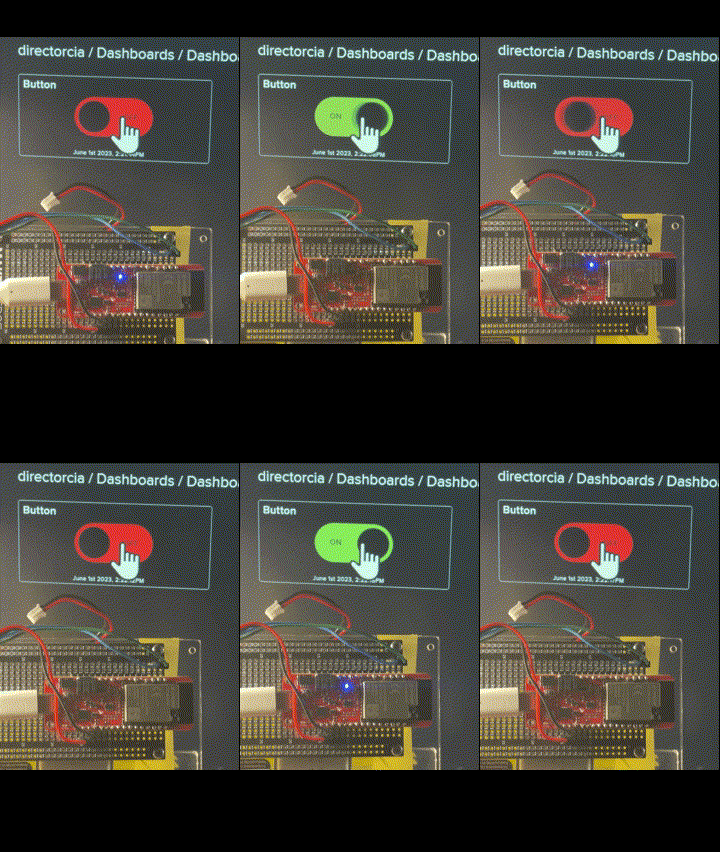
You’ll find the code at:
https://github.com/directorcia/Azure/blob/master/Iot/ESP32-S2/IO-Adafruit-Subscribe/main.cpp
So using Adafruit IO I’ve able to pretty easily send information to a dashboard and receive information from a dashboard. I now need to have a look at sending data from Azure to the device but I’m in no rush to do that just yet as I figure it will take a bit of work. I think my next project will trying to use the device to control some motors and add ‘motion’ to my project.
Stay tuned for more.
 CIAOPS